SimpleProxyChat
⚪ Last updated 2024🖼️ Gallery (3 images)
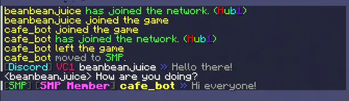

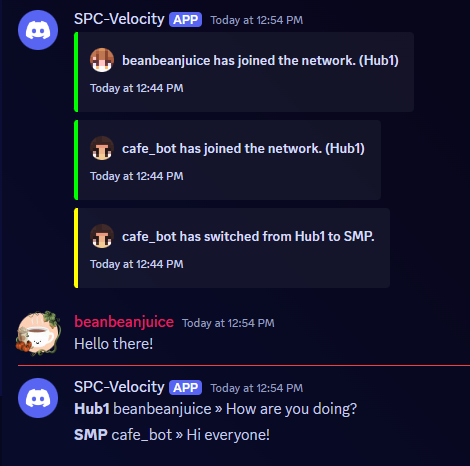
🔍 Analysis
- 👍 0.2% endorsement rate
- 🏆 #22 of 48 bungeecord mods in this game by downloads
📋 About This Mod
<p align="center"> <img src="https://github.com/beanbeanjuice/SimpleProxyChat/blob/master/Images/Finished/SimpleProxyChat.png?raw=true" alt="SimpleProxyChat Logo"/> </p> <center> This is a Bungeecord Chat Sync, Velocity Chat Sync, and Proxy Chat Sync plugin. It is a simple plugin to allow <b>global</b> <i>cross-server</i> communication and messaging with support for <b>PlaceholderAPI</b>, <b>LuckPerms</b>, <b>LiteBans</b>, <b>AdvancedBan</b>, <b>NetworkManager</b>, and <b>Discord</b>. </center> --- <p align="center"> <img src="https://github.com/beanbeanjuice/SimpleProxyChat/blob/master/Images/Finished/Installation.png?raw=true" alt="installation"/> </p> ### With PlaceholderAPI 1) You **must** use the *helper plugin* which you can download (https://www.spigotmc.org/resources/116966/). 1) Drag the helper plugin to each **Spigot/Paper/Bukkit** server that you want PlaceholderAPI support on. * You do not need any additional configuration on the Spigot/Paper/Bukkit server as long as you have PlaceholderAPI installed. 1) Set `use-helper` to `true` in the `config.yml` for the proxy configuration. This will be in your **BungeeCord/Velocity** server. 1) Restart or reload the plugin! `/spc-reload` > For **PlaceholderAPI** support, the helper plugin is required. Additionally, **PlaceholderAPI placeholders** can only be used for **Minecraft chat messages**. It will **not work** for join/leave messages. ### Without Discord 1) Simply place the plugin in your `plugins` folder on **BungeeCord/Waterfall/Velocity** and restart your proxy! ### With Discord 1) Go to discord.com/developers and select **New Application**. You can select *any* name you want. 1) Go to the **OAuth2** section. 1) Go to the **OAuth2 URL Generator** and give it the **bot** scope. 1) Under **bot permissions** select; - Manage Channels (**REQUIRED**: General Permissions) - Send Messages (**REQUIRED**: Text Permissions) - Manage Messages (**REQUIRED**: Text Permissions) - Read Message History (**REQUIRED**: Text Permissions) - *+ Any others that you want to add...* 1) Copy the **Generated URL** at the bottom. 1) Paste the generated URL into a web browser. 1) Invite the bot to your server. 1) Go back to discord.com/developers. 1) Select your bot. 1) Click on **bot**. 1) Click **Reset Token** and copy the token somewhere safe. 1) Scroll down to **Privileged Gateway Intents**. 1) Select **SERVER MEMBER INTENT** and **MESSAGE CONTENT INTENT**. 1) Place the plugin in the `plugins` folder on **BungeeCord/Velocity**. 1) Start your server once *fully*, then stop it. There *will* be errors, this is normal. 1) In the generated `ProxyChat/config.yml` file, paste your **Bot Token** and choose the appropriate channel you want messages being sent to. 1) Restart your proxy! --- <p align="center"> <img src="https://github.com/beanbeanjuice/SimpleProxyChat/blob/master/Images/Finished/Features.png?raw=true" alt="features"/> </p> * **Global Network Chat** * **LuckPerms Support** * **LiteBans Support** * **AdvancedBan Support** * **NetworkManager Support** * **Discord Support** * **Velocity/Waterfall/BungeeCord Support** * **Colored Chat** * **Cross-Server Communication** * **PlaceholderAPI Support** * **...and more!** --- <p align="center"> <img src="https://github.com/beanbeanjuice/SimpleProxyChat/blob/master/Images/Finished/Configuration.png?raw=true" alt="configuration"/> </p> **config.yml** ```YAML # ========================================================== # INFORMATION # HEX Values are Supported # Example: <#FFFFFF>Some text</#FFFFFF> this is a message! # Supports Mini-Message/Legacy Color Codes # ========================================================== # True if you will be using Discord. The reload command does not work with this. use-discord: false # Discord Bot Token (IGNORE IF use_discord = false). BOT-TOKEN: "TOKEN_HERE" # Channel to send Discord messages to (IGNORE IF use_discord = false). CHANNEL-ID: "GLOBAL_CHANNEL_ID" bot-activity: # Valid Types: ONLINE, DO_NOT_DISTURB, IDLE, INVISIBLE status: ONLINE # Valid Types: PLAYING, STREAMING, LISTENING, WATCHING, COMPETING, CUSTOM_STATUS type: "CUSTOM_STATUS" # Valid placeholders are %online% and/or %max-players% (UPDATES EVERY 5 MINUTES) text: "%online%/%max-players% - SimpleProxyChat by beanbeanjuice" # The amount of seconds to check if a server is online/offline. # Smaller numbers can cause errors. Beware. server-update-interval: 3 # Use this if you want to change the default aliases. # It MUST be the same name you have in your bungee/velocity config. # Simply set it to disabled: disabled to disable it. aliases: ServerInConfigExample: ServerAliasExample hub: Hub1 smp: smp1 # Whether to use the permission system. # Some permissions (denoted with ➕) are always active even if this is false. # simpleproxychat.read.chat - Read chat messages. # simpleproxychat.read.join - Read join m


### With PlaceholderAPI 1) You must use the helper plugin which you can download (https://www.spigotmc.org/resources/116966/). 1) Drag the helper plugin to each Spigot/Paper/Bukkit server that you want PlaceholderAPI support on. You do not need any additional configuration on the Spigot/Paper/Bukkit server as long as you have PlaceholderAPI installed. 1) Set `use-helper` to `true` in the `config.yml` for the proxy configuration. This will be in your BungeeCord/Velocity server. 1) Restart or reload the plugin! `/spc-reload`
> For PlaceholderAPI support, the helper plugin is required. Additionally, PlaceholderAPI placeholders can only be used for Minecraft chat messages. It will not work for join/leave messages.
### Without Discord 1) Simply place the plugin in your `plugins` folder on BungeeCord/Waterfall/Velocity and restart your proxy!
### With Discord 1) Go to discord.com/developers and select New Application. You can select any name you want. 1) Go to the OAuth2 section. 1) Go to the OAuth2 URL Generator and give it the bot scope. 1) Under bot permissions select; - Manage Channels (REQUIRED: General Permissions) - Send Messages (REQUIRED: Text Permissions) - Manage Messages (REQUIRED: Text Permissions) - Read Message History (REQUIRED: Text Permissions) - + Any others that you want to add... 1) Copy the Generated URL at the bottom. 1) Paste the generated URL into a web browser. 1) Invite the bot to your server. 1) Go back to discord.com/developers. 1) Select your bot. 1) Click on bot. 1) Click Reset Token and copy the token somewhere safe. 1) Scroll down to Privileged Gateway Intents. 1) Select SERVER MEMBER INTENT and MESSAGE CONTENT INTENT. 1) Place the plugin in the `plugins` folder on BungeeCord/Velocity. 1) Start your server once fully, then stop it. There will be errors, this is normal. 1) In the generated `ProxyChat/config.yml` file, paste your Bot Token and choose the appropriate channel you want messages being sent to. 1) Restart your proxy!

Global Network Chat LuckPerms Support LiteBans Support AdvancedBan Support NetworkManager Support Discord Support Velocity/Waterfall/BungeeCord Support Colored Chat Cross-Server Communication PlaceholderAPI Support ...and more!

config.yml ```YAML # ========================================================== # INFORMATION # HEX Values are Supported # Example: <#FFFFFF>Some text this is a message! # Supports Mini-Message/Legacy Color Codes # ==========================================================
# True if you will be using Discord. The reload command does not work with this. use-discord: false
# Discord Bot Token (IGNORE IF use_discord = false). BOT-TOKEN: "TOKEN_HERE"
# Channel to send Discord messages to (IGNORE IF use_discord = false). CHANNEL-ID: "GLOBAL_CHANNEL_ID"
bot-activity: # Valid Types: ONLINE, DO_NOT_DISTURB, IDLE, INVISIBLE status: ONLINE # Valid Types: PLAYING, STREAMING, LISTENING, WATCHING, COMPETING, CUSTOM_STATUS type: "CUSTOM_STATUS" # Valid placeholders are %online% and/or %max-players% (UPDATES EVERY 5 MINUTES) text: "%online%/%max-players% - SimpleProxyChat by beanbeanjuice"
# The amount of seconds to check if a server is online/offline. # Smaller numbers can cause errors. Beware. server-update-interval: 3
# Use this if you want to change the default aliases. # It MUST be the same name you have in your bungee/velocity config. # Simply set it to disabled: disabled to disable it. aliases: ServerInConfigExample: ServerAliasExample hub: Hub1 smp: smp1
# Whether to use the permission system. # Some permissions (denoted with ➕) are always active even if this is false. # simpleproxychat.read.chat - Read chat messages. # simpleproxychat.read.join - Read join m
📊 Mod Details
- Game
- Minecraft Plugins
- Author
- beanbeanjuice
- Version
- 0.5.7
- Downloads
- 6,128
- Endorsements
- 15
- Category
- bungeecord
- Created
- 8/28/2024
- Updated
- 8/31/2024
- Game Versions
- 1.8, 1.8.1, 1.8.2, 1.8.3, 1.8.4
- Tags
- management, social, utility
🔧 How to Install Minecraft Plugins Mods
Download from Modrinth. Use Prism Launcher or drop into your mods folder.
📖 Full step-by-step install guide for Minecraft Plugins →
Visit the official mod page for specific installation instructions for this mod.
🎮 Need cheat codes or console commands? Check ur gaming wiki for Minecraft Plugins commands, item IDs, and more.
❓ Frequently Asked Questions
Which Minecraft Plugins versions does SimpleProxyChat support?
The author lists 1.8, 1.8.1, 1.8.2, 1.8.3, 1.8.4, 1.8.5. Other versions may work but are untested by the author.
What is the latest version of SimpleProxyChat?
Version 0.5.7, published 2024-08-31 with 6,128 downloads recorded at the source.
Keep browsing — more Minecraft Plugins mods await