Simple Home Gui
🟡 Updated this year🖼️ Gallery (2 images)
🔍 Analysis
- 🏆 #82 of 383 adventure mods in this game by downloads
📋 About This Mod
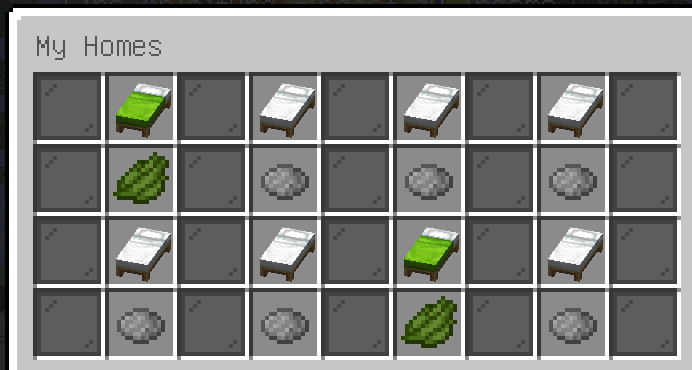
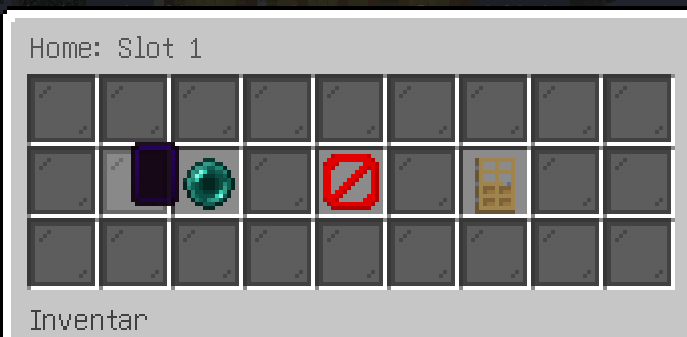
# Simple Home Gui - Slot-Based Home System **Simple Home Gui** is a modern, GUI-based home system. It uses a visual slot system (akin to 8 "save slots") that provides players an intuitive and beginner-friendly way to manage their homes. The plugin is optimized from the ground up for **Paper 1.20.1**, focusing on stability, performance (via caching), and extensive configuration. --- ## Core Features ### 1. Slot-Based GUI Menu The heart of the plugin is the main menu, opened with `/homes`. * **Visual Feedback:** Players see 8 slots (beds and dyes) that can represent 3 states: * **Green (Set):** The home is set. Displays the name and coordinates. Clicking opens the submenu. * **Gray (Empty):** The slot is unlocked, but no home has been set. Clicking sets the home at the player's current location. * **Red (Locked):** The player does not have the necessary permissions for this slot. * **Submenu:** Clicking a set (green) home opens a separate menu where the player can choose to: * Teleport * Delete Home * Go back to the overview * **Fully Customizable:** The layout, items (beds, dyes, ender pearls, etc.), and all text in the GUI can be freely configured in the `config.yml` and language files. ### 2. Comprehensive Command System For players who prefer commands, Simple Home Gui offers full functionality via the chat. * `/homes`: Opens the GUI. * `/homes set <slot> `: Sets a home in a specific slot (e.g., `/homes set 1 Base`). * `/homes tp <slot_or_name>`: Teleports to a home. Accepts both the slot number (e.g., `/homes tp 1`) and the name (e.g., `/homes tp Base`). * `/homes delete <slot>`: Deletes the home in the specified slot. * `/homes rename <slot> <new_name>`: Renames a home (e.g., `/homes rename 1 Farm`). * **Tab Completion:** All commands and arguments (including slot numbers and home names) are fully tab-completable. ### 3. Safe Teleport Timer To prevent abuse (e.g., in combat), every teleport includes a timer. * **3-Second Delay:** The teleport only executes after 3 seconds. * **Movement Cancellation:** If the player moves from their block during the countdown, the teleport is automatically cancelled. --- ## Configuration & Customization The plugin was designed to be perfectly integrated into your server. **Everything is configurable.** * **`config.yml`:** * **Chat Prefix:** Change the appearance of the plugin's name in chat. * **Language:** Set the default language (e.g., `en` or `de`). * **GUI Layout:** Change the exact position of every single slot (1-8) in the GUI. * **GUI Items:** Define every item (material, name, lore) for every state (Locked, Empty, Set) and every menu (Main and Submenu). * **`messages_xx.yml`:** * Translate every single message the plugin sends to players—from error messages to GUI descriptions. --- ## Permission System Simple Home Gui is designed for use with **LuckPerms** (or any other permissions plugin). It does *not* check for groups, but for flexible permission nodes.(ignores the name Valoria that was the original name of the system) * **Home Limits:** The number of available slots is controlled via permissions. * `valoria.homes.limit.1` (Default for every player) * `valoria.homes.limit.2` * ... * `valoria.homes.limit.8` * *(If a player has `valoria.homes.limit.5`, slots 1-5 will be unlocked (gray/green) and 6-8 will be locked (red).)* * **Command Permissions:** * `valoria.homes.command.gui` (For `/homes`) * `valoria.homes.command.set` * `valoria.homes.command.tp` * `valoria.homes.command.delete` * `valoria.homes.command.rename` * **Wildcard:** * `valoria.homes.*` (Grants all permissions, including all 8 slots) --- ## Technical Details * **Server:** Paper (or compatible forks like Purpur) * **Version:** Minecraft 1.20.1 * **Storage:** Homes are managed in a high-performance player cache (RAM) and are saved securely to individual `playerdata/<uuid>.yml` files on logout or server stop.
# Simple Home Gui - Slot-Based Home System
Simple Home Gui is a modern, GUI-based home system. It uses a visual slot system (akin to 8 "save slots") that provides players an intuitive and beginner-friendly way to manage their homes.
The plugin is optimized from the ground up for Paper 1. 20. 1, focusing on stability, performance (via caching), and extensive configuration.
## Core Features
### 1. Slot-Based GUI Menu The heart of the plugin is the main menu, opened with `/homes`.
Visual Feedback: Players see 8 slots (beds and dyes) that can represent 3 states: Green (Set): The home is set. Displays the name and coordinates. Clicking opens the submenu. Gray (Empty): The slot is unlocked, but no home has been set. Clicking sets the home at the player's current location. Red (Locked): The player does not have the necessary permissions for this slot. Submenu: Clicking a set (green) home opens a separate menu where the player can choose to: Teleport Delete Home Go back to the overview Fully Customizable: The layout, items (beds, dyes, ender pearls, etc.), and all text in the GUI can be freely configured in the `config.yml` and language files.
### 2. Comprehensive Command System For players who prefer commands, Simple Home Gui offers full functionality via the chat.
`/homes`: Opens the GUI.
`/homes set
### 3. Safe Teleport Timer To prevent abuse (e.g., in combat), every teleport includes a timer.
3-Second Delay: The teleport only executes after 3 seconds. Movement Cancellation: If the player moves from their block during the countdown, the teleport is automatically cancelled.
## Configuration & Customization
The plugin was designed to be perfectly integrated into your server. Everything is configurable.
`config.yml`: Chat Prefix: Change the appearance of the plugin's name in chat. Language: Set the default language (e.g., `en` or `de`). GUI Layout: Change the exact position of every single slot (1-8) in the GUI. GUI Items: Define every item (material, name, lore) for every state (Locked, Empty, Set) and every menu (Main and Submenu). `messages_xx.yml`: Translate every single message the plugin sends to players—from error messages to GUI descriptions.
## Permission System
Simple Home Gui is designed for use with LuckPerms (or any other permissions plugin). It does not check for groups, but for flexible permission nodes.(ignores the name Valoria that was the original name of the system)
Home Limits: The number of available slots is controlled via permissions. `valoria.homes.limit. 1` (Default for every player) `valoria.homes.limit. 2` ... `valoria.homes.limit. 8` (If a player has `valoria.homes.limit. 5`, slots 1-5 will be unlocked (gray/green) and 6-8 will be locked (red).) Command Permissions: `valoria.homes.command.gui` (For `/homes`) `valoria.homes.command.set` `valoria.homes.command.tp` `valoria.homes.command.delete` `valoria.homes.command.rename` Wildcard: `valoria.homes.` (Grants all permissions, including all 8 slots)
## Technical Details
Server: Paper (or compatible forks like Purpur)
Version: Minecraft 1. 20. 1
Storage: Homes are managed in a high-performance player cache (RAM) and are saved securely to individual `playerdata/
📊 Mod Details
- Game
- Minecraft Plugins
- Author
- maxmt002
- Version
- 1.0.0
- Downloads
- 145
- Endorsements
- 0
- Category
- adventure
- Created
- 10/23/2025
- Updated
- 10/20/2025
- Game Versions
- 1.20, 1.20.1, 1.20.2, 1.20.3, 1.20.4
- Tags
- adventure, management, optimization
🔧 How to Install Minecraft Plugins Mods
Download from Modrinth. Use Prism Launcher or drop into your mods folder.
📖 Full step-by-step install guide for Minecraft Plugins →
Visit the official mod page for specific installation instructions for this mod.
🎮 Need cheat codes or console commands? Check ur gaming wiki for Minecraft Plugins commands, item IDs, and more.
❓ Frequently Asked Questions
Which Minecraft Plugins versions does Simple Home Gui support?
The author lists 1.20, 1.20.1, 1.20.2, 1.20.3, 1.20.4, 1.20.5. Other versions may work but are untested by the author.
What is the latest version of Simple Home Gui?
Version 1.0.0, published 2025-10-20 with 145 downloads recorded at the source.
Keep browsing — more Minecraft Plugins mods await