Simple Bucket Mobs
🟡 Updated this year🖼️ Gallery (2 images)

🔍 Analysis
- 👍 0.4% endorsement rate
- 🏆 #133 of 214 game-mechanics mods in this game by downloads
📋 About This Mod
# SimpleBucketMobs (https://wakatime.com/badge/user/1f3b44b5-611a-484d-bcdc-b2084eefec1a/project/2a7588f5-f1d8-4dae-aa7b-fea0bf437f78.svg)](https://wakatime.com/@1f3b44b5-611a-484d-bcdc-b2084eefec1a/projects/szguvxhtkl) Throw mobs into buckets! :D ## Permissions | Permission | What it do | Default | |---------------------------------|--------------------------------------------------|---------| | `simplebucketmobs.bucket.<mob>` | Allows the user to bucket the specified mob | `false` | | `simplebucketmobs.bucket.all` | Allows the user to bucket all enabled mobs | `op` | | `simplebucketmobs.reload` | Reload plugin configuration files | `op` | | `simplebucketmobs.debucket` | Dump saved mob NBT data from Mob Bucket to chat. | `op` | #### The following information about texture configuration, is for if you want to edit the textures. All released vanilla mobs have been configured to use the (https://modrinth.com/resourcepack/bucket-mobs-resources/versions) ## Texture Configuration This configuration is `texture.yml` which is specifically used for custom model data. Currently, the custom model data is applied to a bucket. The texture configuration is made to be customizable in the event you wanted to make special textures for each variant of a mob. For example, if you wanted to set a special blue sheep texture, rather than just having a generic texture for all sheep. ### Using "default" The simplest way to assign custom model data is to use the default option. ```yaml SHEEP: default: 1 PIG: default: 2 ``` This is the easiest way to set it and will set it to all mobs of that type. In the above example, all sheep will have custom model data 1 and all pigs will have custom model data 2. ### Using the nbtKey and nbtValue nbtKey and nbtValue are the ways I will be referring to the NBT Tags. nbtValue is our "goal". The examples are simplified by removing the extra JSON. Consider a villager's profession... ```json { "VillagerData": {"level":1, "profession":"minecraft:none", "type":"minecraft:desert"} } ``` If we want to differentiate custom model data based on a villager's profession, our nbtValue will be "minecraft:none" in this example. You would get to the nbtValue using all the nbtKeys along the way. This will look like this in your `texture.yml`... ```yaml VILLAGER: VillagerData: profession: "minecraft:none": 1 ``` As shown above, you can use any information stored in the NBT tags to differentiate specific variants of a mob. Here are a few more examples... **Parrot (Variant)** ```json { "Variant": 1 } ``` ```yaml PARROT: default: 0 Variant: 1: 1 ``` **Sheep (Color)** ```json { "Color": "2b" } ``` ```yaml SHEEP: default: 0 Color: 0b: 0 1b: 1 2b: 2 ``` > **Note** > > You can only use one set of nbtValues (in the villager example, profession). > > The method used to search for the desired nbtValue is not recursive and will not find all possible values.
# SimpleBucketMobs
[!(https://wakatime.com/badge/user/1f3b44b5-611a-484d-bcdc-b2084eefec1a/project/2a7588f5-f1d8-4dae-aa7b-fea0bf437f78.svg)](https://wakatime.com/@1f3b44b5-611a-484d-bcdc-b2084eefec1a/projects/szguvxhtkl)
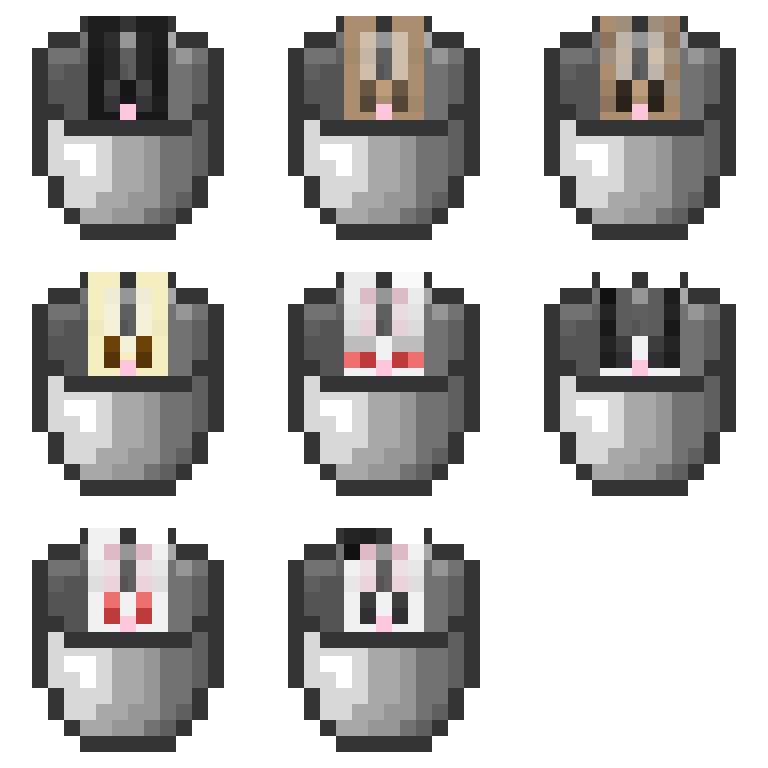
Throw mobs into buckets! :D
## Permissions
| Permission | What it do | Default |
|---------------------------------|--------------------------------------------------|---------|
| `simplebucketmobs.bucket.
#### The following information about texture configuration, is for if you want to edit the textures. All released vanilla mobs have been configured to use the (https://modrinth.com/resourcepack/bucket-mobs-resources/versions)
## Texture Configuration
This configuration is `texture.yml` which is specifically used for custom model data. Currently, the custom model data is applied to a bucket.
The texture configuration is made to be customizable in the event you wanted to make special textures for each variant of a mob.
For example, if you wanted to set a special blue sheep texture, rather than just having a generic texture for all sheep.
### Using "default"
The simplest way to assign custom model data is to use the default option.
```yaml SHEEP: default: 1 PIG: default: 2 ```
This is the easiest way to set it and will set it to all mobs of that type. In the above example, all sheep will have custom model data 1 and all pigs will have custom model data 2.
### Using the nbtKey and nbtValue
nbtKey and nbtValue are the ways I will be referring to the NBT Tags. nbtValue is our "goal". The examples are simplified by removing the extra JSON.
Consider a villager's profession...
```json { "VillagerData": {"level":1, "profession":"minecraft:none", "type":"minecraft:desert"} } ```
If we want to differentiate custom model data based on a villager's profession, our nbtValue will be "minecraft:none" in this example.
You would get to the nbtValue using all the nbtKeys along the way. This will look like this in your `texture.yml`...
```yaml VILLAGER: VillagerData: profession: "minecraft:none": 1 ```
As shown above, you can use any information stored in the NBT tags to differentiate specific variants of a mob. Here are a few more examples...
Parrot (Variant)
```json { "Variant": 1 } ``` ```yaml PARROT: default: 0 Variant: 1: 1 ```
Sheep (Color)
```json { "Color": "2b" } ``` ```yaml SHEEP: default: 0 Color: 0b: 0 1b: 1 2b: 2 ```
> Note > > You can only use one set of nbtValues (in the villager example, profession). > > The method used to search for the desired nbtValue is not recursive and will not find all possible values.
📊 Mod Details
- Game
- Minecraft Plugins
- Author
- Rhythmic
- Version
- 2.0.0
- Downloads
- 2,023
- Endorsements
- 8
- Category
- game-mechanics
- Created
- 4/19/2023
- Updated
- 8/19/2026
- Game Versions
- 1.21.6, 1.21.7, 1.21.8, 1.21.9, 1.21.10
- Tags
- game-mechanics, mobs, utility
🔧 How to Install Minecraft Plugins Mods
Download from Modrinth. Use Prism Launcher or drop into your mods folder.
📖 Full step-by-step install guide for Minecraft Plugins →
Visit the official mod page for specific installation instructions for this mod.
🎮 Need cheat codes or console commands? Check ur gaming wiki for Minecraft Plugins commands, item IDs, and more.
❓ Frequently Asked Questions
Which Minecraft Plugins versions does Simple Bucket Mobs support?
The author lists 1.21.6, 1.21.7, 1.21.8, 1.21.9, 1.21.10, 1.21.11. Other versions may work but are untested by the author.
What is the latest version of Simple Bucket Mobs?
Version 2.0.0, published 2026-08-19 with 2,023 downloads recorded at the source.
Keep browsing — more Minecraft Plugins mods await