ServerTransfer
🟡 Updated this year🖼️ Gallery (1 images)
🔍 Analysis
- 🏆 #212 of 235 management mods in this game by downloads
📋 About This Mod
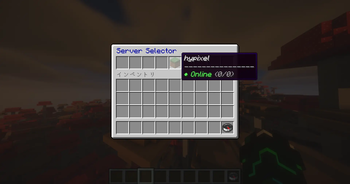
# ServerTransfer ServerTransfer is a high-performance and secure server selector designed for Minecraft 1.20.5 and newer. By utilizing the native Transfer API introduced in Minecraft 1.20.5, this plugin allows you to teleport players directly between servers in your network without the need for complex proxy configurations like BungeeCord or Velocity. It provides a polished, customizable in-game interface that makes server hopping seamless for your players. --- ### Required Setup (Important) To enable the native transfer functionality, you must modify the configuration of all target servers in your network: 1. Open the **server.properties** file on every server. 2. Locate or add the following line and set it to true: `accept-transfers=true` 3. Restart your servers. *Note: Failure to set this will result in connections being rejected when a transfer is attempted.* --- ### Key Features **In-Game GUI Layout Editor** Stop wasting time calculating slot numbers in a config file. Use the `/st setting` command to open a live editor. Simply drag and drop items from your inventory into the GUI. The plugin automatically saves the material, display name, and slot directly to your config.yml. **Polished User Experience** * **Real-time Status**: View server status (Online/Offline) and player counts directly within the item lore. * **Visual Effects**: Includes portal particles, teleportation sounds, and action-bar countdowns. * **Move-to-Cancel**: Automatically cancels the transfer if a player moves during the countdown to prevent accidental teleports. --- ### Commands & Permissions | Command | Description | Permission | | :--- | :--- | :--- | | /st | Opens the server selector GUI. | servertransfer.use | | /st help | Displays the help menu. | servertransfer.use | | /st setting | Opens the visual GUI editor. | servertransfer.admin | | /st reload | Reloads the plugin configuration. | servertransfer.admin | --- ### Installation 1. Download and place the **ServerTransfer.jar** into your server's plugins folder. 2. Ensure `accept-transfers=true` is set in your **server.properties**. 3. Start your server. 4. Use `/st setting` to begin building your menu. 5. (Optional) Edit `plugins/ServerTransfer/config.yml` to change the language to Japanese (`language: ja`) or fine-tune settings.
# ServerTransfer
ServerTransfer is a high-performance and secure server selector designed for Minecraft 1. 20. 5 and newer.
By utilizing the native Transfer API introduced in Minecraft 1. 20. 5, this plugin allows you to teleport players directly between servers in your network without the need for complex proxy configurations like BungeeCord or Velocity. It provides a polished, customizable in-game interface that makes server hopping seamless for your players.
### Required Setup (Important)
To enable the native transfer functionality, you must modify the configuration of all target servers in your network:
1. Open the server.properties file on every server. 2. Locate or add the following line and set it to true: `accept-transfers=true` 3. Restart your servers.
Note: Failure to set this will result in connections being rejected when a transfer is attempted.
### Key Features
In-Game GUI Layout Editor Stop wasting time calculating slot numbers in a config file. Use the `/st setting` command to open a live editor. Simply drag and drop items from your inventory into the GUI. The plugin automatically saves the material, display name, and slot directly to your config.yml.
Polished User Experience Real-time Status: View server status (Online/Offline) and player counts directly within the item lore. Visual Effects: Includes portal particles, teleportation sounds, and action-bar countdowns. * Move-to-Cancel: Automatically cancels the transfer if a player moves during the countdown to prevent accidental teleports.
### Commands & Permissions
| Command | Description | Permission | | :--- | :--- | :--- | | /st | Opens the server selector GUI. | servertransfer.use | | /st help | Displays the help menu. | servertransfer.use | | /st setting | Opens the visual GUI editor. | servertransfer.admin | | /st reload | Reloads the plugin configuration. | servertransfer.admin |
### Installation
1. Download and place the ServerTransfer.jar into your server's plugins folder. 2. Ensure `accept-transfers=true` is set in your server.properties. 3. Start your server. 4. Use `/st setting` to begin building your menu. 5. (Optional) Edit `plugins/ServerTransfer/config.yml` to change the language to Japanese (`language: ja`) or fine-tune settings.
📊 Mod Details
- Game
- Minecraft Plugins
- Author
- Aki2957
- Version
- 1.0
- Downloads
- 177
- Endorsements
- 0
- Category
- management
- Created
- 1/14/2026
- Updated
- 1/8/2026
- Game Versions
- 1.20.5, 1.20.6, 1.21, 1.21.1, 1.21.2
- Tags
- management, transportation, utility
🔧 How to Install Minecraft Plugins Mods
Download from Modrinth. Use Prism Launcher or drop into your mods folder.
📖 Full step-by-step install guide for Minecraft Plugins →
Visit the official mod page for specific installation instructions for this mod.
🎮 Need cheat codes or console commands? Check ur gaming wiki for Minecraft Plugins commands, item IDs, and more.
❓ Frequently Asked Questions
Which Minecraft Plugins versions does ServerTransfer support?
The author lists 1.20.5, 1.20.6, 1.21, 1.21.1, 1.21.2, 1.21.3. Other versions may work but are untested by the author.
What is the latest version of ServerTransfer?
Version 1.0, published 2026-01-08 with 177 downloads recorded at the source.
Keep browsing — more Minecraft Plugins mods await