ServerStats Dashboard
🟡 Updated this year🖼️ Gallery (1 images)
🔍 Analysis
- 🏆 #115 of 333 management mods in this game by downloads
📋 About This Mod
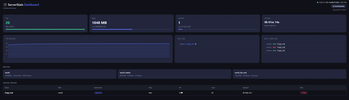
# ServerStats Dashboard **Monitor your Paper server in real time — directly from your browser.** ServerStats Dashboard is a lightweight Paper plugin that spins up a built-in web server and serves a live admin dashboard. No external software, no databases, no dependencies. Just drop in the JAR, start your server, and open your browser. --- ## ✦ Features ### 📊 Live Stats - **TPS** — color-coded (green / yellow / red) with a real-time history graph - **RAM usage** — used vs. max heap with a progress bar - **Player count** — slots used vs. available - **Server uptime** — formatted as hours, minutes, seconds ### 👥 Player Management - Live player table with **world, gamemode, ping, HP, level and playtime** - **Kick players** directly from the dashboard (password-protected) - **Join / Leave log** with timestamps ### 💬 Chat Log - Live scrolling chat log with player names and timestamps - Auto-scrolls to the latest message ### 🌍 World Overview - All loaded worlds with environment type, entity count and loaded chunk count ### 🔒 Security - **HTTP Basic Auth** — optional password protection for the dashboard - **IP Whitelist & Blacklist** — restrict access to specific IPs - **Rate Limiting** — configurable max requests per minute per IP ### ⚙️ Admin Tools - `/dashboard` — shows a clickable dashboard URL in chat - `/dashboardreload` — reloads config and restarts the HTTP server without a full server restart - Fully configurable via `config.yml` ### 🎨 UI - Dark / Light mode toggle - Fully responsive — works on mobile - Auto-refresh every N seconds (configurable) - English & German language support --- ## 🚀 Installation 1. Download the JAR and drop it into your `plugins/` folder 2. Start or restart your server 3. Open `http://YOUR-SERVER-IP:8080` in your browser 4. Done ✓ --- ## ⚙️ Configuration ```yaml port: 8080 password-enabled: false password: "changeme" refresh-interval-seconds: 3 ip-whitelist: ip-blacklist: chat-log-size: 50 tps-history-size: 60 rate-limit-per-minute: 120 language: "en" ``` --- ## 🔧 Commands & Permissions | Command | Description | Permission | |---|---|---| | `/dashboard` | Shows the dashboard URL in chat | `serverstats.dashboard` | | `/dashboardreload` | Reloads config & restarts HTTP server | `serverstats.reload` | Both permissions default to **OP only**. --- ## 🛠️ Technical Details - **No external libraries** — uses Java's built-in `com.sun.net.httpserver` - **Thread-safe** — all Bukkit API calls happen on the main thread via a snapshot cache; HTTP threads never touch the API directly - **Dedicated thread pool** — HTTP server runs on daemon threads, completely separate from the server thread - **Paper 1.21.11+** required --- ## 📋 Compatibility | Software | Supported | |---|---| | Paper 1.21.11 | ✅ | | Purpur | ✅ | | Folia | ❌ | | Spigot | ❌ | --- *Found a bug or have a feature request? Open an issue on GitHub.*
# ServerStats Dashboard
Monitor your Paper server in real time — directly from your browser.
ServerStats Dashboard is a lightweight Paper plugin that spins up a built-in web server and serves a live admin dashboard. No external software, no databases, no dependencies. Just drop in the JAR, start your server, and open your browser.
## ✦ Features
### 📊 Live Stats - TPS — color-coded (green / yellow / red) with a real-time history graph - RAM usage — used vs. max heap with a progress bar - Player count — slots used vs. available - Server uptime — formatted as hours, minutes, seconds
### 👥 Player Management - Live player table with world, gamemode, ping, HP, level and playtime - Kick players directly from the dashboard (password-protected) - Join / Leave log with timestamps
### 💬 Chat Log - Live scrolling chat log with player names and timestamps - Auto-scrolls to the latest message
### 🌍 World Overview - All loaded worlds with environment type, entity count and loaded chunk count
### 🔒 Security - HTTP Basic Auth — optional password protection for the dashboard - IP Whitelist & Blacklist — restrict access to specific IPs - Rate Limiting — configurable max requests per minute per IP
### ⚙️ Admin Tools - `/dashboard` — shows a clickable dashboard URL in chat - `/dashboardreload` — reloads config and restarts the HTTP server without a full server restart - Fully configurable via `config.yml`
### 🎨 UI - Dark / Light mode toggle - Fully responsive — works on mobile - Auto-refresh every N seconds (configurable) - English & German language support
## 🚀 Installation
1. Download the JAR and drop it into your `plugins/` folder 2. Start or restart your server 3. Open `http://YOUR-SERVER-IP:8080` in your browser 4. Done ✓
## ⚙️ Configuration
```yaml port: 8080 password-enabled: false password: "changeme" refresh-interval-seconds: 3 ip-whitelist: [] ip-blacklist: [] chat-log-size: 50 tps-history-size: 60 rate-limit-per-minute: 120 language: "en" ```
## 🔧 Commands & Permissions
| Command | Description | Permission | |---|---|---| | `/dashboard` | Shows the dashboard URL in chat | `serverstats.dashboard` | | `/dashboardreload` | Reloads config & restarts HTTP server | `serverstats.reload` |
Both permissions default to OP only.
## 🛠️ Technical Details
- No external libraries — uses Java's built-in `com.sun.net.httpserver`
- Thread-safe — all Bukkit API calls happen on the main thread via a snapshot cache; HTTP threads never touch the API directly
- Dedicated thread pool — HTTP server runs on daemon threads, completely separate from the server thread
- Paper 1. 21. 11+ required
## 📋 Compatibility
| Software | Supported | |---|---| | Paper 1. 21. 11 | ✅ | | Purpur | ✅ | | Folia | ❌ | | Spigot | ❌ |
Found a bug or have a feature request? Open an issue on GitHub.
📊 Mod Details
- Game
- Minecraft Plugins
- Author
- crqzycat
- Version
- 1.0
- Downloads
- 60
- Endorsements
- 0
- Category
- management
- Created
- 5/14/2026
- Updated
- 5/14/2026
- Game Versions
- 1.21.11
- Tags
- management, utility
🔧 How to Install Minecraft Plugins Mods
Download from Modrinth. Use Prism Launcher or drop into your mods folder.
📖 Full step-by-step install guide for Minecraft Plugins →
Visit the official mod page for specific installation instructions for this mod.
🎮 Need cheat codes or console commands? Check ur gaming wiki for Minecraft Plugins commands, item IDs, and more.
❓ Frequently Asked Questions
Which Minecraft Plugins versions does ServerStats Dashboard support?
The author lists 1.21.11. Other versions may work but are untested by the author.
What is the latest version of ServerStats Dashboard?
Version 1.0, published 2026-05-14 with 60 downloads recorded at the source.
Keep browsing — more Minecraft Plugins mods await