SDLore
🟡 Updated this year🖼️ Gallery (3 images)
🔍 Analysis
- 🏆 #1 of 33 decoration mods in this game by downloads
📋 About This Mod
!(https://cdn.sapphi.dev/assets/sdlore/sdlore-overview.webp)
📄 Transcription of the overview image
### PLUGIN — Why use SDLore?
SDLore lets you manage item lore, names, and enchantments directly from a web interface, without needing to recompile or restart your server. This enables faster updates, centralized control, and a much more dynamic experience for servers aiming for advanced customization.
### FEATURE — Web-Based Item Management
Manage item names, lore, and enchantments through a web platform connected to an API, without editing files or recompiling the plugin. Keep everything organized, scalable, and easy to maintain.
### FEATURE — API-Driven Sync
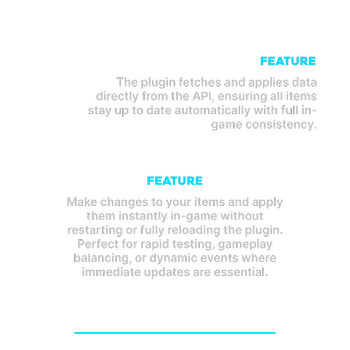
The plugin fetches and applies data directly from the API, ensuring all items stay up to date automatically with full in-game consistency.
### FEATURE — Hot Reload
Make changes to your items and apply them instantly in-game without restarting or fully reloading the plugin. Perfect for rapid testing, gameplay balancing, or dynamic events where immediate updates are essential.
### SHOWCASE — SDLore Editor
Create spectacular lores for your Minecraft items.
The built-in editor supports MiniMessage formatting, real-time lore preview, and enchantment management — all from a clean web UI.
## ✨ Features
### 🌐 Web-Based Item Management Manage item names, lore, and enchantments through a web platform connected to an API — no file editing, no plugin recompilation. Keep everything organized, scalable, and easy to maintain.
### 🔄 API-Driven Sync The plugin fetches and applies data directly from the API, ensuring all items stay up to date automatically with full in-game consistency.
### ⚡ Hot Reload Apply changes instantly in-game without restarting or fully reloading the plugin. Perfect for rapid testing, gameplay balancing, or dynamic events where immediate updates are essential.
## 🛠️ SDLore Editor
The editor provides a rich web UI to craft item metadata using MiniMessage format:
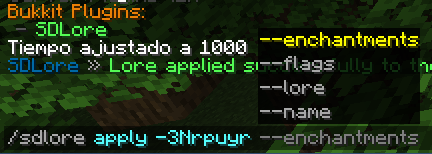
- Item Name — styled with MiniMessage (and Legacy) color tags
- Lore Lines — add, reorder, and remove lines with live preview
- Enchantments — manage enchantment entries directly from the panel
- Flags — manage item flags entries directly from the panel
- Game-like preview — preview the item name and lore from the editor
- Generate Code — export ready-to-use configuration
## 🔗 Links
- 🌍 (https://sapphi.dev/sdlore)
- ❓ (https://sapphi.dev/docs/plugins/sdlore)
- 💬 (https://discord.sapphi.dev)
📊 Mod Details
- Game
- Minecraft Plugins
- Author
- SapphireDev
- Version
- 2.1
- Downloads
- 31
- Endorsements
- 1
- Category
- decoration
- Created
- 7/13/2026
- Updated
- 7/3/2026
- Game Versions
- 1.19.4, 1.20, 1.20.1, 1.20.2, 1.20.3
- Tags
- decoration, management, utility
🔧 How to Install Minecraft Plugins Mods
Download from Modrinth. Use Prism Launcher or drop into your mods folder.
📖 Full step-by-step install guide for Minecraft Plugins →
Visit the official mod page for specific installation instructions for this mod.
🎮 Need cheat codes or console commands? Check ur gaming wiki for Minecraft Plugins commands, item IDs, and more.
❓ Frequently Asked Questions
Which Minecraft Plugins versions does SDLore support?
The author lists 1.19.4, 1.20, 1.20.1, 1.20.2, 1.20.3, 1.20.4. Other versions may work but are untested by the author.
What is the latest version of SDLore?
Version 2.1, published 2026-07-03 with 31 downloads recorded at the source.
Keep browsing — more Minecraft Plugins mods await