ScreenShare+
🟡 Updated this year🖼️ Gallery (7 images)




🔍 Analysis
- 🏆 #17 of 81 folia mods in this game by downloads
📋 About This Mod
<div align="center"> ## 🟢 ScreenShare+ **Modern Screenshare Management for Paper & Folia** ScreenShare+ gives staff teams a clean and controlled way to handle screenshare checks, protect player inventories, keep private logs and review previous sessions when disputes happen. <br> !(https://img.shields.io/badge/Paper-26.1.2-red?style=for-the-badge) !(https://img.shields.io/badge/Folia-Supported-brightgreen?style=for-the-badge) !(https://img.shields.io/badge/Java-25+-orange?style=for-the-badge) !(https://img.shields.io/badge/Storage-MariaDB%20%2F%20SQLite-blue?style=for-the-badge) !(https://img.shields.io/badge/Sync-Redis-critical?style=for-the-badge) !(https://img.shields.io/badge/Author-Bad__0320-black?style=for-the-badge) <br> **Author:** `Bad_0320` **Platform:** `Paper / Folia` **Minecraft:** `26.1.2` **Java:** `25+` **Storage:** `MariaDB / SQLite` **Sync:** `Redis` </div> --- ## ✨ Overview **ScreenShare+** is a complete screenshare system made for Minecraft staff teams that want a cleaner way to handle suspects. Start a session, automatically move staff and suspect to their configured positions, protect both inventories, use a private chat, track the duration of the check and keep a permanent history of what happened. The plugin also records useful information for future disputes, including chat messages, quits, session duration, staff involved and ban-on-quit events. > **Built to control screenshares without turning moderation into a mess.** --- ## 🚀 Feature Highlights <table> <tr> <td width="50%"> ### 🔍 Controlled Screenshares Start a complete staff check with one command. * `/ss <player>` * Automatic suspect teleport * Automatic staff teleport * Configurable SS positions * Configurable return hub * Private session handling * Clean end workflow * Tab completion </td> <td width="50%"> ### 📊 Live Screenshare Sidebar Both players can see useful session information while the check is active. * Suspect currently under control * Staff member handling the check * Live session duration * ScreenShare+ branding * Lightweight timer updates * Packet-based implementation * Paper & Folia compatible design </td> </tr> <tr> <td width="50%"> ### 💬 Private SS Chat During a screenshare, staff and suspect communicate through a private session chat. * `STAFF` role * `SUSPECT` role * Public chat separation * Clean role colors * Small caps styling * Messages stored in session history * Useful for future staff reviews </td> <td width="50%"> ### 🕘 Screenshare History Review previous screenshares directly in-game. * `/sschat <player>` * Clean inventory GUI * Player heads * Previous sessions * Staff involved * Start and end time * Session duration * Chat transcript * Quit history * Ban-on-quit records </td> </tr> <tr> <td width="50%"> ### 🎒 Inventory Protection Staff and suspect inventories are protected during every check. * Main inventory backup * Hotbar backup * Armor backup * Offhand backup * Selected slot backup * Inventory clear during SS * Restore after normal end * Restore after reconnect * Persistent recovery after restart </td> <td width="50%"> ### 🌐 Network Ready Built for single servers and larger networks. * MariaDB support * Redis synchronization * SQLite fallback * Safe multi-server fallback * Shared session history * Runtime-loaded libraries * Lightweight release jar * Modular storage structure </td> </tr> </table> --- ## 📊 Live Screenshare Sidebar When a screenshare starts, ScreenShare+ shows a dedicated sidebar to the staff member and suspect. It can display: | Information | Example | | ----------- | --------------- | | Suspect | `PlayerName` | | Staff | `ModeratorName` | | Time | `04:32` | | Credits | `Bad_0320` | The timer updates while the session is active and disappears when the check ends. The sidebar is handled without relying on Bukkit's unsupported Folia scoreboard creation system. --- ## 🕘 Screenshare Evidence & History ScreenShare+ keeps a history of screenshare sessions so staff can review what happened later. This is especially useful when a player claims they were punished unfairly or disputes what happened during the check. Use: `/sschat <player>` A clean GUI opens showing previous sessions for that player. Hovering over a session can show information such as: * Screenshare ID * Suspect * Staff member * Server * Start time * End time * Total duration * Session result * Staff messages * Suspect messages * Quit events * Ban-on-quit actions * Console punishment command Session history remains available after server restarts. --- ## 💬 Private Staff ↔ Suspect Chat While an SS is active, normal public chat is replaced by a private conversation between the two players. | Role | Prefix | | ------- | --------- | | Staff | `STAFF` | | Suspect | `SUSPECT` | Messages are also added to the screenshare history. This gives staff a proper r
## 🟢 ScreenShare+
Modern Screenshare Management for Paper & Folia
ScreenShare+ gives staff teams a clean and controlled way to handle screenshare checks, protect player inventories, keep private logs and review previous sessions when disputes happen.
!(https://img.shields.io/badge/Paper-26. 1. 2-red?style=for-the-badge) !(https://img.shields.io/badge/Folia-Supported-brightgreen?style=for-the-badge) !(https://img.shields.io/badge/Java-25+-orange?style=for-the-badge) !(https://img.shields.io/badge/Storage-MariaDB%20%2F%20SQLite-blue?style=for-the-badge) !(https://img.shields.io/badge/Sync-Redis-critical?style=for-the-badge) !(https://img.shields.io/badge/Author-Bad__0320-black?style=for-the-badge)
- Author
- `Bad_0320`
- Platform
- `Paper / Folia`
- Minecraft
- `26. 1. 2`
- Java
- `25+`
- Storage
- `MariaDB / SQLite`
- Sync
- `Redis`
## ✨ Overview
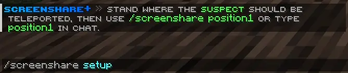
ScreenShare+ is a complete screenshare system made for Minecraft staff teams that want a cleaner way to handle suspects.
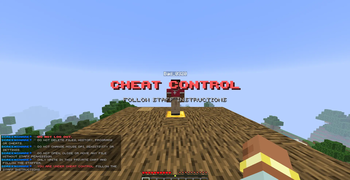
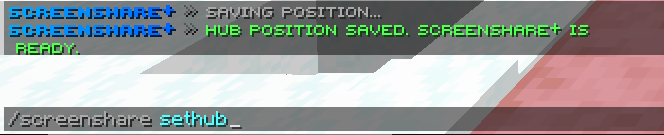
Start a session, automatically move staff and suspect to their configured positions, protect both inventories, use a private chat, track the duration of the check and keep a permanent history of what happened.
The plugin also records useful information for future disputes, including chat messages, quits, session duration, staff involved and ban-on-quit events.
> Built to control screenshares without turning moderation into a mess.
## 🚀 Feature Highlights
### 🔍 Controlled Screenshares Start a complete staff check with one command. `/ss |
### 📊 Live Screenshare Sidebar Both players can see useful session information while the check is active. Suspect currently under control Staff member handling the check Live session duration ScreenShare+ branding Lightweight timer updates Packet-based implementation Paper & Folia compatible design |
### 💬 Private SS Chat During a screenshare, staff and suspect communicate through a private session chat. `STAFF` role `SUSPECT` role Public chat separation Clean role colors Small caps styling Messages stored in session history Useful for future staff reviews |
### 🕘 Screenshare History Review previous screenshares directly in-game. `/sschat |
### 🎒 Inventory Protection Staff and suspect inventories are protected during every check. Main inventory backup Hotbar backup Armor backup Offhand backup Selected slot backup Inventory clear during SS Restore after normal end Restore after reconnect Persistent recovery after restart |
### 🌐 Network Ready Built for single servers and larger networks. MariaDB support Redis synchronization SQLite fallback Safe multi-server fallback Shared session history Runtime-loaded libraries Lightweight release jar Modular storage structure |
## 📊 Live Screenshare Sidebar
When a screenshare starts, ScreenShare+ shows a dedicated sidebar to the staff member and suspect.
It can display:
| Information | Example | | ----------- | --------------- | | Suspect | `PlayerName` | | Staff | `ModeratorName` | | Time | `04:32` | | Credits | `Bad_0320` |
The timer updates while the session is active and disappears when the check ends.
The sidebar is handled without relying on Bukkit's unsupported Folia scoreboard creation system.
## 🕘 Screenshare Evidence & History
ScreenShare+ keeps a history of screenshare sessions so staff can review what happened later.
This is especially useful when a player claims they were punished unfairly or disputes what happened during the check.
`/sschat
A clean GUI opens showing previous sessions for that player.
Hovering over a session can show information such as:
Screenshare ID Suspect Staff member Server Start time End time Total duration Session result Staff messages Suspect messages Quit events Ban-on-quit actions Console punishment command
Session history remains available after server restarts.
## 💬 Private Staff ↔ Suspect Chat
While an SS is active, normal public chat is replaced by a private conversation between the two players.
| Role | Prefix | | ------- | --------- | | Staff | `STAFF` | | Suspect | `SUSPECT` |
Messages are also added to the screenshare history.
This gives staff a proper r
📊 Mod Details
- Game
- Minecraft Plugins
- Author
- Bad_0320
- Version
- 1.1.1
- Downloads
- 26
- Endorsements
- 0
- Category
- folia
- Created
- 7/25/2026
- Updated
- 8/18/2026
- Game Versions
- 26.1.2
- Tags
- management, social, utility
🔧 How to Install Minecraft Plugins Mods
Download from Modrinth. Use Prism Launcher or drop into your mods folder.
📖 Full step-by-step install guide for Minecraft Plugins →
Visit the official mod page for specific installation instructions for this mod.
🎮 Need cheat codes or console commands? Check ur gaming wiki for Minecraft Plugins commands, item IDs, and more.
❓ Frequently Asked Questions
Which Minecraft Plugins versions does ScreenShare+ support?
The author lists 26.1.2. Other versions may work but are untested by the author.
What is the latest version of ScreenShare+?
Version 1.1.1, published 2026-08-18 with 26 downloads recorded at the source.
Keep browsing — more Minecraft Plugins mods await