RvCustomRecipies
🟡 Updated this year🖼️ Gallery (6 images)

🔍 Analysis
- 🏆 #34 of 83 equipment mods in this game by downloads
📋 About This Mod
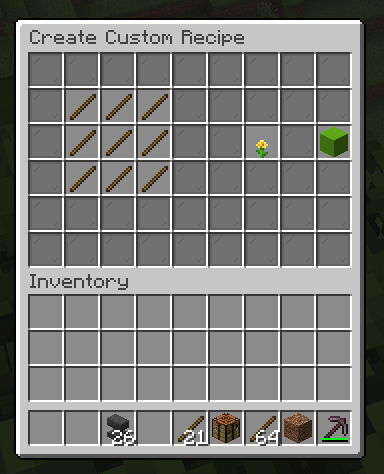
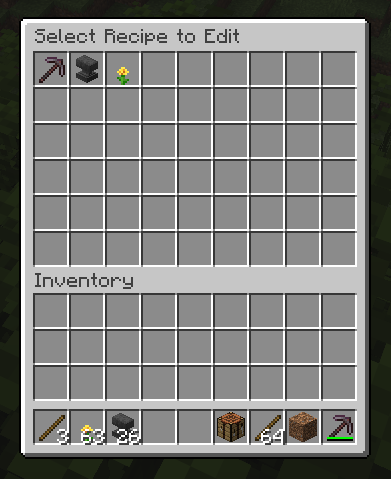
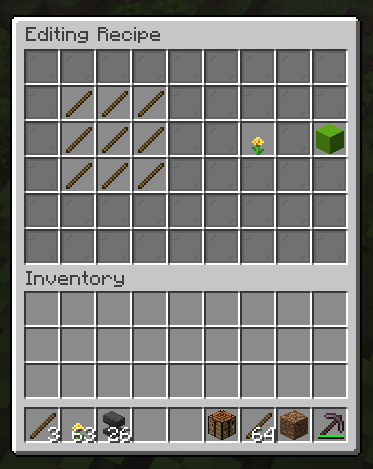
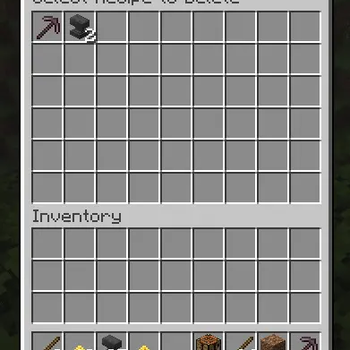
# 🌟 RvCustomRecipies **The Ultimate GUI-Based Custom Recipe Manager for Modern Minecraft Servers** *Developed by RvDevelopment (RealVansh)* **RvCustomRecipies** is a premium, lightweight, and incredibly powerful Minecraft plugin that allows server administrators to create, edit, and delete custom crafting recipes entirely through an intuitive in-game GUI. No coding, no complex item IDs, and no messy config setups required. Just drop your items into the crafting grid and hit save! ### ✨ Key Features * **🎨 100% GUI-Driven Management:** Create, view, edit, and delete recipes using beautiful, interactive chest menus. No typing out long UUIDs or NBT tags in chat. * **📐 Dynamic Grid Detection (2x2 & 3x3):** The plugin automatically calculates the "bounding box" of your recipe. If you make a recipe that fits in a 2x2 grid (like torches or sticks), players can craft it directly in their personal inventory! Larger recipes seamlessly require a Crafting Table. * **creative-mode Bypass:** Since custom NBT items don't appear in the vanilla creative menu, Admins can simply **Shift-Click** any item in the `/recipe` list to instantly grab a copy for themselves. * **💾 Smart YAML Storage:** Recipes are saved instantly to a human-readable `recipes.yml` file, ensuring no data is lost on server restarts. * **⚙️ Fully Customizable:** Tweak chat messages, plugin prefixes, and toggle features directly from the `config.yml`. * **🖥️ Premium Console Branding:** Features a sleek ASCII art startup banner to let you know the plugin is loaded and ready. --- ### 📜 Commands & Permissions | Command | Permission | Description | | :--- | :--- | :--- | | `/recipe` | *None (Default)* | Opens the public GUI list where players can view all available custom recipes. | | `/cr create` | `rvc.admin` | Opens a blank crafting grid to design and save a brand new recipe. | | `/cr edit` | `rvc.admin` | Opens a menu to select an existing recipe, loading it back into the grid for modifications. | | `/cr delete` | `rvc.admin` | Opens a menu to quickly select and permanently delete a custom recipe. | *(Note: Users with the `rvc.admin` permission also gain access to the in-GUI Delete button and the Shift-Click to copy feature).* --- ### 📂 Configuration (`config.yml`) The plugin generates a configuration file on startup, allowing you to personalize the experience for your server network: * Customize the chat prefix (Default: ` RvRecipes »`). * Translate or alter every chat message in the plugin. * Toggle Admin Shift-Clicking and Admin GUI Delete buttons on or off. ### 🚀 Installation 1. Ensure your server is running **Paper or Spigot (1.20+)** and supports **Java 25**. 2. Download the `RvCustomRecipies.jar` file. 3. Drop it into your server's `plugins/` folder. 4. Restart your server. 5. Type `/cr create` in-game and start crafting!
# 🌟 RvCustomRecipies The Ultimate GUI-Based Custom Recipe Manager for Modern Minecraft Servers Developed by RvDevelopment (RealVansh)
RvCustomRecipies is a premium, lightweight, and incredibly powerful Minecraft plugin that allows server administrators to create, edit, and delete custom crafting recipes entirely through an intuitive in-game GUI. No coding, no complex item IDs, and no messy config setups required. Just drop your items into the crafting grid and hit save!
### ✨ Key Features
🎨 100% GUI-Driven Management: Create, view, edit, and delete recipes using beautiful, interactive chest menus. No typing out long UUIDs or NBT tags in chat. 📐 Dynamic Grid Detection (2x2 & 3x3): The plugin automatically calculates the "bounding box" of your recipe. If you make a recipe that fits in a 2x2 grid (like torches or sticks), players can craft it directly in their personal inventory! Larger recipes seamlessly require a Crafting Table. creative-mode Bypass: Since custom NBT items don't appear in the vanilla creative menu, Admins can simply Shift-Click any item in the `/recipe` list to instantly grab a copy for themselves. 💾 Smart YAML Storage: Recipes are saved instantly to a human-readable `recipes.yml` file, ensuring no data is lost on server restarts. ⚙️ Fully Customizable: Tweak chat messages, plugin prefixes, and toggle features directly from the `config.yml`. 🖥️ Premium Console Branding: Features a sleek ASCII art startup banner to let you know the plugin is loaded and ready.
### 📜 Commands & Permissions
| Command | Permission | Description | | :--- | :--- | :--- | | `/recipe` | None (Default) | Opens the public GUI list where players can view all available custom recipes. | | `/cr create` | `rvc.admin` | Opens a blank crafting grid to design and save a brand new recipe. | | `/cr edit` | `rvc.admin` | Opens a menu to select an existing recipe, loading it back into the grid for modifications. | | `/cr delete` | `rvc.admin` | Opens a menu to quickly select and permanently delete a custom recipe. |
(Note: Users with the `rvc.admin` permission also gain access to the in-GUI Delete button and the Shift-Click to copy feature).
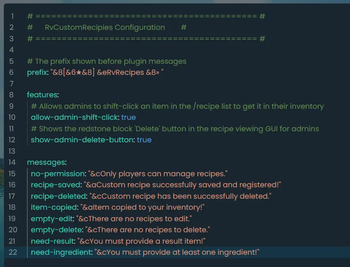
### 📂 Configuration (`config.yml`) The plugin generates a configuration file on startup, allowing you to personalize the experience for your server network: Customize the chat prefix (Default: `[★] RvRecipes »`). Translate or alter every chat message in the plugin. * Toggle Admin Shift-Clicking and Admin GUI Delete buttons on or off.
### 🚀 Installation 1. Ensure your server is running Paper or Spigot (1. 20+) and supports Java 25. 2. Download the `RvCustomRecipies.jar` file. 3. Drop it into your server's `plugins/` folder. 4. Restart your server. 5. Type `/cr create` in-game and start crafting!
📊 Mod Details
- Game
- Minecraft Plugins
- Author
- EpicGaming
- Version
- 1.0
- Downloads
- 57
- Endorsements
- 0
- Category
- equipment
- Created
- 7/23/2026
- Updated
- 7/7/2026
- Game Versions
- 1.21, 1.21.1, 1.21.2, 1.21.3, 1.21.4
- Tags
- equipment, game-mechanics, utility
🔧 How to Install Minecraft Plugins Mods
Download from Modrinth. Use Prism Launcher or drop into your mods folder.
📖 Full step-by-step install guide for Minecraft Plugins →
Visit the official mod page for specific installation instructions for this mod.
🎮 Need cheat codes or console commands? Check ur gaming wiki for Minecraft Plugins commands, item IDs, and more.
❓ Frequently Asked Questions
Which Minecraft Plugins versions does RvCustomRecipies support?
The author lists 1.21, 1.21.1, 1.21.2, 1.21.3, 1.21.4, 1.21.5. Other versions may work but are untested by the author.
What is the latest version of RvCustomRecipies?
Version 1.0, published 2026-07-07 with 57 downloads recorded at the source.
Keep browsing — more Minecraft Plugins mods await