Region Signs
🟡 Updated this year🖼️ Gallery (2 images)
🔍 Analysis
- 🏆 #568 of 1080 bukkit mods in this game by downloads
📋 About This Mod
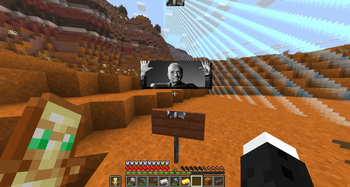
RegionSigns is a Paper plugin that allows you to turn regular signs into beautiful region displays for players who enter their radius. Perfect for private servers, survival servers, SMP, or MMORPG/RPG projects I originally made this for myself and my (https://discord.gg/mZ7Uw8XY7G), and didn’t plan to release it… but why not?
*If you notice a bug, or want to suggest some new functionality, write to (https://discord.gg/jbBmtAzDQ2), in the `#region-signs`, or in private messages to the (https://t.me/alexei4884)**
When a player enters a sign’s radius, a Title/BossBar is displayed using the sign’s text, with customizable sounds and particles.
## Features: 4 region tiers (fully configurable and extendable) > Iron - 25 blocks radius > Gold — 50 blocks radius > Diamond - 100 blocks radius > Netherite - 400 blocks radius Per-player settings PlaceholderAPI MiniMessage
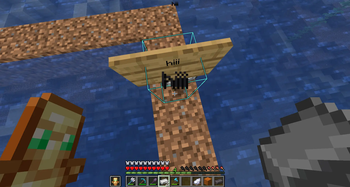
## How to create Region Sign? 1. Place a sign 2. Write the region name 3. Drop one of the following items onto the sign: > Iron - 25 blocks radius > Gold - 50 blocks radius > Diamond - 100 blocks radius > Netherite - 400 blocks radius If a region already exists, it will be upgraded to a higher tier. To remove a region, simply break the sign.
## Commands:
`/regionsigns
`/regionsigns reload` - reloads the config
`/regionsigns` - shows current settings
## Permissions: `regionsigns.command` - access to commands
`regionsigns.admin` - allows /regionsigns reload
`regionsigns.create` - create and upgrade regions
`regionsigns.remove` - remove regions
`regionsigns.view` - see region display
`regionsigns.view.titles`
`regionsigns.view.bossbar`
`regionsigns.view.sounds`
`regionsigns.view.particles`
## PlaceholderAPI: `%regionsigns_name%` - current region name
`%regionsigns_tier%` - region tier
`%regionsigns_world%` - world
`%regionsigns_radius%` - radius
`%regionsigns_material%` - sign (OAK_SIGN)
## Configuration: ```yaml language: "en_us" # 1. 0. 1 upd / or ru_ru
features: enabled: true titles: true consume-items: true # 1. 0. 1 upd bossbar: true sounds: true actionbar: false # 1. 0. 1 upd particles: true
check-interval-ticks: 20
titles:
header: "
bossbar:
text: "
# 1. 0. 1 upd
actionbar:
text: "
tiers: IRON: radius: 25 effects: enter: sounds: - "minecraft:block.ender_chest.open 5 0. 7" create: sounds: - "minecraft:block.amethyst_block.break 2 1" - "minecraft:block.bell.resonate 2 2" particles: - "WAX_OFF 5 0 0 0 0. 15" GOLD: radius: 50 effects: enter: sounds: - "minecraft:block.ender_chest.open 5 0. 7" - "minecraft:entity.evoker.prepare_summon 5 0. 95" - "minecraft:entity.evoker.prepare_summon 5 1. 17" create: sounds: - "minecraft:block.amethyst_block.break 2 1" - "minecraft:block.bell.resonate 2 2" particles: - "WAX_OFF 15 0 0 0 0. 15" DIAMOND: radius: 100 effects: enter: sounds: - "minecraft:block.ender_chest.open 5 0. 7" - "minecraft:entity.evoker.prepare_summon 5 0. 8" - "minecraft:entity.evoker.prepare_summon 5 0. 95" - "minecraft:entity.evoker.prepare_summon 5 1. 17" create: sounds: - "minecraft:block.amethyst_block.break 2 1" - "minecraft:block.bell.resonate 2 2" particles: - "WAX_OFF 25 0 0 0 0. 15" - "FLAME 20 0 0. 25 0 0. 03" NETHERITE: radius: 300 effects: enter: sounds: - "minecraft:block.ender_chest.open 5 0. 7" - "minecraft:entity.evoker.prepare_summon 5 0. 8" - "minecraft:entity.evoker.prepare_summon 5 0. 95" - "minecraft:entity.evoker.prepare_summon 5 1. 17" - "minecraft:block.bell.resonate 5 1. 15" create: sounds: - "minecraft:block.amethyst_block.break 2 1" - "minecraft:block.bell.resonate 2 2" particles: - "WAX_OFF 50 0 0 0 0. 15" - "SOUL 20 0 0. 25 0 0. 03"
defaults: empty-sign-name: "Region"
## Roadmap: backport to older versions? like >1. 20, >1. 16 <1. 8 gradients/books? Dynmap / BlueMap? commands for create nosign regions? optimization? more permissions? customization?
**If you notice a bug, or want to suggest some new functionality, write to (https://discord.gg/jbBmtAzDQ2), in the `#region-signs`, or in private
📊 Mod Details
- Game
- Minecraft Plugins
- Author
- alexei4884
- Version
- 1.0.1
- Downloads
- 53
- Endorsements
- 2
- Category
- bukkit
- Created
- 4/30/2026
- Updated
- 5/14/2026
- Game Versions
- 1.21, 1.21.1, 1.21.2, 1.21.3, 1.21.4
- Tags
- decoration, game-mechanics, social
🔧 How to Install Minecraft Plugins Mods
Download from Modrinth. Use Prism Launcher or drop into your mods folder.
📖 Full step-by-step install guide for Minecraft Plugins →
Visit the official mod page for specific installation instructions for this mod.
🎮 Need cheat codes or console commands? Check ur gaming wiki for Minecraft Plugins commands, item IDs, and more.
❓ Frequently Asked Questions
Which Minecraft Plugins versions does Region Signs support?
The author lists 1.21, 1.21.1, 1.21.2, 1.21.3, 1.21.4, 1.21.5. Other versions may work but are untested by the author.
What is the latest version of Region Signs?
Version 1.0.1, published 2026-05-14 with 53 downloads recorded at the source.
Keep browsing — more Minecraft Plugins mods await