RealMines
🟡 Updated this year🖼️ Gallery (7 images)
🔍 Analysis
- 👍 0.1% endorsement rate
- 🏆 #51 of 214 game-mechanics mods in this game by downloads
📋 About This Mod
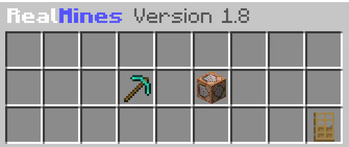
# Introduction Welcome to the RealMines plugin page. This is a brand new mine management plugin with focus on a GUI management system. Coded in the 1.14 codebase, its aim is to provide Server Owners and Players with a fast and reliable mines system. **NOTE:** To use this plugin, you will need FAWE/WorldEdit. **Statistics:** bStats - RealMines **Found an issue? Report it!** (https://github.com/JoseGamerPT/RealMines/issues) **My Discord:** (https://discord.gg/SK7M7f2YkV) ## Features - YAML Configuration. - Simple and performant GUI interface. - RealPermissions and RealRegions integrations! - Sign System. - Mine Break Actions. - Reset System (by time or by percentages). - Search function for Adding Blocks. - GUI for managing individual Mines. - Player Input System to accept input from the user. ## How-To ### Silence a Mine `/mine silent <name>` ### Add a Break Action With Break Actions, you can assign actions to execute when a specific type of block in the mine is broken by a player. By default, when you add a new block to the mine, the block doesn't have a break action assigned. Access the break actions menu for a specific block by right-clicking it in the mine's blocks menu. **Current break actions supported:** 1. Give Money when a block is broken 2. Give or Drop an ItemStack when a block is broken 3. Execute a Command in the console when a block is broken (`%player%` to get the player name) ### Create a Mine 1. Select a region with **WorldEdit**. 2. Type `/mine create <name>` to create a Mine. 3. Type `/mine panel` and click the created mine to explore the plugin possibilities. ### See Registered Mines `/mine list` ### Edit Mine Settings and Contents 1. Type `/mine panel`. 2. Click the mine you want to edit. 3. Click your desired option. ### Set The Mine Teleport or Region `/mine settp <name>` or `/mine setregion <name>` ### Delete a Mine Type `/mine del<name>`. ### Create a new Sign 1. Place a new Sign and type: - **Line 1:** `` - **Line 2:** `<mine name>` - **Line 3:** Setting *(Refer to the sign settings section for more details.)* ### Clear or Reset a Mine `/mine reset <name>` or `/mine clear <name>` ## Videos <iframe width="560" height="315" src="https://www.youtube-nocookie.com/embed/ZGdKb9H8WdM" title="YouTube video player" frameborder="0" allow="accelerometer; autoplay; clipboard-write; encrypted-media; gyroscope; picture-in-picture; web-share" allowfullscreen></iframe> <iframe width="560" height="315" src="https://www.youtube-nocookie.com/embed/DLBoTOnOxws" title="YouTube video player" frameborder="0" allow="accelerometer; autoplay; clipboard-write; encrypted-media; gyroscope; picture-in-picture; web-share" allowfullscreen></iframe> <iframe width="560" height="315" src="https://www.youtube-nocookie.com/embed/TromrLYyWw4" title="YouTube video player" frameborder="0" allow="accelerometer; autoplay; clipboard-write; encrypted-media; gyroscope; picture-in-picture; web-share" allowfullscreen></iframe> <iframe width="560" height="315" src="https://www.youtube-nocookie.com/embed/jANodkVNARk" title="YouTube video player" frameborder="0" allow="accelerometer; autoplay; clipboard-write; encrypted-media; gyroscope; picture-in-picture; web-share" allowfullscreen></iframe> ## Support & Requirements If you have any issues with the plugin, DM me here or join the discord server. ## Commands & Permissions - `/realmines`, `/mine`, `/mines`, `/rm` - **Permission:** `realmines.admin` - **Teleport to a mine:** `realmines.tp.<mine name>` - **Silence a mine:** `realmines.silent` - **Reset a mine:** `realmines.reset` - **Get notified of an update:** `realmines.update.notify` ## PlaceholderAPI Placeholders - `%realmines_bar_MINE%` - `%realmines_totalblocks_MINE%` - `%realmines_minedblocks_MINE%` - `%realmines_remainingblocks_MINE%` - `%realmines_perremainingblocks_MINE%` - `%realmines_perminedblocks_MINE%` - `%realmines_secondsleft_MINE%` ## Signs Line 1 - or | Line 2 - <mine name> Accepted settings for Line 3: - bm - Number of Mined Blocks - br - Number of Remaining Blocks - pm - Percentage of Mined Blocks - pl - Percentage of Remaining Blocks - b - Bar of Mine's Blocks - pb - Percentage Bar of Mine's Blocks - tl - Time Left - sl - Seconds Left ## If you like this plugin Don't forget to give it a **heart**!
# Introduction Welcome to the RealMines plugin page. This is a brand new mine management plugin with focus on a GUI management system. Coded in the 1. 14 codebase, its aim is to provide Server Owners and Players with a fast and reliable mines system. NOTE: To use this plugin, you will need FAWE/WorldEdit.
Statistics: bStats - RealMines
Found an issue? Report it! (https://github.com/JoseGamerPT/RealMines/issues) My Discord: (https://discord.gg/SK7M7f2YkV)
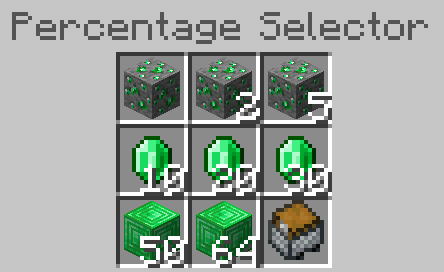
## Features - YAML Configuration. - Simple and performant GUI interface. - RealPermissions and RealRegions integrations! - Sign System. - Mine Break Actions. - Reset System (by time or by percentages). - Search function for Adding Blocks. - GUI for managing individual Mines. - Player Input System to accept input from the user.
### Silence a Mine
`/mine silent
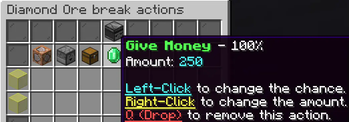
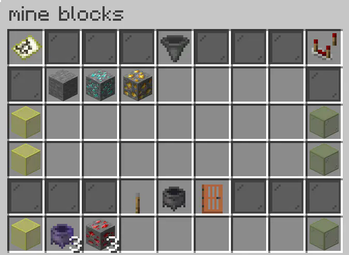
### Add a Break Action With Break Actions, you can assign actions to execute when a specific type of block in the mine is broken by a player. By default, when you add a new block to the mine, the block doesn't have a break action assigned. Access the break actions menu for a specific block by right-clicking it in the mine's blocks menu.
Current break actions supported: 1. Give Money when a block is broken 2. Give or Drop an ItemStack when a block is broken 3. Execute a Command in the console when a block is broken (`%player%` to get the player name)
### Create a Mine
1. Select a region with WorldEdit.
2. Type `/mine create
### See Registered Mines `/mine list`
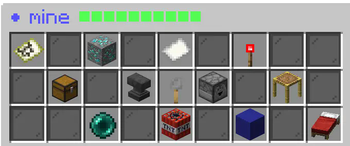
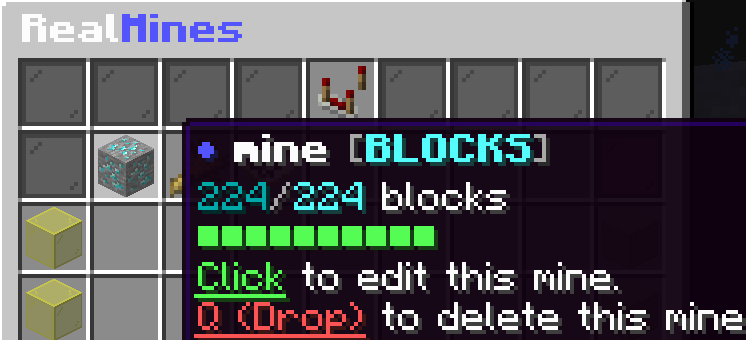
### Edit Mine Settings and Contents 1. Type `/mine panel`. 2. Click the mine you want to edit. 3. Click your desired option.
### Set The Mine Teleport or Region
`/mine settp
### Delete a Mine
Type `/mine del
### Create a new Sign
1. Place a new Sign and type:
- Line 1: ``
- Line 2: `
(Refer to the sign settings section for more details.)
### Clear or Reset a Mine
`/mine reset
## Support & Requirements If you have any issues with the plugin, DM me here or join the discord server.
## Commands & Permissions
- `/realmines`, `/mine`, `/mines`, `/rm`
- Permission: `realmines.admin`
- Teleport to a mine: `realmines.tp.
## PlaceholderAPI Placeholders - `%realmines_bar_MINE%` - `%realmines_totalblocks_MINE%` - `%realmines_minedblocks_MINE%` - `%realmines_remainingblocks_MINE%` - `%realmines_perremainingblocks_MINE%` - `%realmines_perminedblocks_MINE%` - `%realmines_secondsleft_MINE%`
## Signs
Line 1 - or | Line 2 -
## If you like this plugin Don't forget to give it a heart!
📊 Mod Details
- Game
- Minecraft Plugins
- Author
- JoseGamer_PT
- Version
- 1.8.8
- Downloads
- 5,985
- Endorsements
- 7
- Category
- game-mechanics
- Created
- 12/1/2024
- Updated
- 12/1/2025
- Game Versions
- 1.14, 1.14.1, 1.14.2, 1.14.3, 1.14.4
- Tags
- game-mechanics, management, utility
🔧 How to Install Minecraft Plugins Mods
Download from Modrinth. Use Prism Launcher or drop into your mods folder.
📖 Full step-by-step install guide for Minecraft Plugins →
Visit the official mod page for specific installation instructions for this mod.
🎮 Need cheat codes or console commands? Check ur gaming wiki for Minecraft Plugins commands, item IDs, and more.
❓ Frequently Asked Questions
Which Minecraft Plugins versions does RealMines support?
The author lists 1.14, 1.14.1, 1.14.2, 1.14.3, 1.14.4. Other versions may work but are untested by the author.
What is the latest version of RealMines?
Version 1.8.8, published 2025-12-01 with 5,985 downloads recorded at the source.
Keep browsing — more Minecraft Plugins mods await