RatsCurrencies
🟡 Updated this year🖼️ Gallery (3 images)
🔍 Analysis
- 🏆 #776 of 1080 bukkit mods in this game by downloads
📋 About This Mod
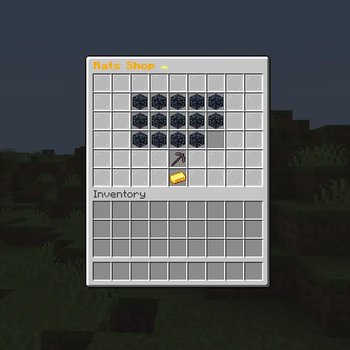
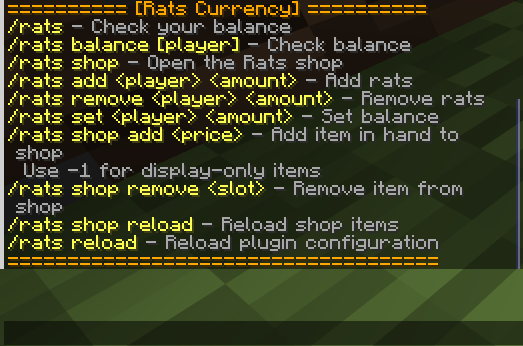
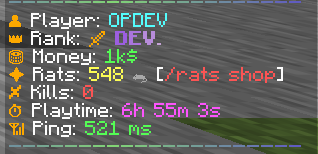
RatsCurrencies - A Unique Economy Plugin Add a fun and engaging rat-themed currency system to your Minecraft server! RatsCurrency provides a complete economy solution with a custom shop system, rewards, and full Vault integration. Features ✨ Custom Rat Currency System Independent economy separate from server money Automatic rewards for active players Easy balance management with admin commands 🛍️ Interactive Shop GUI Beautiful inventory-based shop interface Display-only items (set price to -1) Easy item management with commands 💰 Dual Economy Support Works with Vault for Money economy Separate Rats economy for special shops Compatible with EconomyShopGUI 🎯 PlaceholderAPI Integration %rats_balance% - Player's rat balance %rats_balance_formatted% - Formatted balance with decimals Use in chat, scoreboards, holograms, and more ⚙️ Admin Tools Add/remove/set player balances Manage shop items easily Reload configuration without restart Full LuckPerms permission support Commands Player Commands: /rats - Check your balance /rats shop - Open the shop Admin Commands: /rats add <player> <amount> - Add rats to player /rats remove <player> <amount> - Remove rats from player /rats set <player> <amount> - Set player balance /rats shop add <price> - Add item to shop (hold item, use -1 for display-only) /rats shop remove <slot> - Remove item from shop /rats reload - Reload all configurations Permissions rats.balance - Check balance rats.shop - Use the shop rats.admin - All admin commands Requirements Spigot/Paper 1.16+ Vault (for economy integration) PlaceholderAPI (optional, for placeholders) LuckPerms (recommended, for permissions) Configuration Customize in config.yml: Reward amount and interval Starting balance for new players Currency display name and symbol Reward notifications
RatsCurrencies - A Unique Economy Plugin Add a fun and engaging rat-themed currency system to your Minecraft server! RatsCurrency provides a complete economy solution with a custom shop system, rewards, and full Vault integration.
Features ✨ Custom Rat Currency System
Independent economy separate from server money Automatic rewards for active players Easy balance management with admin commands 🛍️ Interactive Shop GUI
Beautiful inventory-based shop interface Display-only items (set price to -1) Easy item management with commands 💰 Dual Economy Support
Works with Vault for Money economy Separate Rats economy for special shops Compatible with EconomyShopGUI 🎯 PlaceholderAPI Integration
%rats_balance% - Player's rat balance %rats_balance_formatted% - Formatted balance with decimals Use in chat, scoreboards, holograms, and more ⚙️ Admin Tools
Add/remove/set player balances Manage shop items easily Reload configuration without restart Full LuckPerms permission support Commands Player Commands:
/rats - Check your balance /rats shop - Open the shop Admin Commands:
/rats add
Reward amount and interval Starting balance for new players Currency display name and symbol Reward notifications
📊 Mod Details
- Game
- Minecraft Plugins
- Author
- Knockback
- Version
- sLca1MA1
- Downloads
- 45
- Endorsements
- 1
- Category
- bukkit
- Created
- 4/30/2026
- Updated
- 4/22/2026
- Game Versions
- sLca1MA1
- Tags
- economy, game-mechanics, library
🔧 How to Install Minecraft Plugins Mods
Download from Modrinth. Use Prism Launcher or drop into your mods folder.
📖 Full step-by-step install guide for Minecraft Plugins →
Visit the official mod page for specific installation instructions for this mod.
🎮 Need cheat codes or console commands? Check ur gaming wiki for Minecraft Plugins commands, item IDs, and more.
❓ Frequently Asked Questions
Which Minecraft Plugins versions does RatsCurrencies support?
The author lists sLca1MA1. Other versions may work but are untested by the author.
What is the latest version of RatsCurrencies?
Version sLca1MA1, published 2026-04-22 with 45 downloads recorded at the source.
Keep browsing — more Minecraft Plugins mods await