QWERTZ Core
🟡 Updated this year🖼️ Gallery (2 images)

🔍 Analysis
- 👍 0.6% endorsement rate
- 🏆 #112 of 131 management mods in this game by downloads
📋 About This Mod
# QWERTZ Core Documentation ## Overview QWERTZ Core is an all-in-one event management plugin for Minecraft servers. It provides a comprehensive set of tools for hosts and administrators to manage events, player statuses, and game mechanics. **Newest version:** 3.5 **Author:** QWERTZ_EXE **Website:** https://qwertz.app ## Features - Event countdown and timer management - Player revival system with tokens - Gamemode management - Inventory management for alive/dead players - Automatic inventory clearing on join and teleport - Player visibility controls - Set and let players use warps - Create and give out kits - Inventory see (and edit) - Custom event blocks - A lot of Configuration options - Optional Luckperms features - Optional PowerRanks features - Placeholder API support - Database for tracking wins and revive tokens ## Commands ### General Commands - `/core` - Displays information about QWERTZ Core - `/reloadcore` - Reload QWERTZ Core - `/config <key> <value>` - Edit configuration values. Running without arguments opens a GUI - `/setspawn` - Set spawn to your current position - `/setevent <event>` - Set the event to the specified event - `/setserver <server>` - Set the server to the specified server - `/settheme <theme>` - Set the theme to the specified theme - `/hide <number|host|staff|all|off>` - Hide other players based on their rank or show only a specific number of players - `/spawn` - Teleport to spawn location - `/discord` - Displays the discord invite set in the config - `/message <player> <message>` - Private messages a player - `/reply <message>` - Reply to the last player who messaged you - `/togglemessage` - Toggles incoming private messages - `/mutechat` - Mute the chat - `/unmutechat` - Unmute the chat - `/ad <platform>` - Broadcast an advertisement - `/wins ` - Check the wins of a player - `/revives ` - Check the revive tokens of a player - `/warp <warp>` - Warp to a warp - `/warps` - List all available warps - `/vanish` - Makes you completely invisible - `/unvanish` - Removes the vanish effect - `/setwarp <warp>` - Create a warp - `/delwarp <warp>` - Delete a warp - `/createkit <kit>` - Create a kit - `/delkit <kit>` - Delete a kit - `/setad <platform> <advertisement>` - Set an advertisement for a platform - `/eventblock <block> <material>` - Bind a QWERTZ Core event block to a specific minecraft block, run it without args to see current mappings - `/kits` - Lists all kits - `/speed <speed>` - Sets your speed - `/broadcast <message>` - Broadcast a message to all players in bigger form and action bar - `/rejoin ` - Manage the rejoining system ### Event Management - `/timer <seconds|cancel>` - Starts or cancels a countdown timer - `/eventcountdown <time|cancel>` - Start or cancel a countdown for the event ### Gamemode Commands - `/gmc` - Set gamemode to creative - `/gms` - Set gamemode to survival - `/gmsp` - Set gamemode to spectator - `/gma` - Set gamemode to adventure - `/gm <creative|survival|adventure|spectator>` - Set gamemode ### Revival System - `/chatrevival <math|typer|guess|custom> ` - Start a chat revival game - `/revive <player>` - Revive a player - `/unrevive <player>` - Mark a player as dead - `/reviveall` - Revive all players - `/unreviveall` - Unrevive all players - `/revivelast ` - Revives all players who died in the last specified time - `/userevive` - Request to use a revive token - `/reviveaccept <player>` - Accept a player's revive request - `/revivedeny <player>` - Deny a player's revive request - `/addrevive <player>` - Add a revive token to a player - `/removerevive <player>` - Remove a revive token from a player ### Player Management - `/listalive` - List all alive players - `/listdead` - List all dead players - `/givedead <item> ` - Give an item to all dead players - `/givealive <item> ` - Give an item to all alive players - `/tpalive` - Teleport all alive players to you - `/tpdead` - Teleport all dead players to you - `/tpall` - Teleport all players to you - `/tphere <player>` - Teleport the selected player to you - `/clearalive` - Clears the inventory of all alive players - `/cleardead` - Clears the inventory of all dead players - `/healalive` - Heals all alive players - `/healdead` - Heals all dead players - `/kit <kit> <player|alive|dead|all>` - Gives a kit to the selected group - `/invsee <player>` - View and modify another player's inventory - `/poll <duration> <question> <answer1> <answer2> ...` - Create a poll, to use multiword parameters, use "-" instead of " ". Running without arguments opens a GUI - `/freeze <player|alive|dead|all>` - Freezes a player / a group of players - `/unfreeze <player|alive|dead|all>` - Unfreezes a player / a group of players ### WorldGuard Management - `/pvp ` - Toggle PVP in the selected region or globally - `/place ` - Toggle Block Placing in the selected region or globally - `/break ` -
# QWERTZ Core Documentation
## Overview
QWERTZ Core is an all-in-one event management plugin for Minecraft servers. It provides a comprehensive set of tools for hosts and administrators to manage events, player statuses, and game mechanics.
Newest version: 3. 5 Author: QWERTZ_EXE Website: https://qwertz.app
## Features
- Event countdown and timer management
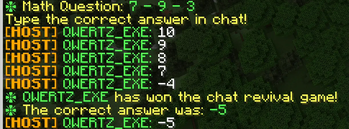
- Player revival system with tokens
- Gamemode management
- Inventory management for alive/dead players
- Automatic inventory clearing on join and teleport
- Player visibility controls
- Set and let players use warps
- Create and give out kits
- Inventory see (and edit)
- Custom event blocks
- A lot of Configuration options
- Optional Luckperms features
- Optional PowerRanks features
- Placeholder API support
- Database for tracking wins and revive tokens
## Commands
### General Commands
- `/core` - Displays information about QWERTZ Core
- `/reloadcore` - Reload QWERTZ Core
- `/config
` - Edit configuration values. Running without arguments opens a GUI - `/setspawn` - Set spawn to your current position
- `/setevent
` - Set the event to the specified event - `/setserver
` - Set the server to the specified server - `/settheme
` - Set the theme to the specified theme - `/hide
- `/spawn` - Teleport to spawn location
- `/discord` - Displays the discord invite set in the config
- `/message
` - Private messages a player - `/reply
` - Reply to the last player who messaged you - `/togglemessage` - Toggles incoming private messages
- `/mutechat` - Mute the chat
- `/unmutechat` - Unmute the chat
- `/ad
` - Broadcast an advertisement - `/wins ` - Check the wins of a player
- `/revives ` - Check the revive tokens of a player
- `/warp
` - Warp to a warp - `/warps` - List all available warps
- `/vanish` - Makes you completely invisible
- `/unvanish` - Removes the vanish effect
- `/setwarp
` - Create a warp - `/delwarp
` - Delete a warp - `/createkit
` - Create a kit - `/delkit
` - Delete a kit - `/setad
` - Set an advertisement for a platform - `/eventblock
` - Bind a QWERTZ Core event block to a specific minecraft block, run it without args to see current mappings - `/kits` - Lists all kits
- `/speed
` - Sets your speed - `/broadcast
` - Broadcast a message to all players in bigger form and action bar - `/rejoin ` - Manage the rejoining system
### Event Management
- `/timer
- `/eventcountdown
### Gamemode Commands
- `/gmc` - Set gamemode to creative
- `/gms` - Set gamemode to survival
- `/gmsp` - Set gamemode to spectator
- `/gma` - Set gamemode to adventure
- `/gm
### Revival System
- `/chatrevival
- `/revive
` - Revive a player - `/unrevive
` - Mark a player as dead - `/reviveall` - Revive all players
- `/unreviveall` - Unrevive all players
- `/revivelast ` - Revives all players who died in the last specified time
- `/userevive` - Request to use a revive token
- `/reviveaccept
` - Accept a player's revive request - `/revivedeny
` - Deny a player's revive request - `/addrevive
` - Add a revive token to a player - `/removerevive
` - Remove a revive token from a player
### Player Management
- `/listalive` - List all alive players
- `/listdead` - List all dead players
- `/givedead
- ` - Give an item to all dead players
- `/givealive
- ` - Give an item to all alive players
- `/tpalive` - Teleport all alive players to you
- `/tpdead` - Teleport all dead players to you
- `/tpall` - Teleport all players to you
- `/tphere
` - Teleport the selected player to you - `/clearalive` - Clears the inventory of all alive players
- `/cleardead` - Clears the inventory of all dead players
- `/healalive` - Heals all alive players
- `/healdead` - Heals all dead players
- `/kit
- `/invsee
` - View and modify another player's inventory - `/poll
...` - Create a poll, to use multiword parameters, use "-" instead of " ". Running without arguments opens a GUI - `/freeze
- `/unfreeze
### WorldGuard Management
- `/pvp ` - Toggle PVP in the selected region or globally
- `/place ` - Toggle Block Placing in the selected region or globally
- `/break ` -
📊 Mod Details
- Game
- Minecraft Plugins
- Author
- QWERTZexe
- Version
- 3.6
- Downloads
- 1,352
- Endorsements
- 8
- Category
- management
- Created
- 8/22/2024
- Updated
- 4/28/2026
- Game Versions
- 1.19, 1.19.1, 1.19.2, 1.19.3, 1.19.4
- Tags
- management, minigame, utility
🔧 How to Install Minecraft Plugins Mods
Download from Modrinth. Use Prism Launcher or drop into your mods folder.
📖 Full step-by-step install guide for Minecraft Plugins →
Visit the official mod page for specific installation instructions for this mod.
🎮 Need cheat codes or console commands? Check ur gaming wiki for Minecraft Plugins commands, item IDs, and more.
❓ Frequently Asked Questions
Which Minecraft Plugins versions does QWERTZ Core support?
The author lists 1.19, 1.19.1, 1.19.2, 1.19.3, 1.19.4, 1.20. Other versions may work but are untested by the author.
What is the latest version of QWERTZ Core?
Version 3.6, published 2026-04-28 with 1,352 downloads recorded at the source.
Keep browsing — more Minecraft Plugins mods await