PVPBots
🟡 Updated this year🖼️ Gallery (1 images)
🔍 Analysis
- 👍 0.2% endorsement rate
- 🏆 #264 of 367 adventure mods in this game by downloads
📋 About This Mod
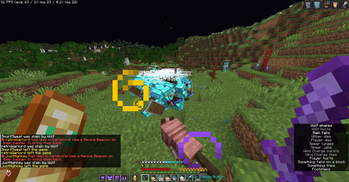
Why use this? We have the most features out of ANY other plugins or mod and we're also optimized for maximum performance while spawning a tons of players uses citizens api # IF YOU WANNA USE THIS FOR YOUR VIDEO PLEASE GIVE ME CREDIT: @zeebishere ALSO HEADS DROP OR REDBANNERS ARE REMOVED IF ANY VERSIONS ABOVE 1.1.0 the BEST plugin for simulating outnumbered fights, praticing pvp or using the bots as background fighters, npc in your videos with maximum customizability and it uses citizens plugins as dependencies and also optimized for servers Commands: /spawnbotcycle (start or stop) (your cordinates if left empty use ur cordinates) use this for like simulating a player joining cycle like unstable smp /friendlybotspawn (name, secret usages: <r4nd0m> (random name), <cof> (curse of vanishing armor), <invis> (invisibility)), (their gear) (true = looks at you when you walk nearby, false = doesnt) it just walks around and if u hit it it becomes aggresive and start fighting you /botspawn (name, secret usages: <r4nd0m> (random name), <cof> (curse of vanishing armor), <invis> (invisibility)) (their gear) (their enchants) (their skill) (whitelist: put it none for no one or put a player name that u want them to not attack use commas to seperate) /botremove (bot name or all) /friendlybotremove (botname or all) places red banner (is removed if above version 1.0.0), and death sounds and a custom death message cuz i use this for my scripted smp, u can turn these off through /config DM ZEEBISHERE ON DISCORD FOR MORE INFO Pvpbot plugin commands: /botspawn (bot name) or use <cof> (curse of vanishing armor) <r4nd0m> (generates random name) <invis> (invisible) they all work together, <gear: none, leather, gold, iron, diamond, netherite>, <enchants: broke, normal, decent, rich> <skill: noob average, pro, insane> <offhand item; none, shield,totem> <whitelist: people that the bot wont attack or target> <amount spawn> <be able to mend and srop mending armor and exp bottles> /botremove <bot name or all> /spawnfriendlybot <name: same thing as botspawn> <gear> <extra stuff like head turns: true or false> a bot that will just walk around like a npc but if attacked it will start fighting /friendlybotremove (botname or all) /spawnbotcycle (start or stop) (cordinates: if left blank starts it at your location) /redbannerclear (breaks all redbanner within a 500 blocks radius) (not needed if version 1.1.0) /itemdropclear (clear ever drop item within loaded chunks) They can combo, shield disable, strafe, wtap depending on their skill level Prob the most complex plugin ive ever made
Why use this? We have the most features out of ANY other plugins or mod and we're also optimized for maximum performance while spawning a tons of players uses citizens api
# IF YOU WANNA USE THIS FOR YOUR VIDEO PLEASE GIVE ME CREDIT: @zeebishere ALSO HEADS DROP OR REDBANNERS ARE REMOVED IF ANY VERSIONS ABOVE 1. 1. 0
the BEST plugin for simulating outnumbered fights, praticing pvp or using the bots as background fighters, npc in your videos with maximum customizability and it uses citizens plugins as dependencies and also optimized for servers
/spawnbotcycle (start or stop) (your cordinates if left empty use ur cordinates) use this for like simulating a player joining cycle like unstable smp
/friendlybotspawn (name, secret usages:
/botspawn (name, secret usages:
/botremove (bot name or all)
/friendlybotremove (botname or all)
places red banner (is removed if above version 1. 0. 0), and death sounds and a custom death message cuz i use this for my scripted smp, u can turn these off through /config
DM ZEEBISHERE ON DISCORD FOR MORE INFO
Pvpbot plugin commands:
/botspawn (bot name) or use
📊 Mod Details
- Game
- Minecraft Plugins
- Author
- zeebishere
- Version
- 1.5.1
- Downloads
- 1,833
- Endorsements
- 3
- Category
- adventure
- Created
- 5/28/2026
- Updated
- 8/2/2026
- Game Versions
- 1.21, 1.21.1, 1.21.2, 1.21.3, 1.21.4
- Tags
- adventure, mobs, social
🔧 How to Install Minecraft Plugins Mods
Download from Modrinth. Use Prism Launcher or drop into your mods folder.
📖 Full step-by-step install guide for Minecraft Plugins →
Visit the official mod page for specific installation instructions for this mod.
🎮 Need cheat codes or console commands? Check ur gaming wiki for Minecraft Plugins commands, item IDs, and more.
❓ Frequently Asked Questions
Which Minecraft Plugins versions does PVPBots support?
The author lists 1.21, 1.21.1, 1.21.2, 1.21.3, 1.21.4, 1.21.5. Other versions may work but are untested by the author.
What is the latest version of PVPBots?
Version 1.5.1, published 2026-08-02 with 1,833 downloads recorded at the source.
Keep browsing — more Minecraft Plugins mods await