ProtectionBlocks
🟠 Updated over a year ago🖼️ Gallery (5 images)
🔍 Analysis
- 👍 0.5% endorsement rate
- 🏆 #599 of 1560 bukkit mods in this game by downloads
📋 About This Mod
<div style="text-align: center;"> <strong> <img src="https://cdn.discordapp.com/attachments/810884357543165963/1130614435854159872/overview.png" alt="Overview Image"> </strong> <div> <a href="https://discord.gg/xRfE5dkmYX"> <img src="https://cdn.discordapp.com/attachments/810884357543165963/1130614436537847828/discord.png" alt="Discord Icon"> </a> <p style="font-family: Tahoma; font-size: 20px;"> With <strong>ProtectionBlocks</strong>, you can quickly & easily create private territory blocks for your players. </p> <img src="https://cdn.discordapp.com/attachments/810884357543165963/1130609855468679228/requirements.png" alt="Requirements Image"> <p style="font-family: Tahoma; font-size: 20px;"> <strong><span style="color: rgb(179, 0, 0);">Spigot 1.17</span></strong> or higher<br> <strong><span style="color: rgb(179, 0, 0);">Java 16</span></strong> or higher </p> <strong> <a href="https://github.com/getplusm/Engine" style="font-family: Tahoma; font-size: 20px; color: rgb(255, 166, 77);"> PLAZMER-ENGINE </a> </strong> <img src="https://cdn.discordapp.com/attachments/810884357543165963/1130617182359928933/depend.png" alt="Dependency Image"> <p style="font-family: Georgia; font-size: 20px; color: rgb(255, 166, 77);"> <strong>Optional</strong> </p> <p style="font-family: Tahoma; font-size: 20px;"> <a href="https://dev.bukkit.org/projects/holographic-displays/files" style="color: rgb(255, 166, 77);"> HolographicDisplays </a> or <a href="https://www.spigotmc.org/resources/decentholograms-1-8-1-20-1-papi-support-no-dependencies.96927/" style="color: rgb(255, 166, 77);"> DecentHolograms </a> </p> <p style="font-family: Courier New; font-size: 20px;"> <a href="https://boosty.to/p1azmer/donate" style="color: rgb(0, 0, 0);"> This plugin is free and is actively maintained and new features are regularly added. If you like this plugin, you can support me with a <strong><u>donation</u></strong> </a> </p> </div> <div style="text-align: center;"> <strong> <img src="https://cdn.discordapp.com/attachments/810884357543165963/1130614437506715738/features.png" alt="Features Image"> </strong> </div> <p style="font-family: Tahoma;"> <u> <strong> <span style="font-size: 35px;">Light Editor</span> </strong> </u> </p> <p style="font-family: Tahoma; font-size: 20px;"> You can quickly and conveniently create a new block that will be available to players instantly. </p> <p style="font-family: Tahoma; font-size: 35px;"> <strong><u>Holograms</u></strong> </p> <p style="font-family: Tahoma; font-size: 20px;"> If you use the HD or DH plugin dependencies, the plugin will create holograms over the block. In <strong>/pb editor</strong>, you can customize the display of these holograms. Currently, there are two types of display: </p> <ul> <li><strong>Always</strong> - The hologram will always be over the block for any player</li> <li><strong>Regional</strong> - The hologram will be above the block only when the player enters a region</li> </ul> <p style="font-family: Tahoma;"> <u> <strong> <span style="font-size: 35px;">Region LifeTime</span> </strong> </u> </p> <p style="font-family: Tahoma; font-size: 20px;"> You can specify the lifetime of the block. The block lifetime can be different for each group of players, and you can extend it with any currency that the plugin supports. <span style="color: #ff4d4d;"><strong>Note:</strong> If your plugin is not supported, write about it in our discord!</span><br> <strong>Supported:</strong> Exp, Vault, ItemStack </p> <p style="font-family: Tahoma;"> <u> <strong> <span style="font-size: 35px;">Region Breakers</span> </strong> </u> </p> <p style="font-family: Tahoma; font-size: 20px;"> You can specify specific items that can destroy a region. If you add TNT, the region will only be destroyed by an explosion. </p> <p style="font-family: Tahoma;"> <u> <strong> <span style="font-size: 35px;">Strength</span> </strong> </u> </p> <p style="font-family: Tahoma; font-size: 20px;"> Any block has a strength setting; strength is responsible for how many times a block has to have been damaged to be destroyed. </p>


With ProtectionBlocks, you can quickly & easily create private territory blocks for your players.

Spigot 1. 17 or higher
Java 16 or higher

Optional

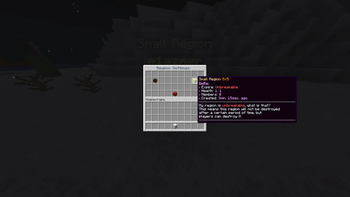
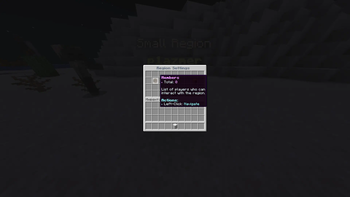
Light Editor
You can quickly and conveniently create a new block that will be available to players instantly.
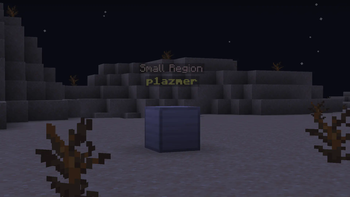
Holograms
If you use the HD or DH plugin dependencies, the plugin will create holograms over the block. In /pb editor, you can customize the display of these holograms. Currently, there are two types of display:
- Always - The hologram will always be over the block for any player
- Regional - The hologram will be above the block only when the player enters a region
Region LifeTime
You can specify the lifetime of the block. The block lifetime can be different for each group of players, and you can extend it with any currency that the plugin supports. Note: If your plugin is not supported, write about it in our discord!
Supported: Exp, Vault, ItemStack
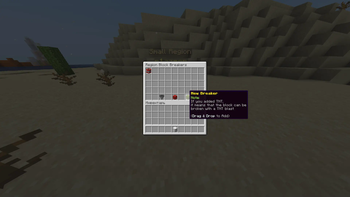
Region Breakers
You can specify specific items that can destroy a region. If you add TNT, the region will only be destroyed by an explosion.
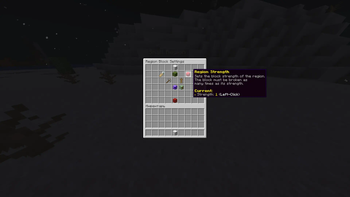
Strength
Any block has a strength setting; strength is responsible for how many times a block has to have been damaged to be destroyed.
📊 Mod Details
- Game
- Minecraft Plugins
- Author
- plazmer
- Version
- 2.0.1
- Downloads
- 4,238
- Endorsements
- 20
- Category
- bukkit
- Created
- 12/21/2023
- Updated
- 1/22/2025
- Game Versions
- 1.17, 1.17.1, 1.18, 1.18.1, 1.18.2
- Tags
- game-mechanics, management, utility
🔧 How to Install Minecraft Plugins Mods
Download from Modrinth. Use Prism Launcher or drop into your mods folder.
📖 Full step-by-step install guide for Minecraft Plugins →
Visit the official mod page for specific installation instructions for this mod.
🎮 Need cheat codes or console commands? Check ur gaming wiki for Minecraft Plugins commands, item IDs, and more.
❓ Frequently Asked Questions
Which Minecraft Plugins versions does ProtectionBlocks support?
The author lists 1.17, 1.17.1, 1.18, 1.18.1, 1.18.2, 1.19. Other versions may work but are untested by the author.
What is the latest version of ProtectionBlocks?
Version 2.0.1, published 2025-01-22 with 4,238 downloads recorded at the source.
Keep browsing — more Minecraft Plugins mods await