ProAntiTab
🟡 Updated this year🖼️ Gallery (12 images)








🔍 Analysis
- 👍 0.4% endorsement rate
- 🏆 #324 of 1560 bukkit mods in this game by downloads
📋 About This Mod
<center> ##### **!(https://www.rayzs.de/proantitab/assets/Banner8.png)** <center>One of the simplest plugin & command hider! <center>Decide what plugins and commands your players should see! ^^ **placeholderapi support - free - no dependencies required** ___________________________________ **</center>****</center>****</center>** # **A**BOUT ProAntiTab is an advanced **plugin hider** with **many features** and a very simple to understand system. It prevents your server from **plugin spoofers** used by hack clients, manipulates the **tab-completion**, blocks unwanted **suggestions** and much more! ##### <iframe width="130" height="100" src="https://www.youtube-nocookie.com/embed/WLGDYsa0uxc" title="YouTube video player" frameborder="0" allow="accelerometer; autoplay; clipboard-write; encrypted-media; gyroscope; picture-in-picture; web-share" allowfullscreen></iframe> <iframe width="130" height="100" src="https://www.youtube-nocookie.com/embed/illp_GmjPlo" title="YouTube video player" frameborder="0" allow="accelerometer; autoplay; clipboard-write; encrypted-media; gyroscope; picture-in-picture; web-share" allowfullscreen></iframe> ##### # **I**N ACTION !(https://www.rayzs.de/proantitab/assets/beforeafter5.png) ###### # **C**USTOM SERVER BRAND (F3) Create your own animated custom server brand on your Spigot, Bungeecord and Velocity server! *!(https://www.rayzs.de/proantitab/assets/csbr.gif)!(https://www.rayzs.de/proantitab/assets/edc.gif)* <details> <summary>open config.yml section</summary> ```yaml # This feature allows you to customize your server-brand you see when you press F3. # Normally there stands something like 'Purpur', or 'Spigot'. # With this feature you are able to change and even animate it! ^^ custom-server-brand: enabled: false # Determines the speed in that the animation goes repeat-delay: 3 # This here is the list of the animation # Possible placeholders: # %player% - name of the player # %displayname% - displayname of the player # %world% - name of world where the player is # and the other placeholders from PlaceholderAPI brands: - '&f&lP&froAntiTab |' - '&fP&lr&foAntiTab /' - '&fPr&lo&fAntiTab -' - '&fPro&lA&fntiTab |' - '&fProA&ln&ftiTab \' - '&fProAn<&fiTab |' - '&fProAnt&li&fTab /' - '&fProAnti&lT&fab -' - '&fProAnti&lT&fab \' - '&fProAntiT&la&fb |' - '&fProAntiTa&lb&f /' - '&fProAntiTab -' - '&fProAntiTab \' ``` </details> ###### # **U**SE BLACKLIST AS WHITELIST You have way too many commands to block? Don't worry. There's a section in the config.yml located pretty much high that allows you to turn the blacklist into a whitelist instead. This will block every command on your server except for those that are listed. <details> <summary>section in config.yml</summary> ```yaml # This is a very necessary feature if you have way too many commands to block and instead decide # to whitelist specific commands. # Enabling this will disable ALL commands except for those that are in the (group-)list. turn-blacklist-to-whitelist: false ``` </details> ###### # **A**NTI PLUGIN SPOOFING ##### ProAntiTab is able to detect and block plugin spoofing attempts used by hack clients. *!(https://www.rayzs.de/proantitab/assets/noplspoof.png)* ###### # **B**LOCK SUB ARGUMENTS We all know the problem when players should be able to use some of the commands but should not see literally EVERY sub-argument in a command. Well, then just blend them out? ProAntiTab can do this for you and it's very easy to setup as well! (See some examples below) !(https://www.rayzs.de/proantitab/assets/subargs.png) <details> <summary>example</summary> ```yaml # Let's say you just want to allow "/help Minecraft" only and not "/help apple". # It will also automatically allow everything after "/help Minecraft ..." - help Minecraft # = Allow the execution of the command # = Allow the tab-completion of the command - "cmi tpa" # Only executable. Not tab-completable - tpa # Executable & Tab-Completable # %hidden_online_players% = Online players (Removed from tab-completion) # %online_players% = Online players # %hidden_players% = Registered players (Removed from tab-completion) # %players% = Registered players # %numbers% = Numbers, such as 1000 or 1.000 # _- = Block everything after - "tpa %online_players%" - "sell %numbers%" # Using the operator _- at the end cancels every argument afterwards and blocks it. # This will allow the player to use "/help Minecraft" but not "/help Minecraft xyz" - help Minecraft _- ``` </details>
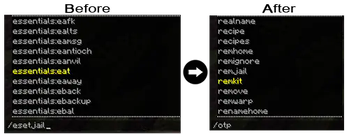
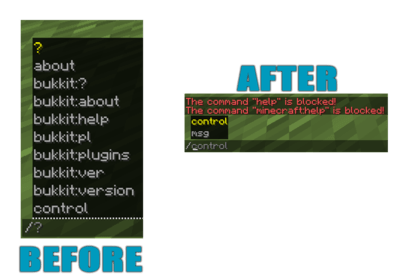
# IN ACTION !(https://www.rayzs.de/proantitab/assets/beforeafter5.png)
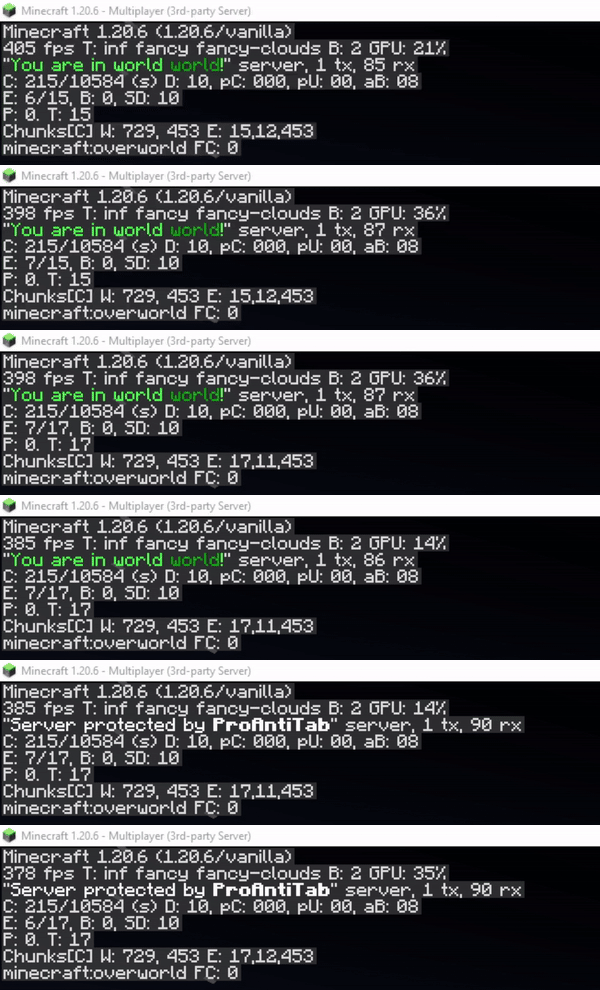
###### # CUSTOM SERVER BRAND (F3) Create your own animated custom server brand on your Spigot, Bungeecord and Velocity server!
!(https://www.rayzs.de/proantitab/assets/csbr.gif)!(https://www.rayzs.de/proantitab/assets/edc.gif)*open config.yml section
```yaml # This feature allows you to customize your server-brand you see when you press F3. # Normally there stands something like 'Purpur', or 'Spigot'. # With this feature you are able to change and even animate it! ^^ custom-server-brand: enabled: false
# Determines the speed in that the animation goes repeat-delay: 3
# This here is the list of the animation # Possible placeholders: # %player% - name of the player # %displayname% - displayname of the player # %world% - name of world where the player is # and the other placeholders from PlaceholderAPI brands: - '&f&lP&froAntiTab |' - '&fP&lr&foAntiTab /' - '&fPr&lo&fAntiTab -' - '&fPro&lA&fntiTab |' - '&fProA&ln&ftiTab \' - '&fProAn<&fiTab |' - '&fProAnt&li&fTab /' - '&fProAnti&lT&fab -' - '&fProAnti&lT&fab \' - '&fProAntiT&la&fb |' - '&fProAntiTa&lb&f /' - '&fProAntiTab -' - '&fProAntiTab \' ```
######
# USE BLACKLIST AS WHITELIST
You have way too many commands to block? Don't worry.
There's a section in the config.yml located pretty much high that allows you to turn the blacklist into a whitelist instead. This will block every command on your server except for those that are listed.
section in config.yml
```yaml # This is a very necessary feature if you have way too many commands to block and instead decide # to whitelist specific commands. # Enabling this will disable ALL commands except for those that are in the (group-)list. turn-blacklist-to-whitelist: false ```
###### # ANTI PLUGIN SPOOFING ##### ProAntiTab is able to detect and block plugin spoofing attempts used by hack clients. *!(https://www.rayzs.de/proantitab/assets/noplspoof.png)*
###### # BLOCK SUB ARGUMENTS We all know the problem when players should be able to use some of the commands but should not see literally EVERY sub-argument in a command. Well, then just blend them out? ProAntiTab can do this for you and it's very easy to setup as well! (See some examples below)
!(https://www.rayzs.de/proantitab/assets/subargs.png)
example
```yaml # Let's say you just want to allow "/help Minecraft" only and not "/help apple". # It will also automatically allow everything after "/help Minecraft ..." - help Minecraft
# = Allow the execution of the command # = Allow the tab-completion of the command - "cmi tpa" # Only executable. Not tab-completable - tpa # Executable & Tab-Completable
# %hidden_online_players% = Online players (Removed from tab-completion) # %online_players% = Online players # %hidden_players% = Registered players (Removed from tab-completion) # %players% = Registered players # %numbers% = Numbers, such as 1000 or 1. 000 # _- = Block everything after - "tpa %online_players%" - "sell %numbers%"
# Using the operator _- at the end cancels every argument afterwards and blocks it. # This will allow the player to use "/help Minecraft" but not "/help Minecraft xyz" - help Minecraft _- ```
📊 Mod Details
- Game
- Minecraft Plugins
- Author
- Alihan
- Version
- 2.4.3
- Downloads
- 11,735
- Endorsements
- 51
- Category
- bukkit
- Created
- 6/20/2024
- Updated
- 8/13/2026
- Game Versions
- 1.8.8, 1.8.9, 1.9, 1.9.1, 1.9.2
- Tags
- management, utility
🔧 How to Install Minecraft Plugins Mods
Download from Modrinth. Use Prism Launcher or drop into your mods folder.
📖 Full step-by-step install guide for Minecraft Plugins →
Visit the official mod page for specific installation instructions for this mod.
🎮 Need cheat codes or console commands? Check ur gaming wiki for Minecraft Plugins commands, item IDs, and more.
❓ Frequently Asked Questions
Which Minecraft Plugins versions does ProAntiTab support?
The author lists 1.8.8, 1.8.9, 1.9, 1.9.1, 1.9.2, 1.9.3. Other versions may work but are untested by the author.
What is the latest version of ProAntiTab?
Version 2.4.3, published 2026-08-13 with 11,735 downloads recorded at the source.
Keep browsing — more Minecraft Plugins mods await