Prismatik Tabs
🟡 Updated this year🖼️ Gallery (3 images)
🔍 Analysis
- 🏆 #163 of 235 management mods in this game by downloads
📋 About This Mod
## **✦ PrismatikTabs** **The all-in-one display manager for Paper servers.** Tablist headers & footers, sidebar scoreboards, rank-based nametags, rotating BossBar & ActionBar announcements — all powered by clean YAML config and MiniMessage, with a built-in web editor for live changes. Zero dependencies required. --- ### 📋 Requirements | Requirement | Details | |---|---| | **Server** | Paper 1.21+ (or any fork — Purpur, Pufferfish, etc.) | | **Java** | 21 or newer | | **LuckPerms** | *Optional* — enables rank-based nametags & `{rank}` placeholder | | **PlaceholderAPI** | *Optional* — enables thousands of extra `%placeholders%` | > PrismatikTabs works completely standalone. LuckPerms and PlaceholderAPI are soft dependencies — install them only if you need their features. --- ### ⚡ Features **📋 Tablist — Header & Footer** - Fully customizable **header & footer** with multi-line support - **Conditional designs** — show different tab overlays per world, rank, or permission - Built-in placeholders: `{player}` `{online}` `{max}` `{ping}` `{world}` `{tps}` `{rank}` `{health}` **📊 Scoreboard — Sidebar** - Beautiful **sidebar scoreboard** with up to 15 lines - Multiple scoreboards with **display conditions** — auto-switches based on world, rank, or permissions - Animated titles using the built-in animation engine **🏷️ Nametags — Rank Prefixes** - **Rank-based prefix & suffix** nametags that sync with LuckPerms groups - Customizable **name colors**, **collision rules**, and **visibility settings** per rank - Supports unlimited rank tiers (Owner → Admin → Mod → Helper → VIP+ → VIP → Member) **📢 Announcer — BossBar & ActionBar** - **Rotating BossBar** messages with customizable color & overlay style - **ActionBar** announcements with live placeholder support - Independent timing controls for each channel **🎬 Animations — Animated Text** - Define **frame-by-frame text animations** in a single file - Use them anywhere with `%animation:name%` — in scoreboards, tablist, nametags, or announcements - Tick-precise frame intervals (20 ticks = 1 second) **🎨 MiniMessage & Gradients** - Full **MiniMessage** support — `<gradient>`, `<bold>`, `<italic>`, `<hover>`, `<click>`, and more - Create stunning gradient text: `<gradient:#FF9933:#FFFFFF:#57A818>Your Text</gradient>` **🔌 Soft Integrations** - **PlaceholderAPI** — use any PAPI placeholder like `%player_health%`, `%vault_eco_balance%`, etc. - **LuckPerms** — automatic rank detection for nametags, conditions, and the `{rank}` placeholder **(https://prismatiktabs.netlify.app)** - Built-in **HTTP API server** — edit all configs from your browser - Visual editors for every module (tablist, scoreboard, nametags, announcer, animations) - **Save & Reload** writes to disk and hot-reloads instantly — no server restart needed - Gradient creator and ASCII art tools built right in - Secure token-based authentication --- ### 🚀 Getting Started — Quick Setup **Step 1: Install** 1. Download `PrismatikTabs.jar` from this page 2. Drop it into your server's `plugins/` folder 3. Start (or restart) your Paper server 4. The plugin auto-generates all config files in `plugins/PrismatikTabs/` **Step 2: Verify** Run `/prismatik debug` in-game or from the console. You should see: ``` === Prismatik Debug === Version: 2.0.0 LuckPerms: true/false PlaceholderAPI: true/false Studio API: disabled Online: 1/20 ``` If you see this — you're good! The default tablist, scoreboard, nametags, and announcer are already running. **Step 3: Customize** Edit the YAML files in `plugins/PrismatikTabs/`, then run: ``` /prismatik reload ``` That's it — changes apply instantly to all online players. No restart needed. --- ### 🖥️ Prismatik Studio — Web Editor Tutorials PrismatikTabs ships with **Prismatik Studio** — a stunning, browser-based visual editor that connects directly to your live server. No more hand-editing YAML files. Design everything visually, see live MiniMessage previews, and push changes to your server with one click. **🔌 Step 1: Enable Studio on Your Server** Before using the web editor, you need to open a port and enable the Studio API. **1.** Allocate an extra port on your hosting panel (e.g., `25660`). This must be a **separate port** from your Minecraft port (25565). **2.** Edit `plugins/PrismatikTabs/config.yml`: ```yaml studio: enabled: true port: 25660 # The port you allocated token: "your-super-secret-token" # Set something strong! allowed-origin: "*" # Or lock to your studio URL ``` **3.** Run `/prismatik reload` in-game to start the Studio API server. **4.** Confirm it's running with `/prismatik studio`: ``` ✦ Prismatik Studio Port: 25660 Token: your**** URL: https://prismatiktabs.netlify.app § Click here to open Prismatik Studio ``` > **💡 Tip:** The clickable link in chat opens the Studio directly in your browser! --- **🔗 Step 2: Conn
## ✦ PrismatikTabs
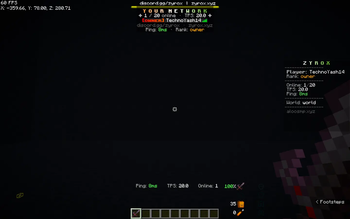
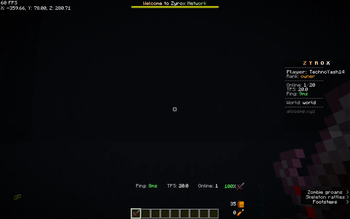
The all-in-one display manager for Paper servers. Tablist headers & footers, sidebar scoreboards, rank-based nametags, rotating BossBar & ActionBar announcements — all powered by clean YAML config and MiniMessage, with a built-in web editor for live changes. Zero dependencies required.
### 📋 Requirements
| Requirement | Details | |---|---| | Server | Paper 1. 21+ (or any fork — Purpur, Pufferfish, etc.) | | Java | 21 or newer | | LuckPerms | Optional — enables rank-based nametags & `{rank}` placeholder | | PlaceholderAPI | Optional — enables thousands of extra `%placeholders%` |
> PrismatikTabs works completely standalone. LuckPerms and PlaceholderAPI are soft dependencies — install them only if you need their features.
### ⚡ Features
📋 Tablist — Header & Footer - Fully customizable header & footer with multi-line support - Conditional designs — show different tab overlays per world, rank, or permission - Built-in placeholders: `{player}` `{online}` `{max}` `{ping}` `{world}` `{tps}` `{rank}` `{health}`
📊 Scoreboard — Sidebar - Beautiful sidebar scoreboard with up to 15 lines - Multiple scoreboards with display conditions — auto-switches based on world, rank, or permissions - Animated titles using the built-in animation engine
🏷️ Nametags — Rank Prefixes - Rank-based prefix & suffix nametags that sync with LuckPerms groups - Customizable name colors, collision rules, and visibility settings per rank - Supports unlimited rank tiers (Owner → Admin → Mod → Helper → VIP+ → VIP → Member)
📢 Announcer — BossBar & ActionBar - Rotating BossBar messages with customizable color & overlay style - ActionBar announcements with live placeholder support - Independent timing controls for each channel
🎬 Animations — Animated Text - Define frame-by-frame text animations in a single file - Use them anywhere with `%animation:name%` — in scoreboards, tablist, nametags, or announcements - Tick-precise frame intervals (20 ticks = 1 second)
🎨 MiniMessage & Gradients
- Full MiniMessage support — `
🔌 Soft Integrations - PlaceholderAPI — use any PAPI placeholder like `%player_health%`, `%vault_eco_balance%`, etc. - LuckPerms — automatic rank detection for nametags, conditions, and the `{rank}` placeholder
[🖥️ Prismatik Studio — Web Editor](https://prismatiktabs.netlify.app)** - Built-in HTTP API server — edit all configs from your browser - Visual editors for every module (tablist, scoreboard, nametags, announcer, animations) - Save & Reload writes to disk and hot-reloads instantly — no server restart needed - Gradient creator and ASCII art tools built right in - Secure token-based authentication
### 🚀 Getting Started — Quick Setup
Step 1: Install
1. Download `PrismatikTabs.jar` from this page 2. Drop it into your server's `plugins/` folder 3. Start (or restart) your Paper server 4. The plugin auto-generates all config files in `plugins/PrismatikTabs/`
Step 2: Verify
Run `/prismatik debug` in-game or from the console. You should see:
``` === Prismatik Debug === Version: 2. 0. 0 LuckPerms: true/false PlaceholderAPI: true/false Studio API: disabled Online: 1/20 ```
If you see this — you're good! The default tablist, scoreboard, nametags, and announcer are already running.
Step 3: Customize
Edit the YAML files in `plugins/PrismatikTabs/`, then run:
``` /prismatik reload ```
That's it — changes apply instantly to all online players. No restart needed.
### 🖥️ Prismatik Studio — Web Editor Tutorials
PrismatikTabs ships with Prismatik Studio — a stunning, browser-based visual editor that connects directly to your live server. No more hand-editing YAML files. Design everything visually, see live MiniMessage previews, and push changes to your server with one click.
🔌 Step 1: Enable Studio on Your Server
Before using the web editor, you need to open a port and enable the Studio API.
1. Allocate an extra port on your hosting panel (e.g., `25660`). This must be a separate port from your Minecraft port (25565).
2.* Edit `plugins/PrismatikTabs/config.yml`:
```yaml studio: enabled: true port: 25660 # The port you allocated token: "your-super-secret-token" # Set something strong! allowed-origin: "" # Or lock to your studio URL ```
3. Run `/prismatik reload` in-game to start the Studio API server.
4. Confirm it's running with `/prismatik studio`:
``` ✦ Prismatik Studio Port: 25660 Token: your** URL: https://prismatiktabs.netlify.app
§ Click here to open Prismatik Studio ```
> 💡 Tip: The clickable link in chat opens the Studio directly in your browser!
🔗 Step 2: Conn
📊 Mod Details
- Game
- Minecraft Plugins
- Author
- yashvardhantechno
- Version
- 1.2.0
- Downloads
- 201
- Endorsements
- 2
- Category
- management
- Created
- 5/12/2026
- Updated
- 5/12/2026
- Game Versions
- 1.21, 1.21.1, 1.21.2, 1.21.3, 1.21.4
- Tags
- management, technology, utility
🔧 How to Install Minecraft Plugins Mods
Download from Modrinth. Use Prism Launcher or drop into your mods folder.
📖 Full step-by-step install guide for Minecraft Plugins →
Visit the official mod page for specific installation instructions for this mod.
🎮 Need cheat codes or console commands? Check ur gaming wiki for Minecraft Plugins commands, item IDs, and more.
❓ Frequently Asked Questions
Which Minecraft Plugins versions does Prismatik Tabs support?
The author lists 1.21, 1.21.1, 1.21.2, 1.21.3, 1.21.4, 1.21.5. Other versions may work but are untested by the author.
What is the latest version of Prismatik Tabs?
Version 1.2.0, published 2026-05-12 with 201 downloads recorded at the source.
Keep browsing — more Minecraft Plugins mods await