PowerItems
🟠 Updated over a year ago🖼️ Gallery (1 images)
🔍 Analysis
- 🏆 #983 of 1317 bukkit mods in this game by downloads
📋 About This Mod
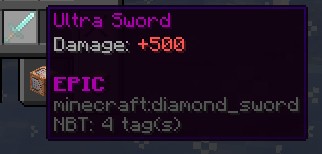
PowerItems lets you create nice looking items! ### Usage: /createitem <itemID> <itemMaterial> <damage> <rarity> <itemName> For rarity see the "Default rarities" section below. For itemName, you can use colour codes. itemMaterial is what the item will be, for example "diamond_sword" or "golden_axe". When you create an item using this command, it will be saved to the config file, you can then get more of this item using: /getitem <itemID> Using /commandtrigger, you can add a command or chat message to the item you are holding that will run when you right click it. Do not include the / when adding a command. Example: /commandtrigger add command teleport ^ ^ ^5 /commandtrigger <add|clear|list> <chat|command> <text> ### Default rarities: - Common - Uncommon - Rare - Epic - Legendary - Mythic Other plugins can add more rarities using the RarityManager class. (https://github.com/xWires/PowerItemsExampleAddon) is an example. Javadocs: https://docs.tangledwires.xyz/poweritems Using as a dependency: To use PowerItems as a dependency, add the following to your plugin.yml file: ```yaml depend: ``` And add the following to your pom.xml file if you are using Maven: ```xml <repositories> <repository> <id>xwires</id> <url>https://nexus.tangledwires.xyz/repository/maven-releases/</url> </repository> </repositories> <dependencies> <dependency> <groupId>xyz.tangledwires.poweritems</groupId> <artifactId>PowerItems</artifactId> <version>65</version> </dependency> </dependencies> ``` This plugin uses bStats for analytics, the data collected is completely anonymous. If you would like to disable bStats, you can do so in the bStats config file. From the bStats website: "bStats does not collect any personal data. Most of the collected data is information about the plugin's server like player count, online mode, Minecraft version, Java version, and more. All data gets sent and stored completely anonymously. Server IPs are only stored for ratelimiting and not linked to the data. All data that is collected is publicly visible. If you are interested in what data is collected for your Minecraft server, take a look at the pages for the plugins on your server. Please note that plugin authors can also send data that is customized for their plugin."
PowerItems lets you create nice looking items!
/createitem
For rarity see the "Default rarities" section below. For itemName, you can use colour codes. itemMaterial is what the item will be, for example "diamond_sword" or "golden_axe".
When you create an item using this command, it will be saved to the config file, you can then get more of this item using:
/getitem
Using /commandtrigger, you can add a command or chat message to the item you are holding that will run when you right click it. Do not include the / when adding a command.
Example: /commandtrigger add command teleport ^ ^ ^5
/commandtrigger
### Default rarities:
- Common
- Uncommon
- Rare
- Epic
- Legendary
- Mythic
Other plugins can add more rarities using the RarityManager class. (https://github.com/xWires/PowerItemsExampleAddon) is an example.
Javadocs: https://docs.tangledwires.xyz/poweritems
Using as a dependency:
To use PowerItems as a dependency, add the following to your plugin.yml file:
```yaml depend: ```
And add the following to your pom.xml file if you are using Maven:
```xml
This plugin uses bStats for analytics, the data collected is completely anonymous. If you would like to disable bStats, you can do so in the bStats config file.
From the bStats website:
"bStats does not collect any personal data. Most of the collected data is information about the plugin's server like player count, online mode, Minecraft version, Java version, and more. All data gets sent and stored completely anonymously. Server IPs are only stored for ratelimiting and not linked to the data. All data that is collected is publicly visible. If you are interested in what data is collected for your Minecraft server, take a look at the pages for the plugins on your server. Please note that plugin authors can also send data that is customized for their plugin."
📊 Mod Details
- Game
- Minecraft Plugins
- Author
- xWires
- Version
- 66
- Downloads
- 199
- Endorsements
- 0
- Category
- bukkit
- Created
- 11/2/2024
- Updated
- 8/21/2025
- Game Versions
- 1.20, 1.20.1, 1.20.2, 1.20.3, 1.20.4
- Tags
- equipment, utility
🔧 How to Install Minecraft Plugins Mods
Download from Modrinth. Use Prism Launcher or drop into your mods folder.
📖 Full step-by-step install guide for Minecraft Plugins →
Visit the official mod page for specific installation instructions for this mod.
🎮 Need cheat codes or console commands? Check ur gaming wiki for Minecraft Plugins commands, item IDs, and more.
❓ Frequently Asked Questions
Which Minecraft Plugins versions does PowerItems support?
The author lists 1.20, 1.20.1, 1.20.2, 1.20.3, 1.20.4, 1.20.5. Other versions may work but are untested by the author.
What is the latest version of PowerItems?
Version 66, published 2025-08-21 with 199 downloads recorded at the source.
Keep browsing — more Minecraft Plugins mods await