PluginListPlus
🟡 Updated this year🖼️ Gallery (5 images)
🔍 Analysis
- 🏆 #366 of 599 bukkit mods in this game by downloads
📋 About This Mod
<p style="text-align:center;"> <strong><span style="color:#D4A017;">A clean, styled replacement for <code>/plugins</code>, <code>/pl</code>, and <code>/plist</code>.</span></strong><br> <span style="color:#B8B8B8;">A more readable plugin list with aesthetic themes, multiple display styles, GUI tools, and privacy controls.</span> </p> --- <p style="text-align:center;"> <strong> <span style="color:#D4A017;">◆ 5 Display Styles</span> <span style="color:#555555;"> ◆ </span> <span style="color:#C73636;">10 Themes</span> <span style="color:#555555;"> ◆ </span> <span style="color:#D4A017;">GUI / Chat Config</span> <span style="color:#555555;"> ◆ </span> <span style="color:#C73636;">GUI / Book List</span> <span style="color:#555555;"> ◆ </span> <span style="color:#D4A017;">Private Mode</span> </strong> </p> --- <span style="color:#B8B8B8;">PluginListPlus replaces the default Minecraft plugin list with a cleaner, more polished, and more customizable version for server owners who want something better than the default <code>/plugins</code> output.</span> <span style="color:#B8B8B8;">It is built for servers that want plugin information to look intentional instead of messy, plain, or exposed in a way that does not fit the server.</span> ## <span style="color:#7A0E12;">▌ Display Styles</span> --- ### <span style="color:#D4A017;">◆ Compact</span> <span style="color:#B8B8B8;">Fits the full plugin list into as few lines as possible. Best for quick checks, smaller screens, and servers that want a clean chat-based layout without wasting space.</span> --- ### <span style="color:#D4A017;">◆ Grouped</span> <span style="color:#B8B8B8;">Splits enabled and disabled plugins into separate groups, making it easier to check plugin status at a glance.</span> --- ### <span style="color:#D4A017;">◆ Boxed</span> <span style="color:#B8B8B8;">Shows one plugin per line inside a clean framed layout. This style is useful when readability matters more than compact spacing.</span> --- ### <span style="color:#D4A017;">◆ Categorized</span> <span style="color:#B8B8B8;">Sorts plugins by Paper, Bukkit, and status-based categories for a more organized server overview.</span> --- ### <span style="color:#D4A017;">◆ Detailed</span> <span style="color:#B8B8B8;">Shows versions, authors, badges, and extra plugin information.</span> > <span style="color:#AAAAAA;">This style is more experimental and is not recommended for every setup, but it is useful for deeper plugin inspection.</span> ## <span style="color:#7A0E12;">▌ Themes</span> --- <span style="color:#B8B8B8;">PluginListPlus includes multiple built-in themes so the plugin list can better match your server style.</span> | Theme | Style | |---|---| | <span style="color:#D4A017;"><strong>Gold</strong></span> | Clean, warm, premium | | <span style="color:#C73636;"><strong>Crimson</strong></span> | Dark red, bold, sharp | | <span style="color:#41C878;"><strong>Emerald</strong></span> | Green, clean, stable | | <span style="color:#E98B3A;"><strong>Sunset</strong></span> | Orange, warm, energetic | | <span style="color:#4BBBEF;"><strong>Ocean</strong></span> | Blue, fresh, readable | | <span style="color:#9B6CFF;"><strong>Galaxy</strong></span> | Purple, modern, stylized | | <span style="color:#FF7FA3;"><strong>Cherry</strong></span> | Pink/red, bright, polished | | <span style="color:#BDEBFF;"><strong>Arctic</strong></span> | Light blue, cold, minimal | | <span style="color:#39FF88;"><strong>Neon</strong></span> | Bright green, high contrast | | <span style="color:#FFCB4D;"><strong>Rainbow</strong></span> | Colorful, playful, standout | ## <span style="color:#7A0E12;">▌ Admin Tools</span> --- ### <span style="color:#D4A017;">◆ Interactive Config Panel</span> <span style="color:#B8B8B8;">Change the active style, theme, sorting mode, badges, versions, legend, and gradients directly in-game.</span> ### <span style="color:#D4A017;">◆ Inventory GUI</span> <span style="color:#B8B8B8;">Configure the plugin visually without needing to manually type every command.</span> ### <span style="color:#D4A017;">◆ Book View</span> <span style="color:#B8B8B8;">Open the plugin list in a paginated written book format for a cleaner in-game reading experience.</span> ### <span style="color:#D4A017;">◆ Inventory Browser</span> <span style="color:#B8B8B8;">Browse plugins one at a time through a clean paginated inventory interface.</span> ### <span style="color:#D4A017;">◆ Private Mode</span> <span style="color:#B8B8B8;">Hide plugin information from players and replace it with a custom denial message.</span> ### <span style="color:#D4A017;">◆ Startup Error Lookup</span> <span style="color:#B8B8B8;">Check the last startup error for any disabled plugin directly in-game.</span> ## <span style="color:#7A0E12;">▌ Commands</span> --- | Command | Description | |---|---| | <span style="color:#D4A017;"
A clean, styled replacement for /plugins, /pl, and /plist.
A more readable plugin list with aesthetic themes, multiple display styles, GUI tools, and privacy controls.
◆ 5 Display Styles ◆ 10 Themes ◆ GUI / Chat Config ◆ GUI / Book List ◆ Private Mode
PluginListPlus replaces the default Minecraft plugin list with a cleaner, more polished, and more customizable version for server owners who want something better than the default /plugins output.
It is built for servers that want plugin information to look intentional instead of messy, plain, or exposed in a way that does not fit the server.
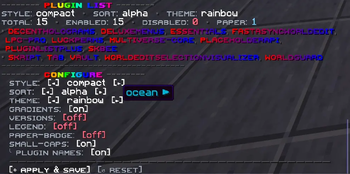
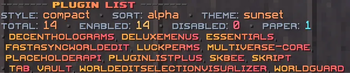
## ▌ Display Styles
### ◆ Compact
Fits the full plugin list into as few lines as possible. Best for quick checks, smaller screens, and servers that want a clean chat-based layout without wasting space.
### ◆ Grouped
Splits enabled and disabled plugins into separate groups, making it easier to check plugin status at a glance.
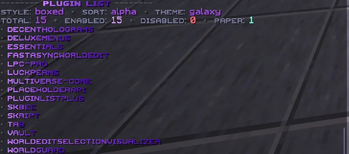
### ◆ Boxed
Shows one plugin per line inside a clean framed layout. This style is useful when readability matters more than compact spacing.
### ◆ Categorized
Sorts plugins by Paper, Bukkit, and status-based categories for a more organized server overview.
### ◆ Detailed
Shows versions, authors, badges, and extra plugin information.
> This style is more experimental and is not recommended for every setup, but it is useful for deeper plugin inspection.
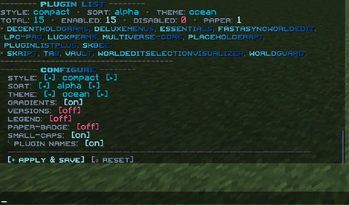
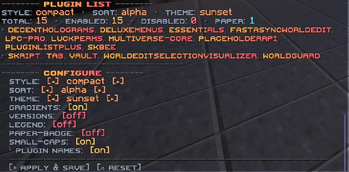
## ▌ Themes
PluginListPlus includes multiple built-in themes so the plugin list can better match your server style.
| Theme | Style | |---|---| | Gold | Clean, warm, premium | | Crimson | Dark red, bold, sharp | | Emerald | Green, clean, stable | | Sunset | Orange, warm, energetic | | Ocean | Blue, fresh, readable | | Galaxy | Purple, modern, stylized | | Cherry | Pink/red, bright, polished | | Arctic | Light blue, cold, minimal | | Neon | Bright green, high contrast | | Rainbow | Colorful, playful, standout |
## ▌ Admin Tools
### ◆ Interactive Config Panel
Change the active style, theme, sorting mode, badges, versions, legend, and gradients directly in-game.
### ◆ Inventory GUI
Configure the plugin visually without needing to manually type every command.
### ◆ Book View
Open the plugin list in a paginated written book format for a cleaner in-game reading experience.
### ◆ Inventory Browser
Browse plugins one at a time through a clean paginated inventory interface.
### ◆ Private Mode
Hide plugin information from players and replace it with a custom denial message.
### ◆ Startup Error Lookup
Check the last startup error for any disabled plugin directly in-game.
## ▌ Commands
| Command | Description | |---|---| |
📊 Mod Details
- Game
- Minecraft Plugins
- Author
- Nenf
- Version
- 1.0.0
- Downloads
- 17
- Endorsements
- 1
- Category
- bukkit
- Created
- 6/7/2026
- Updated
- 6/6/2026
- Game Versions
- 1.21, 1.21.1, 1.21.2, 1.21.3, 1.21.4
- Tags
- decoration, game-mechanics, management
🔧 How to Install Minecraft Plugins Mods
Download from Modrinth. Use Prism Launcher or drop into your mods folder.
📖 Full step-by-step install guide for Minecraft Plugins →
Visit the official mod page for specific installation instructions for this mod.
🎮 Need cheat codes or console commands? Check ur gaming wiki for Minecraft Plugins commands, item IDs, and more.
❓ Frequently Asked Questions
Which Minecraft Plugins versions does PluginListPlus support?
The author lists 1.21, 1.21.1, 1.21.2, 1.21.3, 1.21.4, 1.21.5. Other versions may work but are untested by the author.
What is the latest version of PluginListPlus?
Version 1.0.0, published 2026-06-06 with 17 downloads recorded at the source.
Keep browsing — more Minecraft Plugins mods await