PlayerCorpses
🟡 Updated this year🖼️ Gallery (1 images)
🔍 Analysis
- 👍 0.6% endorsement rate
- 🏆 #291 of 367 adventure mods in this game by downloads
📋 About This Mod
# PlayerCorpses PlayerCorpses is a plugin for Minecraft that allows you to create corpses, adding an immersive and interactive experience for players. When a player dies, they leave behind an NPC representing their corpse that can be interacted with to retreive items. ## Features - **Player Corpses**: When a player dies, a corpse NPC is created at the death location, retaining the player's inventory. - **Npc Interaction**: Players can interact with corpses to access the items stored in their inventory. - **Break Corpses**: Players can break a corpse NPC, dropping its contents at the location of the corpse. - **Customizable Locale Support**: Fully configurable locale system to allow translation and customization of in-game messages. - **NPC Integration**: Works with the **FancyNPCs** plugin to create detailed and interactive NPCs representing fallen players. - **Customizable Menus**: The plugin features customizable menus for interacting with corpses and their items. ## Installation 1. **Download the plugin**: Download the latest version of PlayerCorpses and place it in the `plugins` directory of your server. 2. **Install FancyNPCs Plugin**: To enable NPC functionality, download and install the **(https://modrinth.com/plugin/fancynpcs)** plugin. 3. **Configure Locale**: If you wish to use a language other than English or Russian, configure the plugin’s locale files found in the `locale` folder. 4. **Restart your server**: After installation and configuration, restart your server to apply the changes. ## Configuration PlayerCorpses comes with configurable messages and settings to allow you to tailor the plugin to your server's needs. - **Locale Configuration**: The plugin supports multiple languages. Locale files can be found in the `locale` folder. - **Custom Messages**: The plugin uses the **MiniMessage** format for text formatting. You can find more information on how to format messages in the (https://docs.advntr.dev/minimessage/format). ## Commands Currently, there are no commands provided by this plugin. Interaction is done through the GUI menus generated when interacting with a corpse NPC. However, as the plugin evolves, additional commands may be added in the future, such as reloading the plugin, setting skins for corpse NPCs, and more. ## Usage ### Interacting with Corpses - When a player dies, a corpse NPC will be created at the location of death. - Players can click on the corpse NPC to open a menu with the option to break the corpse and pick up items. ## Support If you encounter any issues or have questions, feel free to reach out to the plugin developers via (https://discord.gg/vsUB7FsRu4). ## Changelog ### 1.1.0 - **Corpse Ownership System**: Corpses are now linked to the player who died. Only the owner can break their corpse by default. - **Configurable Access**: Added `allowOthersBreak` option in `config.yml` to allow or restrict other players from breaking and looting corpses. - **Global Corpse Storage**: Corpse data is now stored globally instead of per-player, fixing errors when other players attempt to interact with a corpse. - **Player Skin Support**: Corpse NPCs now automatically use the skin of the player who died. - **System-based Time Handling**: Death time is now saved using system UTC timestamp instead of a hardcoded timezone offset. - **Improved Stability**: Fixed console errors when non-owners attempted to break a corpse. ### 1.0.0 - First Release - Initial release of PlayerCorpses. ## License This plugin is provided "as-is", without any warranty. You may use it under the terms of the (https://github.com/AvionBlock/PlayerCorpses/blob/main/LICENSE).
# PlayerCorpses
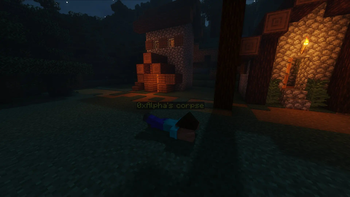
PlayerCorpses is a plugin for Minecraft that allows you to create corpses, adding an immersive and interactive experience for players. When a player dies, they leave behind an NPC representing their corpse that can be interacted with to retreive items.
## Features
- Player Corpses: When a player dies, a corpse NPC is created at the death location, retaining the player's inventory.
- Npc Interaction: Players can interact with corpses to access the items stored in their inventory.
- Break Corpses: Players can break a corpse NPC, dropping its contents at the location of the corpse.
- Customizable Locale Support: Fully configurable locale system to allow translation and customization of in-game messages.
- NPC Integration: Works with the FancyNPCs plugin to create detailed and interactive NPCs representing fallen players.
- Customizable Menus: The plugin features customizable menus for interacting with corpses and their items.
## Installation
1. Download the plugin: Download the latest version of PlayerCorpses and place it in the `plugins` directory of your server. 2. Install FancyNPCs Plugin: To enable NPC functionality, download and install the (https://modrinth.com/plugin/fancynpcs)** plugin. 3. Configure Locale: If you wish to use a language other than English or Russian, configure the plugin’s locale files found in the `locale` folder. 4. Restart your server: After installation and configuration, restart your server to apply the changes.
## Configuration
PlayerCorpses comes with configurable messages and settings to allow you to tailor the plugin to your server's needs.
- Locale Configuration: The plugin supports multiple languages. Locale files can be found in the `locale` folder.
- Custom Messages: The plugin uses the MiniMessage format for text formatting. You can find more information on how to format messages in the (https://docs.advntr.dev/minimessage/format).
## Commands
Currently, there are no commands provided by this plugin. Interaction is done through the GUI menus generated when interacting with a corpse NPC. However, as the plugin evolves, additional commands may be added in the future, such as reloading the plugin, setting skins for corpse NPCs, and more.
### Interacting with Corpses
- When a player dies, a corpse NPC will be created at the location of death.
- Players can click on the corpse NPC to open a menu with the option to break the corpse and pick up items.
If you encounter any issues or have questions, feel free to reach out to the plugin developers via (https://discord.gg/vsUB7FsRu4).
## Changelog
### 1. 1. 0
- Corpse Ownership System: Corpses are now linked to the player who died. Only the owner can break their corpse by default.
- Configurable Access: Added `allowOthersBreak` option in `config.yml` to allow or restrict other players from breaking and looting corpses.
- Global Corpse Storage: Corpse data is now stored globally instead of per-player, fixing errors when other players attempt to interact with a corpse.
- Player Skin Support: Corpse NPCs now automatically use the skin of the player who died.
- System-based Time Handling: Death time is now saved using system UTC timestamp instead of a hardcoded timezone offset.
- Improved Stability**: Fixed console errors when non-owners attempted to break a corpse.
### 1. 0. 0 - First Release
- Initial release of PlayerCorpses.
This plugin is provided "as-is", without any warranty. You may use it under the terms of the (https://github.com/AvionBlock/PlayerCorpses/blob/main/LICENSE).
📊 Mod Details
- Game
- Minecraft Plugins
- Author
- SineVector241
- Version
- 1.1.0
- Downloads
- 1,608
- Endorsements
- 10
- Category
- adventure
- Created
- 3/19/2025
- Updated
- 2/23/2026
- Game Versions
- 1.21.11
- Tags
- adventure, cursed, game-mechanics
🔧 How to Install Minecraft Plugins Mods
Download from Modrinth. Use Prism Launcher or drop into your mods folder.
📖 Full step-by-step install guide for Minecraft Plugins →
Visit the official mod page for specific installation instructions for this mod.
🎮 Need cheat codes or console commands? Check ur gaming wiki for Minecraft Plugins commands, item IDs, and more.
❓ Frequently Asked Questions
Which Minecraft Plugins versions does PlayerCorpses support?
The author lists 1.21.11. Other versions may work but are untested by the author.
What is the latest version of PlayerCorpses?
Version 1.1.0, published 2026-02-23 with 1,608 downloads recorded at the source.
Keep browsing — more Minecraft Plugins mods await