PlacementPlugin
🟠 Updated over a year ago🖼️ Gallery (2 images)
🔍 Analysis
- 🏆 #211 of 234 management mods in this game by downloads
📋 About This Mod
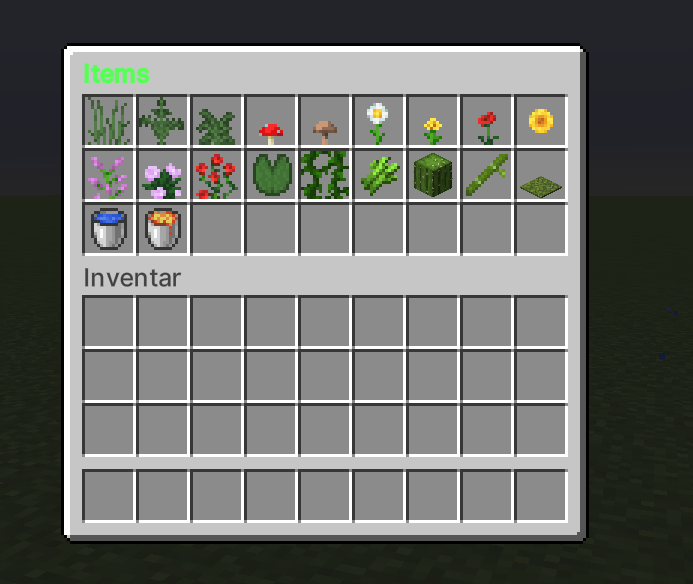
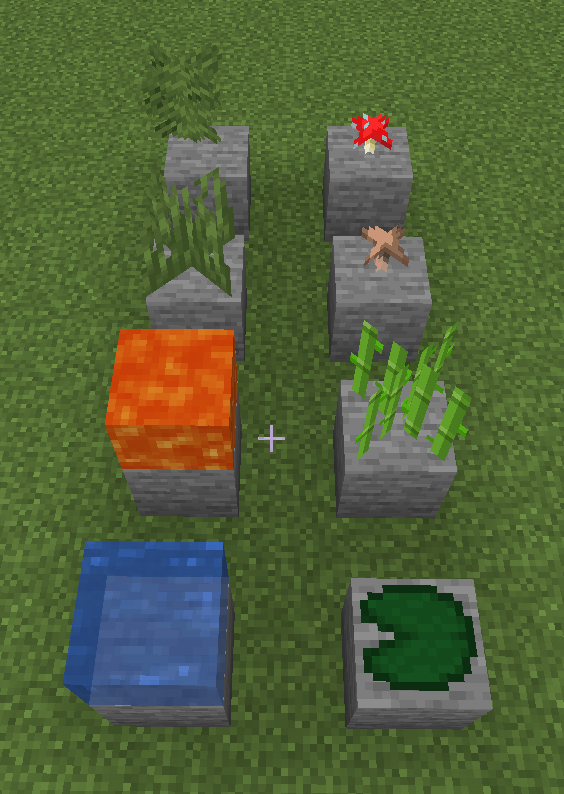
# 🌻 PlacementPlugin 🌻 > **An intuitive building tool for Paper/Spigot 1.20+ that lets you place blocks creatively through a configurable GUI and a special “Placeler” wand – no WorldEdit required.** --- ### ✨ Features - **GUI Selection** — `/farmplace` opens an inventory GUI with configurable blocks, plants, and water‑/lava‑source items. - **Placeler Wand** - **Right‑click**: places blocks with `physics=false`; water/lava stay static. - **Left‑click**: re‑opens the GUI. - **Radius Mode** — `/pradius <1‑20>` - *1* = single block - *>1* = square area of `(2r + 1) × (2r + 1)` blocks. - **Undo & Redo** — `/plundo` & `/plredo` roll back or restore multiple steps (stack‑based). - **Color‑coded Items & Flexible Config** — GUI titles and item labels accept Minecraft color codes (`&aGrass`). All materials, GUI size, defaults, and permissions live in `config.yml`. --- ### 🛠 Installation 1. Drop the **JAR** into your `plugins` folder. 2. Restart the server *or* run: ```bash /reload confirm ``` 3. Adjust `plugins/PlacementPlugin/config.yml` as needed and restart again. --- ### 💻 Commands | Command | Description | |---------|-------------| | `/farmplace` | Open the build GUI | | `/pc` | Clear the current Placeler wand | | `/pradius <n>` | Set placement radius (1 – 20) | | `/plundo` | Undo last placement | | `/plredo` | Redo last undo | --- ### 🔐 Permissions | Node | Purpose | |------|---------| | `farmplace.use` | Open GUI | | `farmplace.clear` | Clear wand | | `farmplace.radius` | Change radius | | `farmplace.undo` | Run undo | | `farmplace.redo` | Run redo | --- ### ⚙ Configuration Snippet ```yaml # plugins/PlacementPlugin/config.yml farm-items: TALL_GRASS: "&2Tall Grass" FERN: "&2Ferns" LARGE_FERN: "&2Large Ferns" RED_MUSHROOM: "&cRed &4Mushrooms" BROWN_MUSHROOM: "&6Brown &cMushrooms" OXEYE_DAISY: "&fOxeye Daisy" DANDELION: "&eDandelion" POPPY: "&cPoppy" SUNFLOWER: "&eSunflower" LILAC: "&dLilac" PEONY: "&dPeony" ROSE_BUSH: "&cRose Bush" LILY_PAD: "&2Lily Pad" VINE: "&2Vines" SUGAR_CANE: "&aSugar Cane" CACTUS: "&2Cactus" BAMBOO: "&aBamboo" MOSS_CARPET: "&2Moss Carpet" WATER: "&bWater" LAVA: "&cLava" # Add more items by increasing gui-size. Maximum: 54 Minimum: 9 gui-size: 27 gui-title: "&a&lItems" default-radius: 1 max-radius: 20 ``` --- Need help? • Open an issue • Join our Discord ((https://discord.gg/XBZfsANgCP))
# 🌻 PlacementPlugin 🌻
> An intuitive building tool for Paper/Spigot 1. 20+ that lets you place blocks creatively through a configurable GUI and a special “Placeler” wand – no WorldEdit required.
### ✨ Features
- GUI Selection — `/farmplace` opens an inventory GUI with configurable blocks, plants, and water‑/lava‑source items.
- Placeler Wand
- - Right‑click: places blocks with `physics=false`; water/lava stay static.
- - Left‑click: re‑opens the GUI.
- Radius Mode — `/pradius <1‑20>`
- - 1 = single block
- - >1 = square area of `(2r + 1) × (2r + 1)` blocks.
- Undo & Redo — `/plundo` & `/plredo` roll back or restore multiple steps (stack‑based).
- Color‑coded Items & Flexible Config — GUI titles and item labels accept Minecraft color codes (`&aGrass`). All materials, GUI size, defaults, and permissions live in `config.yml`.
### 🛠 Installation
1. Drop the JAR into your `plugins` folder. 2. Restart the server or run: ```bash /reload confirm ``` 3. Adjust `plugins/PlacementPlugin/config.yml` as needed and restart again.
### 💻 Commands
| Command | Description |
|---------|-------------|
| `/farmplace` | Open the build GUI |
| `/pc` | Clear the current Placeler wand |
| `/pradius
### 🔐 Permissions
| Node | Purpose | |------|---------| | `farmplace.use` | Open GUI | | `farmplace.clear` | Clear wand | | `farmplace.radius` | Change radius | | `farmplace.undo` | Run undo | | `farmplace.redo` | Run redo |
### ⚙ Configuration Snippet
```yaml # plugins/PlacementPlugin/config.yml
farm-items: TALL_GRASS: "&2Tall Grass" FERN: "&2Ferns" LARGE_FERN: "&2Large Ferns" RED_MUSHROOM: "&cRed &4Mushrooms" BROWN_MUSHROOM: "&6Brown &cMushrooms" OXEYE_DAISY: "&fOxeye Daisy" DANDELION: "&eDandelion" POPPY: "&cPoppy" SUNFLOWER: "&eSunflower" LILAC: "&dLilac" PEONY: "&dPeony" ROSE_BUSH: "&cRose Bush" LILY_PAD: "&2Lily Pad" VINE: "&2Vines" SUGAR_CANE: "&aSugar Cane" CACTUS: "&2Cactus" BAMBOO: "&aBamboo" MOSS_CARPET: "&2Moss Carpet" WATER: "&bWater" LAVA: "&cLava"
# Add more items by increasing gui-size. Maximum: 54 Minimum: 9 gui-size: 27 gui-title: "&a&lItems"
default-radius: 1 max-radius: 20
Need help? • Open an issue • Join our Discord ((https://discord.gg/XBZfsANgCP))
📊 Mod Details
- Game
- Minecraft Plugins
- Author
- Klyroth_jar
- Version
- 1.0.0
- Downloads
- 84
- Endorsements
- 0
- Category
- management
- Created
- 4/25/2025
- Updated
- 4/22/2025
- Game Versions
- 1.20, 1.20.1, 1.20.2, 1.20.3, 1.20.4
- Tags
- management, technology, utility
🔧 How to Install Minecraft Plugins Mods
Download from Modrinth. Use Prism Launcher or drop into your mods folder.
📖 Full step-by-step install guide for Minecraft Plugins →
Visit the official mod page for specific installation instructions for this mod.
🎮 Need cheat codes or console commands? Check ur gaming wiki for Minecraft Plugins commands, item IDs, and more.
❓ Frequently Asked Questions
Which Minecraft Plugins versions does PlacementPlugin support?
The author lists 1.20, 1.20.1, 1.20.2, 1.20.3, 1.20.4, 1.20.5. Other versions may work but are untested by the author.
What is the latest version of PlacementPlugin?
Version 1.0.0, published 2025-04-22 with 84 downloads recorded at the source.
Keep browsing — more Minecraft Plugins mods await