Pl3xMarkers
🟡 Updated this year🖼️ Gallery (9 images)





🔍 Analysis
- 👍 0.7% endorsement rate
- 🏆 #214 of 367 adventure mods in this game by downloads
📋 About This Mod
!(https://cdn.modrinth.com/data/cached_images/1a17539794c717c310b9bf3e3dd8f0e4d4e9070a_0.webp)
## Added markers
- (https://modrinth.com/mod/open-parties-and-claims) claimed chunks
- (https://dev.bukkit.org/projects/shopkeepers) shops
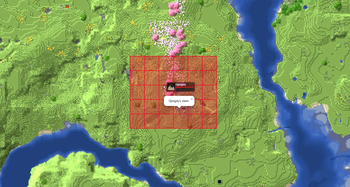
- Player made areas
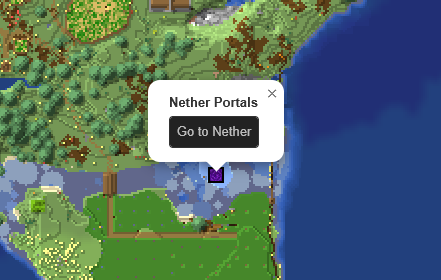
- Nether Portals
- End Portals
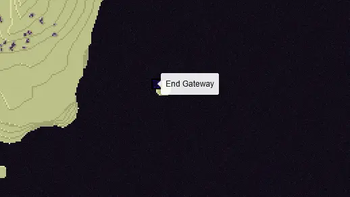
- End Gateways
- Lightning strikes
- Beacons
- Signs
- Cross-dimensional players
All without the need for any commands and all fully configurable
## How to -
Make an area
1. Get a lodestone and a banner (all the same color) for all corners of your area. 2. Give all banners the name of your area in an anvil. 3. Place a lodestone with one of the banners on top on every corner. 4. Admire your area on the web map.
- An area can have a max distance of 512 blocks between its furthest points.
- The names on the banners need to be an exact match.
- The placement order does not matter, the points will be connected automatically.
- You can add or remove points as you wish, the area will adapt.
- 2 points in a straight line create a circle.
- 2 points not in a straight line create a rectangle.
Add a portal marker
1. Go through a portal. 2. Admire your portal on the web map.
Add a beacon marker
1. Place a beacon. 2. Activate the beacon. 3. Admire your b~~e~~acon on the web map.
Add a sign marker
1. Place a sign on top of a lodestone. 2. Write some text on your sign. 3. Admire your sign on the web map.
## FAQ ### Q: The layers are not showing up on my web map, what do I do? A: You most likely use custom names for your worlds. Make sure they use the correct suffix structure: ``{worldname}``, ``{worldname}_nether``, ``{worldname}_the_end`` ### Q: Why are some points not showing up? A: Areas are made out of the outermost points. If you have points inside the area they will not be used. Or the points are too far apart from the center. ### Q: Can I customize area labels? A: Yes! Area names support basic HTML tags such as ``, ``, ``, ` `, and ` {text} `. ### Q: Why is my area a small triangle? A: You either have too few points (minimum 3) or your points are too far apart. ### Q: How to reload the config? A: Pl3xMarkers listens to Pl3xMap's reload, so you can reload using `/pl3xmap reload`
The Pl3xMarkers mod started out as Helix Markers, for my server; (https://play.hexasis.eu/)
You can check its webmap at (https://map.hexasis.eu/?world=minecraft-overworld&renderer=vintage_story&zoom=2&x=842&z=1412)
📊 Mod Details
- Game
- Minecraft Plugins
- Author
- Gjorgdy
- Version
- 0.8.3+26.2
- Downloads
- 2,486
- Endorsements
- 17
- Category
- adventure
- Created
- 9/9/2025
- Updated
- 8/13/2026
- Game Versions
- 26.2
- Tags
- adventure, decoration, utility
🔧 How to Install Minecraft Plugins Mods
Download from Modrinth. Use Prism Launcher or drop into your mods folder.
📖 Full step-by-step install guide for Minecraft Plugins →
Visit the official mod page for specific installation instructions for this mod.
🎮 Need cheat codes or console commands? Check ur gaming wiki for Minecraft Plugins commands, item IDs, and more.
❓ Frequently Asked Questions
Which Minecraft Plugins versions does Pl3xMarkers support?
The author lists 26.2. Other versions may work but are untested by the author.
What is the latest version of Pl3xMarkers?
Version 0.8.3+26.2, published 2026-08-13 with 2,486 downloads recorded at the source.
Keep browsing — more Minecraft Plugins mods await