Passwords
🟡 Updated this year🖼️ Gallery (5 images)


🔍 Analysis
- 👍 0.2% endorsement rate
- 🏆 #509 of 1560 bukkit mods in this game by downloads
📋 About This Mod
### Passwords **Secure your server with Passords!** Passwords an easy to use and simple plugin to secure your minecraft server from strangers. If you dont want to use a whitlis you can simply give your friends the password and thats it. <a href="https://www.codefactor.io/repository/github/hamburgbigj/passwords"><img src="https://www.codefactor.io/repository/github/hamburgbigj/passwords/badge" alt="CodeFactor" /></a> !(https://cdn.modrinth.com/data/L0CNo68R/images/93026e3489b32f8d560d691769c0fc1193b62642.png) --- ### **Features** - **Custom Passwords for Each Player** Allow players to create unique passwords, ensuring personalized and secure access to their accounts. - **Admin Password Options** Admins can set a master password for full permissions and Op status. - **Seamless Integration** Works effortlessly with any Minecraft server without requiring complex setup. --- ### **Sample Config.yml** Below is an example configuration file to get you started: <details> <summary><strong>Click to view config.yml</strong></summary> ```yaml version: "2.6.2" debug: false # Password dose not supports PlaceholderAPI in messages. # Supported placeholders are: &player& -> Player Name # Placeholders are only supported in messages settings: # check-type: server : One password for the entire server. # check-type: player : A unique password for each player. (Works only on the first join. To reset, delete player data or use the /setpassword command) # check-type: none : No password check. # check-type: pattern : The player must enter a pattern like "o x o" # "x x x" # "x x x" check-type: server # GUI Name gui-name: Enter Passwords # Set password name set-password-name: Set Password # Message that will be displayed as the kick reason. fail-message: The password is incorrect! # When the UI is closed without a password close-ui-message: You need to enter a password! # Enable welcome message. welcome-message-enabled: true # Welcome message after login. welcome-message: Welcome to ExampleServer # Welcome message second line (Only for title) welcome-message-second: Passwords # Display type for the welcome message: message; actionbar; title welcome-message-display-type: message # Enable login gamemode. login-gamemode-enabled: true # Gamemode every player will have upon login: survival, creative, adventure, spectator login-gamemode: survival # Player password length (for the check-type: player) player-password-length: 4 # Blocked passwords ( only for the check-type: player & server ) blocked-passwords: - 1111 # Saves the player inventory on logout and restores it on login. ( !!!!! Waring: When the data folder or the player data in the passwords folder is deleted, the player inventory will be lost !!!!! ) save-player-inventory: false # Saves the player inventory automatically enable-auto-save: true # Saves the player inventory every 5 minutes (if save-player-inventory is true) save-player-inventory-intervall: 10 # in minutes ( min 3 ) # Invulnerable on login (note: this will prevent fall damage when exploited) invulnerable-on-login: true server: # Server password (the password can be any length | for the check-type: server) password: 1234 # Staff password (the password can be any length | for the check-type: server) staff-password: 8181 # Staff permissions (will be given to the player after login) staff-permissions: - passwords.* # Remove staff permissions on logout remove-staff-permissions-on-logout: true # Password pattern (for the check-type: pattern) pattern: - oxo - xxx - xxx ``` </details> --- ### **Commands** <details> <summary><strong>Click to view commands</strong></summary> - `/setpassword <Password>` → Set your password. - `/setplayerpassword <Player> <Password>` → Ser a Player's password. - `/logout <Player>` → Logout player. </details> --- ### **For Developers: Maven/Gradle Setup** <details> <summary><strong>Click to view Maven/Gradle setup</strong></summary> **Maven**: ```xml <dependency> <groupId>cho.info</groupId> <artifactId>passwords</artifactId> <version>(Plugin version)</version> </dependency> <repositories> <repository> <id>local-repo</id> <url>file:/path/to/my-local-repo</url> </repository> </repositories> ``` **Gradle**: ```gradle implementation files("$projectDir/lib/passwords-(Plugin version).jar") ``` </details>
### Passwords
Secure your server with Passords! Passwords an easy to use and simple plugin to secure your minecraft server from strangers. If you dont want to use a whitlis you can simply give your friends the password and thats it.
!(https://cdn.modrinth.com/data/L0CNo68R/images/93026e3489b32f8d560d691769c0fc1193b62642.png)
### Features
- Custom Passwords for Each Player
- Allow players to create unique passwords, ensuring personalized and secure access to their accounts.
- Admin Password Options
- Admins can set a master password for full permissions and Op status.
- Seamless Integration
- Works effortlessly with any Minecraft server without requiring complex setup.
### Sample Config.yml
Below is an example configuration file to get you started:
Click to view config.yml
```yaml version: "2. 6. 2" debug: false # Password dose not supports PlaceholderAPI in messages. # Supported placeholders are: &player& -> Player Name # Placeholders are only supported in messages
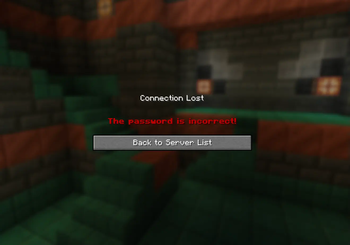
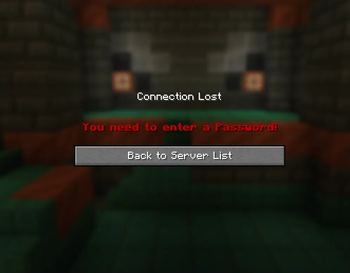
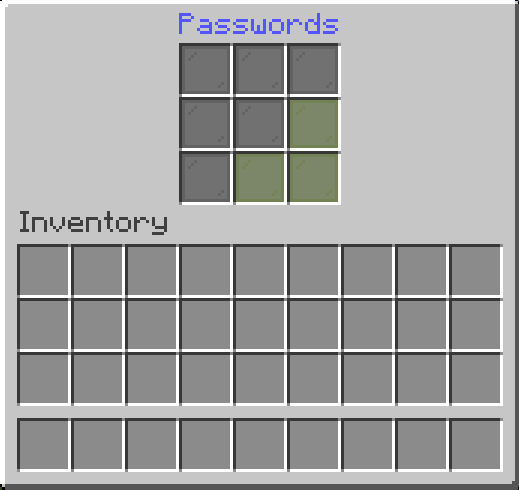
settings: # check-type: server : One password for the entire server. # check-type: player : A unique password for each player. (Works only on the first join. To reset, delete player data or use the /setpassword command) # check-type: none : No password check. # check-type: pattern : The player must enter a pattern like "o x o" # "x x x" # "x x x" check-type: server # GUI Name gui-name: Enter Passwords # Set password name set-password-name: Set Password # Message that will be displayed as the kick reason. fail-message: The password is incorrect! # When the UI is closed without a password close-ui-message: You need to enter a password! # Enable welcome message. welcome-message-enabled: true # Welcome message after login. welcome-message: Welcome to ExampleServer # Welcome message second line (Only for title) welcome-message-second: Passwords # Display type for the welcome message: message; actionbar; title welcome-message-display-type: message # Enable login gamemode. login-gamemode-enabled: true # Gamemode every player will have upon login: survival, creative, adventure, spectator login-gamemode: survival # Player password length (for the check-type: player) player-password-length: 4 # Blocked passwords ( only for the check-type: player & server ) blocked-passwords: - 1111 # Saves the player inventory on logout and restores it on login. ( !!!!! Waring: When the data folder or the player data in the passwords folder is deleted, the player inventory will be lost !!!!! ) save-player-inventory: false # Saves the player inventory automatically enable-auto-save: true # Saves the player inventory every 5 minutes (if save-player-inventory is true) save-player-inventory-intervall: 10 # in minutes ( min 3 ) # Invulnerable on login (note: this will prevent fall damage when exploited) invulnerable-on-login: true
server: # Server password (the password can be any length | for the check-type: server) password: 1234 # Staff password (the password can be any length | for the check-type: server) staff-password: 8181 # Staff permissions (will be given to the player after login) staff-permissions: - passwords.* # Remove staff permissions on logout remove-staff-permissions-on-logout: true # Password pattern (for the check-type: pattern) pattern: - oxo - xxx - xxx ```
### Commands
Click to view commands
- `/setpassword
` → Set your password. - `/setplayerpassword
` → Ser a Player's password. - `/logout
` → Logout player.
### For Developers: Maven/Gradle Setup
Click to view Maven/Gradle setup
Maven:
```xml
Gradle: ```gradle implementation files("$projectDir/lib/passwords-(Plugin version).jar") ```
📊 Mod Details
- Game
- Minecraft Plugins
- Author
- HamburgBigJ
- Version
- 2.6.2
- Downloads
- 5,307
- Endorsements
- 8
- Category
- bukkit
- Created
- 11/2/2024
- Updated
- 12/25/2025
- Game Versions
- 1.21.5, 1.21.6, 1.21.7, 1.21.8, 1.21.9
- Tags
- management, social, utility
🔧 How to Install Minecraft Plugins Mods
Download from Modrinth. Use Prism Launcher or drop into your mods folder.
📖 Full step-by-step install guide for Minecraft Plugins →
Visit the official mod page for specific installation instructions for this mod.
🎮 Need cheat codes or console commands? Check ur gaming wiki for Minecraft Plugins commands, item IDs, and more.
❓ Frequently Asked Questions
Which Minecraft Plugins versions does Passwords support?
The author lists 1.21.5, 1.21.6, 1.21.7, 1.21.8, 1.21.9, 1.21.10. Other versions may work but are untested by the author.
What is the latest version of Passwords?
Version 2.6.2, published 2025-12-25 with 5,307 downloads recorded at the source.
Keep browsing — more Minecraft Plugins mods await