P_Pickaxe
🟡 Updated this year🖼️ Gallery (4 images)
🔍 Analysis
- 🏆 #887 of 1080 bukkit mods in this game by downloads
📋 About This Mod
# P-Pickaxe ## Overview P-Pickaxe is a plugin for Paper servers that creates evolving items. Players use an item normally, build progress through gameplay actions, and automatically receive rewards when configured goals are reached. The plugin was prepared for Paper 1.21.3, Java 21, and version 1.0.0. The plugin does not need to rename the item or change the item's real lore to track evolution. Progress is saved inside the item itself and can be shown through commands, the actionbar, and the menu. ## Summary - (#what-the-plugin-can-do) - (#commands) - (#permissions) - (#how-evolution-works) - (#progress-types) - (#menu-and-interface) - (#rewards) - (#available-settings) - (#plugin-files) - (#default-evolving-items) - (#important-notes) ## What the plugin can do - Create evolving items by category, such as pickaxes, axes, shovels, hoes, swords, bows, crossbows, tridents, and armor. - Track progress automatically when a player breaks blocks, kills entities, shoots projectiles, throws a trident, or takes damage while wearing armor. - Evolve items through levels, with different progress goals and rewards at each stage. - Apply vanilla enchantments and custom enchantments registered on the server. - Run commands as evolution rewards, either as console or as the player, depending on the reward configuration. - Show progress in the actionbar while the item is being used. - Show the progress of the evolving item in the player's main hand through a command. - Open a visual menu with categories, items, progress, levels, percentage, status, and the next reward. - Use menu icons from common Minecraft materials or custom player heads. - Reload settings, menu, languages, and evolutions without restarting the server. - List enchantments recognized by the server and test whether a specific enchantment is recognized. - Keep the best progress when items are combined through an anvil, smithing table, or grindstone. - Support Portuguese and English messages through language files. ## Commands ### Player commands | Command | What it does | |---|---| | /evolutivos menu | Opens the evolving items menu. | | /evolutivos progresso | Shows the progress of the evolving item in the main hand. | | /evolutivos ajuda | Shows the player command help. | Player aliases: /ppickaxe, /pp, /pevoluir, and /evoluir. ### Admin commands | Command | What it does | |---|---| | /evolutivosadmin recarregar | Reloads settings, menu, languages, and evolutions. | | /evolutivosadmin encantamentos | Lists enchantments registered on the server. | | /evolutivosadmin encantamentos filter | Lists registered enchantments that match the provided filter. | | /evolutivosadmin reconhecer enchantment | Tests whether the plugin can recognize an enchantment by the provided name. | | /evolutivosadmin ajuda | Shows the admin command help. | Admin aliases: /ppickaxeadmin, /ppadmin, and /evoluiradmin. ## Permissions | Permission | Default | Allows | |---|---:|---| | p_pickaxe.use | Everyone | Use the menu and view evolving item progress. | | p_pickaxe.admin | Operators | Reload files, list enchantments, and test enchantment recognition. | ## How evolution works - The item starts being tracked automatically when used, if that option is enabled. - Each item has one or more ways to gain progress. - When progress reaches a stage goal, the plugin applies the reward for that level. - Each evolution can have multiple rewards in the same stage. - When the item finishes all stages, it appears as complete in the command and in the menu. - Progress is individual per item. Two identical items can have different levels and progress. - The menu can show the next reward, status, current level, maximum level, and completion percentage. ## Progress types | Type | How the player progresses | Usually used by | |---|---|---| | Breaking blocks | Gains progress by breaking blocks outside creative or spectator mode. | Pickaxes, shovels, hoes, and axes. | | Killing entities | Gains progress when the item lands the final hit on an entity. | Swords and axes. | | Shooting projectiles | Gains progress by shooting a bow or crossbow. | Bows and crossbows. | | Throwing tridents | Gains progress by throwing a trident. | Tridents. | | Taking damage | Gains progress by taking damage while wearing the armor piece. | Helmets, chestplates, leggings, and boots. | An item can accept more than one progress type. By default, axes evolve both by breaking blocks and by killing entities. ## Menu and interface - Main menu with evolving item categories. - Category screen with the items from that category. - Item screen with matching items found in the player's inventory. - Page navigation, back button, and page information item. - Configurable title, size, slots, filler item, and navigation items. - Icons using
# P-Pickaxe
## Overview
P-Pickaxe is a plugin for Paper servers that creates evolving items. Players use an item normally, build progress through gameplay actions, and automatically receive rewards when configured goals are reached. The plugin was prepared for Paper 1. 21. 3, Java 21, and version 1. 0. 0.
The plugin does not need to rename the item or change the item's real lore to track evolution. Progress is saved inside the item itself and can be shown through commands, the actionbar, and the menu.
- (#what-the-plugin-can-do)
- (#commands)
- (#permissions)
- (#how-evolution-works)
- (#progress-types)
- (#menu-and-interface)
- (#rewards)
- (#available-settings)
- (#plugin-files)
- (#default-evolving-items)
- (#important-notes)
## What the plugin can do
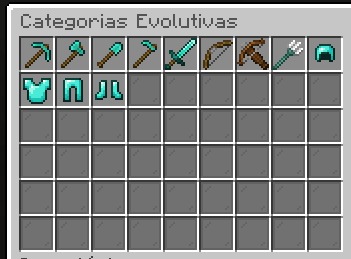
- Create evolving items by category, such as pickaxes, axes, shovels, hoes, swords, bows, crossbows, tridents, and armor.
- Track progress automatically when a player breaks blocks, kills entities, shoots projectiles, throws a trident, or takes damage while wearing armor.
- Evolve items through levels, with different progress goals and rewards at each stage.
- Apply vanilla enchantments and custom enchantments registered on the server.
- Run commands as evolution rewards, either as console or as the player, depending on the reward configuration.
- Show progress in the actionbar while the item is being used.
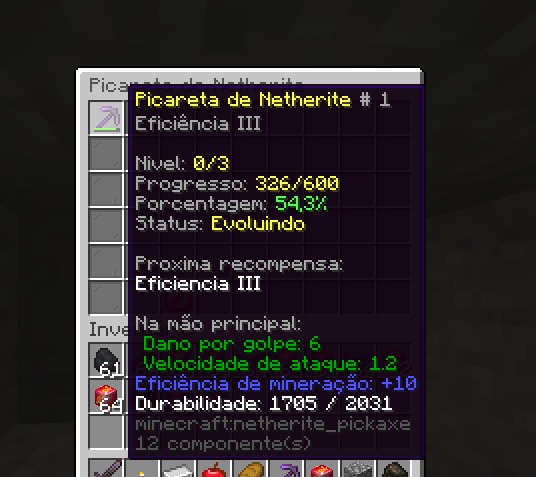
- Show the progress of the evolving item in the player's main hand through a command.
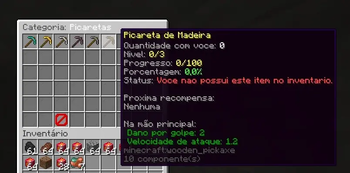
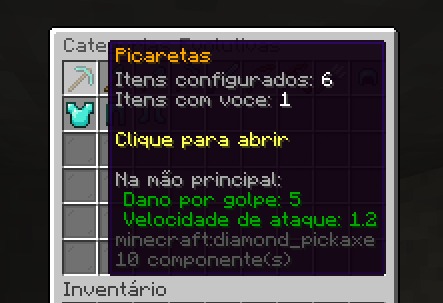
- Open a visual menu with categories, items, progress, levels, percentage, status, and the next reward.
- Use menu icons from common Minecraft materials or custom player heads.
- Reload settings, menu, languages, and evolutions without restarting the server.
- List enchantments recognized by the server and test whether a specific enchantment is recognized.
- Keep the best progress when items are combined through an anvil, smithing table, or grindstone.
- Support Portuguese and English messages through language files.
## Commands
### Player commands
| Command | What it does | |---|---| | /evolutivos menu | Opens the evolving items menu. | | /evolutivos progresso | Shows the progress of the evolving item in the main hand. | | /evolutivos ajuda | Shows the player command help. |
Player aliases: /ppickaxe, /pp, /pevoluir, and /evoluir.
### Admin commands
| Command | What it does | |---|---| | /evolutivosadmin recarregar | Reloads settings, menu, languages, and evolutions. | | /evolutivosadmin encantamentos | Lists enchantments registered on the server. | | /evolutivosadmin encantamentos filter | Lists registered enchantments that match the provided filter. | | /evolutivosadmin reconhecer enchantment | Tests whether the plugin can recognize an enchantment by the provided name. | | /evolutivosadmin ajuda | Shows the admin command help. |
Admin aliases: /ppickaxeadmin, /ppadmin, and /evoluiradmin.
## Permissions
| Permission | Default | Allows | |---|---:|---| | p_pickaxe.use | Everyone | Use the menu and view evolving item progress. | | p_pickaxe.admin | Operators | Reload files, list enchantments, and test enchantment recognition. |
## How evolution works
- The item starts being tracked automatically when used, if that option is enabled.
- Each item has one or more ways to gain progress.
- When progress reaches a stage goal, the plugin applies the reward for that level.
- Each evolution can have multiple rewards in the same stage.
- When the item finishes all stages, it appears as complete in the command and in the menu.
- Progress is individual per item. Two identical items can have different levels and progress.
- The menu can show the next reward, status, current level, maximum level, and completion percentage.
## Progress types
| Type | How the player progresses | Usually used by | |---|---|---| | Breaking blocks | Gains progress by breaking blocks outside creative or spectator mode. | Pickaxes, shovels, hoes, and axes. | | Killing entities | Gains progress when the item lands the final hit on an entity. | Swords and axes. | | Shooting projectiles | Gains progress by shooting a bow or crossbow. | Bows and crossbows. | | Throwing tridents | Gains progress by throwing a trident. | Tridents. | | Taking damage | Gains progress by taking damage while wearing the armor piece. | Helmets, chestplates, leggings, and boots. |
An item can accept more than one progress type. By default, axes evolve both by breaking blocks and by killing entities.
## Menu and interface
- Main menu with evolving item categories.
- Category screen with the items from that category.
- Item screen with matching items found in the player's inventory.
- Page navigation, back button, and page information item.
- Configurable title, size, slots, filler item, and navigation items.
- Icons using
📊 Mod Details
- Game
- Minecraft Plugins
- Author
- Mr_Haruki
- Version
- 1.0.0
- Downloads
- 39
- Endorsements
- 1
- Category
- bukkit
- Created
- 5/18/2026
- Updated
- 5/14/2026
- Game Versions
- 1.21, 1.21.1, 1.21.2, 1.21.3, 1.21.4
- Tags
- equipment, magic
🔧 How to Install Minecraft Plugins Mods
Download from Modrinth. Use Prism Launcher or drop into your mods folder.
📖 Full step-by-step install guide for Minecraft Plugins →
Visit the official mod page for specific installation instructions for this mod.
🎮 Need cheat codes or console commands? Check ur gaming wiki for Minecraft Plugins commands, item IDs, and more.
❓ Frequently Asked Questions
Which Minecraft Plugins versions does P_Pickaxe support?
The author lists 1.21, 1.21.1, 1.21.2, 1.21.3, 1.21.4, 1.21.5. Other versions may work but are untested by the author.
What is the latest version of P_Pickaxe?
Version 1.0.0, published 2026-05-14 with 39 downloads recorded at the source.
Keep browsing — more Minecraft Plugins mods await