OptimizationUtils
🟡 Updated this yearPreview

🔍 Analysis
- 👍 0.3% endorsement rate
- 🏆 #2 of 13 optimization mods in this game by downloads
📋 About This Mod
# OptimizationUtils A minecraft plugin with some useful optimization utils (see below). ## Features - **Dynamic mobcap** - automatically throttles mob spawning (optionally spawners too) when MSPT exceeds a configurable threshold. - **Dynamic random tick speed** - automatically turns random ticks off when MSPT exceeds a configurable threshold. - **Disable entity ticking** - stops ticking selected mobs (they stay in the world, but no AI/movement). Two modes: disabled entity ticking entirely, or uses Bukkit's `Mob#setAware`. Mobs can be filtered by entity type or Bukkit class, with include/exclude lists. - **Runtime tweaks via commands** - change view distance (globally or per player, persisted), simulation distance, mobcaps, mob spawn frequency and villager tick rates without a restart. - **Diagnostics** - analyze which chunks hold the most entities, kill entities/animals far away from players, and a detailed `/ou info` overview. ## Commands Main command: `/optimizationutils` (aliases: `/ou`, `/opt`) | Command | Description | |---------|-------------| | `/ou info` | Displays server and plugin information (view/simulation distances, entity counts, loaded chunks, tick rates, feature status) | | `/ou analyzechunks` | Lists the top 10 loaded chunks with the most entities | | `/ou setviewdistance <distance> ` | Sets view distance for all worlds, or for a specific player (persisted across restarts) | | `/ou resetviewdistance <player>` | Resets a player's view distance to the server default | | `/ou setsimulationdistance <distance>` | Sets simulation distance for all worlds while respecting despawn ranges | | `/ou setspawnlimit <spawn category> <limit>` | Sets the mobcap for all worlds | | `/ou setticksperspawn <spawn category> <ticks>` | Sets mob spawn frequency (ticks between spawn attempts) for all worlds | | `/ou setvillagersensortickrate <ticks>` | Sets villager sensor tick rate for all worlds | | `/ou setvillagerbehaviortickrate <ticks>` | Sets villager behavior tick rate for all worlds | | `/ou killoutofrange <entity type> <range>` | Kills entities of the given type that are out of range of all players | | `/ou killanimalsoutofrange <range>` | Kills animals that are out of range of all players | | `/ou reload` | Reloads the configuration | ## Permissions - `optimizationutils.admin` - Access to all commands ## Stats !(https://bstats.org/signatures/bukkit/OptimizationUtils.svg)
# OptimizationUtils
A minecraft plugin with some useful optimization utils (see below).
## Features
- Dynamic mobcap - automatically throttles mob spawning (optionally spawners too) when MSPT exceeds a configurable threshold.
- Dynamic random tick speed - automatically turns random ticks off when MSPT exceeds a configurable threshold.
- Disable entity ticking - stops ticking selected mobs (they stay in the world, but no AI/movement). Two modes: disabled entity ticking entirely, or uses Bukkit's `Mob#setAware`. Mobs can be filtered by entity type or Bukkit class, with include/exclude lists.
- Runtime tweaks via commands - change view distance (globally or per player, persisted), simulation distance, mobcaps, mob spawn frequency and villager tick rates without a restart.
- Diagnostics - analyze which chunks hold the most entities, kill entities/animals far away from players, and a detailed `/ou info` overview.
## Commands
Main command: `/optimizationutils` (aliases: `/ou`, `/opt`)
| Command | Description |
|---------|-------------|
| `/ou info` | Displays server and plugin information (view/simulation distances, entity counts, loaded chunks, tick rates, feature status) |
| `/ou analyzechunks` | Lists the top 10 loaded chunks with the most entities |
| `/ou setviewdistance
## Permissions
- `optimizationutils.admin` - Access to all commands
## Stats 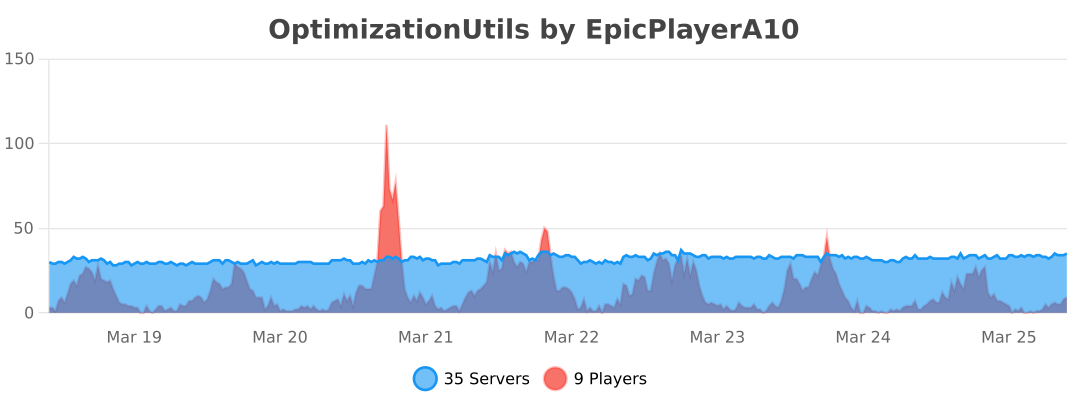
📊 Mod Details
- Game
- Minecraft Plugins
- Author
- EpicPlayerA10
- Version
- 1.0.10
- Downloads
- 909
- Endorsements
- 3
- Category
- optimization
- Created
- 8/14/2025
- Updated
- 8/26/2026
- Game Versions
- 1.16, 1.16.1, 1.16.2, 1.16.3, 1.16.4
- Tags
- optimization
🔧 How to Install Minecraft Plugins Mods
Download from Modrinth. Use Prism Launcher or drop into your mods folder.
📖 Full step-by-step install guide for Minecraft Plugins →
Visit the official mod page for specific installation instructions for this mod.
🎮 Need cheat codes or console commands? Check ur gaming wiki for Minecraft Plugins commands, item IDs, and more.
❓ Frequently Asked Questions
Which Minecraft Plugins versions does OptimizationUtils support?
The author lists 1.16, 1.16.1, 1.16.2, 1.16.3, 1.16.4, 1.16.5. Other versions may work but are untested by the author.
What is the latest version of OptimizationUtils?
Version 1.0.10, published 2026-08-26 with 909 downloads recorded at the source.
Keep browsing — more Minecraft Plugins mods await