OneChunkGuard
🟠 Updated over a year ago🖼️ Gallery (4 images)
🔍 Analysis
- 🏆 #37 of 219 paper mods in this game by downloads
📋 About This Mod
<div align="center"> <img src="https://github.com/Kamesuta/OneChunkGuard/blob/main/assets/logo.png?raw=true" alt="OneChunkGuard Logo" width="200"> (https://img.shields.io/modrinth/dt/onechunkguard?style=for-the-badge&logo=modrinth&color=00AF5C&label=Modrinth)](https://modrinth.com/plugin/onechunkguard) (https://img.shields.io/github/v/release/kamesuta/OneChunkGuard?style=for-the-badge&logo=github)](https://github.com/kamesuta/OneChunkGuard/releases) (https://img.shields.io/bstats/servers/26619?style=for-the-badge&logo=minecraft&color=green)](https://bstats.org/plugin/bukkit/OneChunkGuard/26619) (https://img.shields.io/github/license/kamesuta/OneChunkGuard?style=for-the-badge)](LICENSE) </div> English | (https://github.com/Kamesuta/OneChunkGuard) > 🏆 **Just Place a Block - 1 Chunk Protection Plugin** for Minecraft OneChunkGuard is a simple land protection plugin that **anyone from beginners to Minecraft pros** can use easily. Leveraging the WorldGuard API, it combines intuitive no-command operation with convenience. ## 🚀 Why Choose OneChunkGuard? ### 🎮 **Full Survival Mode Support** - ⚔️ **No OP Required** - Regular players can protect their land - 🏗️ **Survival or Creative** - Works in any game mode - 🎯 **Fair System** - Everyone can protect the same amount (1 chunk) ### ✨ **Simple Usability** - 🎯 **Easy Protection Without Commands** - Just place a block for instant protection - 🎁 **Automatic Distribution System** - Protection blocks automatically given to new players - 👀 **Visual Feedback** - Player head display shows owner at a glance. Owner shown in action bar when entering chunks - ✨ **Chunk Visualizer** - Particles display chunk boundaries ### 🛡️ **Flexible Protection System** - 🏗️ **Multiple Protection Block Types** - Multi-layer protection like spawn areas (1x1 chunk), VIP areas (3x3 chunks) (configurable) - 📐 **Variable Chunk Range** - Freely configurable from 1x1 to NxN - 🏛️ **Parent Region Restrictions** - Protection blocks for specific areas only - 🔄 **Independent Protection Management** - Create and remove protection independently by area type ### 👥 **Collaboration Features** - 🤝 **Advanced Trust System** - Fine permission management per player - 💬 **Interactive TUI** - Intuitive menu displayed on right-click - 🎮 **Intuitive Setup** - Set co-players with just right-click and player name input ## 📋 Requirements - **Minecraft**: 1.20+ | **Java**: 21+ - **Server**: Spigot/Paper - **Dependencies**: - WorldGuard 7.0+ - WorldEdit 7.2+ ## 🚀 Installation 1. Install (https://modrinth.com/plugin/worldguard) and (https://modrinth.com/plugin/worldedit) 2. Download the latest version from (https://github.com/Kamesuta/OneChunkGuard/releases) 3. Place `OneChunkGuard-X.X.X.jar` in the `plugins` folder 4. Restart the server 5. Confirm the plugin loaded successfully ## 🎯 How to Use (So Simple!) ### ✨ **Complete in 3 Steps! No Commands Needed!** #### 🔥 **1. Join the Server** !(https://github.com/Kamesuta/OneChunkGuard/blob/main/assets/login.png?raw=true) When you first join the server, a **protection block is automatically placed in hotbar slot 9**. Nothing to do! You can start protecting land immediately. #### 🏠 **2. Place the Block Where You Want to Protect** !(https://github.com/Kamesuta/OneChunkGuard/blob/main/assets/place.png?raw=true) Just place the protection block where you want to protect. - The moment you place it, **1 chunk (16x16 blocks) is protected** - A player head is automatically placed on top, **owner clearly visible** - Particles show chunk boundaries, so you **instantly see the protected area** #### 👥 **3. Share with Friends (Optional)** !(https://github.com/Kamesuta/OneChunkGuard/blob/main/assets/menu.png?raw=true) **Right-click** the protection block to display an intuitive menu: - **** click → `/trust playername` auto-filled - **** click → `/untrust playername` auto-filled - **** click → Shows trusted player list ### 📱 **As Easy as a Smartphone** | Action | Method | Result | |--------|--------|--------| | 🏠 **Land Protection** | Place block | Instant 1-chunk protection | | 👥 **Add Friend** | Right-click→Menu | Complete in 2 clicks | | 🔓 **Remove Protection** | Break block or `/unprotect` | Block returned & protection removed | | 👁️ **Check Owner** | Enter chunk | Shown in action bar | ### 💎 **Command List (No Need to Memorize!)** While you don't need to memorize commands, these are available: | Command | Description | When to Use | |---------|-------------|-------------| | `/unprotect` | Remove protection & return block | When removing from afar | | `/trust Steve` | Add Steve as trusted player | When menu is inconvenient | | `/untrust Steve` | Remove Steve from trusted list | When menu is inconvenient | | `/trustlist` | Sho

[!(https://img.shields.io/modrinth/dt/onechunkguard?style=for-the-badge&logo=modrinth&color=00AF5C&label=Modrinth)](https://modrinth.com/plugin/onechunkguard) [!(https://img.shields.io/github/v/release/kamesuta/OneChunkGuard?style=for-the-badge&logo=github)](https://github.com/kamesuta/OneChunkGuard/releases) [!(https://img.shields.io/bstats/servers/26619?style=for-the-badge&logo=minecraft&color=green)](https://bstats.org/plugin/bukkit/OneChunkGuard/26619) [!(https://img.shields.io/github/license/kamesuta/OneChunkGuard?style=for-the-badge)](LICENSE)
English | [日本語](https://github.com/Kamesuta/OneChunkGuard)
> 🏆 Just Place a Block - 1 Chunk Protection Plugin for Minecraft
OneChunkGuard is a simple land protection plugin that anyone from beginners to Minecraft pros can use easily. Leveraging the WorldGuard API, it combines intuitive no-command operation with convenience.
## 🚀 Why Choose OneChunkGuard?
### 🎮 Full Survival Mode Support - ⚔️ No OP Required - Regular players can protect their land - 🏗️ Survival or Creative - Works in any game mode - 🎯 Fair System - Everyone can protect the same amount (1 chunk)
### ✨ Simple Usability - 🎯 Easy Protection Without Commands - Just place a block for instant protection - 🎁 Automatic Distribution System - Protection blocks automatically given to new players - 👀 Visual Feedback - Player head display shows owner at a glance. Owner shown in action bar when entering chunks - ✨ Chunk Visualizer - Particles display chunk boundaries
### 🛡️ Flexible Protection System - 🏗️ Multiple Protection Block Types - Multi-layer protection like spawn areas (1x1 chunk), VIP areas (3x3 chunks) (configurable) - 📐 Variable Chunk Range - Freely configurable from 1x1 to NxN - 🏛️ Parent Region Restrictions - Protection blocks for specific areas only - 🔄 Independent Protection Management - Create and remove protection independently by area type
### 👥 Collaboration Features - 🤝 Advanced Trust System - Fine permission management per player - 💬 Interactive TUI - Intuitive menu displayed on right-click - 🎮 Intuitive Setup - Set co-players with just right-click and player name input
## 📋 Requirements
- Minecraft: 1. 20+ | Java: 21+
- Server: Spigot/Paper
- Dependencies:
- - WorldGuard 7. 0+
- - WorldEdit 7. 2+
## 🚀 Installation
1. Install (https://modrinth.com/plugin/worldguard) and (https://modrinth.com/plugin/worldedit) 2. Download the latest version from (https://github.com/Kamesuta/OneChunkGuard/releases) 3. Place `OneChunkGuard-X. X. X.jar` in the `plugins` folder 4. Restart the server 5. Confirm the plugin loaded successfully
## 🎯 How to Use (So Simple!)
### ✨ Complete in 3 Steps! No Commands Needed!
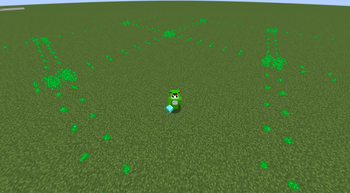
#### 🔥 1. Join the Server !(https://github.com/Kamesuta/OneChunkGuard/blob/main/assets/login.png?raw=true)
When you first join the server, a protection block is automatically placed in hotbar slot 9. Nothing to do! You can start protecting land immediately.
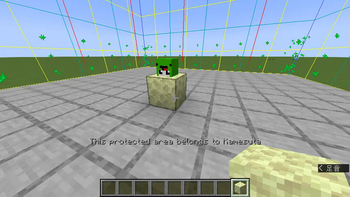
#### 🏠 2. Place the Block Where You Want to Protect !(https://github.com/Kamesuta/OneChunkGuard/blob/main/assets/place.png?raw=true)
Just place the protection block where you want to protect. - The moment you place it, 1 chunk (16x16 blocks) is protected - A player head is automatically placed on top, owner clearly visible - Particles show chunk boundaries, so you instantly see the protected area
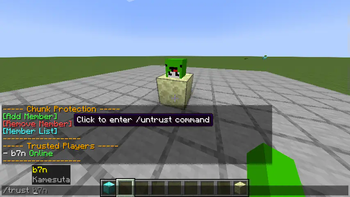
#### 👥 3. Share with Friends (Optional) !(https://github.com/Kamesuta/OneChunkGuard/blob/main/assets/menu.png?raw=true)
Right-click the protection block to display an intuitive menu: - click → `/trust playername` auto-filled - click → `/untrust playername` auto-filled - click → Shows trusted player list
### 📱 As Easy as a Smartphone
| Action | Method | Result | |--------|--------|--------| | 🏠 Land Protection | Place block | Instant 1-chunk protection | | 👥 Add Friend | Right-click→Menu | Complete in 2 clicks | | 🔓 Remove Protection | Break block or `/unprotect` | Block returned & protection removed | | 👁️ Check Owner | Enter chunk | Shown in action bar |
### 💎 Command List (No Need to Memorize!)
While you don't need to memorize commands, these are available:
| Command | Description | When to Use | |---------|-------------|-------------| | `/unprotect` | Remove protection & return block | When removing from afar | | `/trust Steve` | Add Steve as trusted player | When menu is inconvenient | | `/untrust Steve` | Remove Steve from trusted list | When menu is inconvenient | | `/trustlist` | Sho
📊 Mod Details
- Game
- Minecraft Plugins
- Author
- kamesuta
- Version
- 1.9
- Downloads
- 310
- Endorsements
- 3
- Category
- paper
- Created
- 7/26/2025
- Updated
- 8/23/2025
- Game Versions
- 1.20, 1.20.1, 1.20.2, 1.20.3, 1.20.4
- Tags
- utility
🔧 How to Install Minecraft Plugins Mods
Download from Modrinth. Use Prism Launcher or drop into your mods folder.
📖 Full step-by-step install guide for Minecraft Plugins →
Visit the official mod page for specific installation instructions for this mod.
🎮 Need cheat codes or console commands? Check ur gaming wiki for Minecraft Plugins commands, item IDs, and more.
❓ Frequently Asked Questions
Which Minecraft Plugins versions does OneChunkGuard support?
The author lists 1.20, 1.20.1, 1.20.2, 1.20.3, 1.20.4, 1.20.5. Other versions may work but are untested by the author.
What is the latest version of OneChunkGuard?
Version 1.9, published 2025-08-23 with 310 downloads recorded at the source.
Keep browsing — more Minecraft Plugins mods await