OlEncounters
🟡 Updated this year🖼️ Gallery (2 images)

🔍 Analysis
- 🏆 #109 of 183 adventure mods in this game by downloads
📋 About This Mod
# OlEncounters **Build cinematic world encounters that arrive, fight, reward, and disappear without leaving the world damaged.** OlEncounters is a highly configurable encounter and world-event plugin for Paper and Folia. Create meteor impacts, portal invasions, structures that rise from the ground, flying encounters, boss arenas, resource sites, treasure events, and more—all from one system. Every encounter can have its own schematic, arrival animation, mobs, waves, loot, leaderboard, messages, effects, location rules, and cleanup behavior. ## More than a meteor plugin OlEncounters is designed as a general encounter engine. A preset can represent almost any temporary world event: - A meteor crashing into a forest - A structure emerging from underground - A dungeon entrance materializing through a portal - A boss arena descending from the sky - A flying structure arriving from the horizon - A timed resource site with personal loot - A multi-wave invasion with ranking rewards Each preset is configured independently, so two encounters in the same category can behave completely differently. !(https://cdn.modrinth.com/data/cached_images/1e06d83d05a0317df3d7f8ee7d30e5aca9b7aede.png) ## Full-schematic arrival animations The plugin can animate the schematic itself instead of moving only a decorative meteor core. Schematic blocks are represented with display entities during arrival, then the real structure is safely placed when the animation finishes. Available encounter arrival modes: - Instant placement - Normal sky fall - Slow cinematic descent - Underground rise - Portal arrival - Materialization - Horizontal fly-in Animation duration, distance, particle density, sounds, display limits, batch size, and layer timing can be adjusted per encounter. Large schematics can use safe limits and automatic fallback behavior to protect server performance. !(https://cdn.modrinth.com/data/cached_images/6b8bf66328e55da789507e844650ca49c57d4b93.png) ## In-game setup and editing Create encounters without manually calculating every position in configuration files. The guided setup system lets administrators build a new preset or edit an existing schematic directly in game. Setup tools can be used to define: - The schematic root block - Selection boundaries - Multiple mob spawn points - Multiple loot locations - Custom loot blocks, including chests or other materials - Hologram and text positions - Saved schematic names - Whether the temporary setup structure should be removed afterward Selecting an existing point again removes it. Setup inventories are backed up, temporary tools are cleaned when leaving, and administrators can exit with or without saving. !(https://cdn.modrinth.com/data/cached_images/d4bea439c7b83d3b5eedd3664f0dc2d88504b7e6_0.webp) ## MythicMobs, waves, and animated mob arrivals Build anything from a small creature encounter to a multi-stage boss fight. Each preset can define multiple MythicMobs entries, selection weights, spawn locations, and wave behavior. Mob arrival modes include: - Instant spawn - Sky descent - Underground emergence - Portal arrival - Materialization Encounter mobs can be protected from natural distance-based despawning and are cleaned up by the event lifecycle. The MythicMobs selector supports multiple pages when the available mob list exceeds one inventory. !(https://cdn.modrinth.com/data/cached_images/8405f14ba17b7006d78ee08275b3bac9be9a05d6.png) !(https://cdn.modrinth.com/data/cached_images/4d48c2acaa4b5ce5e3b984ee712c7dd0c3d68aa7_0.webp) ## Flexible loot and rewards Loot does not have to come from a single chest. Each encounter can contain multiple loot points, and nearly any configured block can act as a loot source. The reward system supports: - Personal or shared loot - Drag-and-drop in-game loot editing - Per-item chance, weight, and amount - Multiple loot blocks - Reopenable containers until they are emptied - Locked reward vaults - Optional key requirements - Custom key items - Damage-ranking rewards - Console-command rewards - ItemsAdder items - NBT, PDC, and modern Data Component preservation With personal loot enabled, every player's reward state is tracked independently. !(https://cdn.modrinth.com/data/cached_images/0076f954b70338bdec4a6432a1f40483209f4fd4.png) !(https://cdn.modrinth.com/data/cached_images/cb7a24cdd6973c75279cd43f8faa0bce61582fbd.png) ## Automatic encounters with advanced location rules OlEncounters can automatically select and start encounters within configurable time and distance ranges. Multiple presets can share a category, with weighted selection controlling how often each one appears. Automatic placement supports: - Per-w
# OlEncounters
Build cinematic world encounters that arrive, fight, reward, and disappear without leaving the world damaged.
OlEncounters is a highly configurable encounter and world-event plugin for Paper and Folia. Create meteor impacts, portal invasions, structures that rise from the ground, flying encounters, boss arenas, resource sites, treasure events, and more—all from one system.
Every encounter can have its own schematic, arrival animation, mobs, waves, loot, leaderboard, messages, effects, location rules, and cleanup behavior.
## More than a meteor plugin
OlEncounters is designed as a general encounter engine. A preset can represent almost any temporary world event:
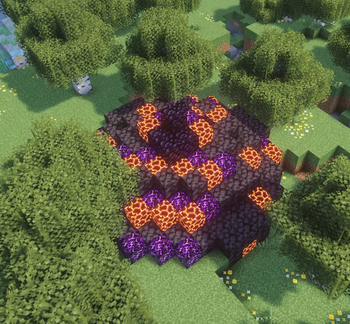
- A meteor crashing into a forest
- A structure emerging from underground
- A dungeon entrance materializing through a portal
- A boss arena descending from the sky
- A flying structure arriving from the horizon
- A timed resource site with personal loot
- A multi-wave invasion with ranking rewards
Each preset is configured independently, so two encounters in the same category can behave completely differently.
!(https://cdn.modrinth.com/data/cached_images/1e06d83d05a0317df3d7f8ee7d30e5aca9b7aede.png)
## Full-schematic arrival animations
The plugin can animate the schematic itself instead of moving only a decorative meteor core. Schematic blocks are represented with display entities during arrival, then the real structure is safely placed when the animation finishes.
Available encounter arrival modes:
- Instant placement
- Normal sky fall
- Slow cinematic descent
- Underground rise
- Portal arrival
- Materialization
- Horizontal fly-in
Animation duration, distance, particle density, sounds, display limits, batch size, and layer timing can be adjusted per encounter. Large schematics can use safe limits and automatic fallback behavior to protect server performance.
!(https://cdn.modrinth.com/data/cached_images/6b8bf66328e55da789507e844650ca49c57d4b93.png)
## In-game setup and editing
Create encounters without manually calculating every position in configuration files. The guided setup system lets administrators build a new preset or edit an existing schematic directly in game.
Setup tools can be used to define:
- The schematic root block
- Selection boundaries
- Multiple mob spawn points
- Multiple loot locations
- Custom loot blocks, including chests or other materials
- Hologram and text positions
- Saved schematic names
- Whether the temporary setup structure should be removed afterward
Selecting an existing point again removes it. Setup inventories are backed up, temporary tools are cleaned when leaving, and administrators can exit with or without saving.
!(https://cdn.modrinth.com/data/cached_images/d4bea439c7b83d3b5eedd3664f0dc2d88504b7e6_0.webp)
## MythicMobs, waves, and animated mob arrivals
Build anything from a small creature encounter to a multi-stage boss fight. Each preset can define multiple MythicMobs entries, selection weights, spawn locations, and wave behavior.
Mob arrival modes include:
- Instant spawn
- Sky descent
- Underground emergence
- Portal arrival
- Materialization
Encounter mobs can be protected from natural distance-based despawning and are cleaned up by the event lifecycle. The MythicMobs selector supports multiple pages when the available mob list exceeds one inventory.
!(https://cdn.modrinth.com/data/cached_images/8405f14ba17b7006d78ee08275b3bac9be9a05d6.png) !(https://cdn.modrinth.com/data/cached_images/4d48c2acaa4b5ce5e3b984ee712c7dd0c3d68aa7_0.webp)
## Flexible loot and rewards
Loot does not have to come from a single chest. Each encounter can contain multiple loot points, and nearly any configured block can act as a loot source.
The reward system supports:
- Personal or shared loot
- Drag-and-drop in-game loot editing
- Per-item chance, weight, and amount
- Multiple loot blocks
- Reopenable containers until they are emptied
- Locked reward vaults
- Optional key requirements
- Custom key items
- Damage-ranking rewards
- Console-command rewards
- ItemsAdder items
- NBT, PDC, and modern Data Component preservation
With personal loot enabled, every player's reward state is tracked independently.
!(https://cdn.modrinth.com/data/cached_images/0076f954b70338bdec4a6432a1f40483209f4fd4.png) !(https://cdn.modrinth.com/data/cached_images/cb7a24cdd6973c75279cd43f8faa0bce61582fbd.png)
## Automatic encounters with advanced location rules
OlEncounters can automatically select and start encounters within configurable time and distance ranges. Multiple presets can share a category, with weighted selection controlling how often each one appears.
Automatic placement supports:
📊 Mod Details
- Game
- Minecraft Plugins
- Author
- iamolmez
- Version
- 1.7.0
- Downloads
- 16
- Endorsements
- 2
- Category
- adventure
- Created
- 8/7/2026
- Updated
- 8/9/2026
- Game Versions
- 1.21, 1.21.1, 1.21.2, 1.21.3, 1.21.4
- Tags
- adventure, game-mechanics, mobs
🔧 How to Install Minecraft Plugins Mods
Download from Modrinth. Use Prism Launcher or drop into your mods folder.
📖 Full step-by-step install guide for Minecraft Plugins →
Visit the official mod page for specific installation instructions for this mod.
🎮 Need cheat codes or console commands? Check ur gaming wiki for Minecraft Plugins commands, item IDs, and more.
❓ Frequently Asked Questions
Which Minecraft Plugins versions does OlEncounters support?
The author lists 1.21, 1.21.1, 1.21.2, 1.21.3, 1.21.4, 1.21.5. Other versions may work but are untested by the author.
What is the latest version of OlEncounters?
Version 1.7.0, published 2026-08-09 with 16 downloads recorded at the source.
Keep browsing — more Minecraft Plugins mods await