NPC Plugin
🟡 Updated this year🖼️ Gallery (2 images)

🔍 Analysis
- 👍 0.1% endorsement rate
- 🏆 #3 of 131 management mods in this game by downloads
📋 About This Mod
# NpcPlugin Create, customize, and manage player-like NPCs with an in-game editor GUI, click actions, AI goals, and a built-in path system. **If you have any suggestions, need a feature implemented, encounter any issues, or just have a question, feel free to use the issue page or reach out to me on Discord @eisi05** > ⚠️ **Important:** If you're upgrading from a version **earlier than 2.1.0**, you must first update to a version between **2.1.0** and **2.4.2** before installing **3.2.x**. ### 🌍 Translations & Localization: > If you want to add a new language to the project, please reach out to me so I can set it up on Crowdin for you! Or you can send me a translated .zip file directly *If you want to make a tutorial video about it, feel free to do so* ## Supported Versions > **Spigot**: *1.20.6 - 26.2* > > **Paper**: *1.21 - 26.2* ## Overview - **In-game editor**: create and configure NPCs directly on your server. - **Click Actions**: build action chains for left/right/both clicks. - **Path system**: create and reuse paths (including visualization + testing). ## Getting Started - `/npc create` - `/npc edit` - Right-click an NPC to open its editor. ## Links - **Plugin docs**: https://github.com/Eisi05/NpcApi-Spigot/wiki/PLUGIN-Home - **API / Developer docs**: - Spigot: https://github.com/Eisi05/NpcApi-Spigot/wiki/API-Home - Paper: https://github.com/Eisi05/NpcApi-Paper/wiki/API-Home ## Highlights - **In-game NPC editor** - Toggle edit-mode and configure NPCs directly by interacting with them. - Edit common properties like name, skin, equipment, glow, visibility, tab-list, pose, and more. - **Click Actions (Left / Right / Both)** - Build action chains that run when players click an NPC. - Built-in action types include: - `Command` (run commands with placeholders + variables) - `Server` (send players to a BungeeCord server) - `Wait` (wait by time *or* by command trigger) - `Animation` (play an animation) - `Path` (make the NPC walk along a saved path) - `SetVariable` (set local/instance/global numeric variables) - `Condition` (run a sub-chain if an expression is true) - `Loop` (repeat a sub-chain; while-loop or for-loop) - `Npc` (apply NPC options per-player or globally as an action) - `Stop` (stop the chain) - **Path system** - Create paths using points, visualize them, test them with a temporary NPC, and reuse them in NPC actions. - **AI Goals** - Configure NPC behavior with built-in goals: Walk to Location, Walk Path, Follow Entity, Attack Entity, Look Around, Wait, and Wander. - Set target predicates using expressions for dynamic entity selection. - **Expression Parser** - Use mathematical expressions with variables, functions, and boolean logic. - Support for local, instance, and global variables. - Execute commands within expressions and use their results. - **Localization + PlaceholderAPI** - Ships with language files (default `en_US`). - PlaceholderAPI is supported (soft-depend): placeholders can be used in plugin messages where applicable. ## Guides <details> <summary><strong>Getting Started (Installation + Quick Start)</strong></summary> ### Installation 1. Download the jar and place it into your server’s `plugins/` folder. 2. Start the server once. 3. Configure (optional): - `plugins/NpcPlugin/config.yml` - `plugins/NpcPlugin/lang/<language>/*.json` 4. Restart or run `/npc reload`. ### Quick Start #### 1) Create an NPC - `/npc create` #### 2) Enable edit-mode - `/npc edit` While edit-mode is enabled: - **Interact with an NPC** to open its editor GUI. If the NPC is **not editable**, you’ll get a message like `This NPC is not editable!`. #### 3) Configure NPC options in the GUI The GUI lets you change things like: - Name - Skin (player name / UUID / local `.png` / URL / `.yml` file / PlaceholderAPI) - “Use Player Skin” (per-player skin) - Equipment slots - Visibility / enabled state - Tab list visibility - Hide nametag - Pose - Skin parts - Glowing + color - Look-at-player radius / interval - Scale - Teleport to NPC / teleport NPC to you - Delete NPC - Goals For detailed information on setting skins, see the (https://github.com/Eisi05/NpcApi-Spigot/wiki/PLUGIN-Skins). </details> <details> <summary><strong>Click Actions</strong></summary> ## Click Actions (Left / Right / Both) In the NPC GUI go to **Click Action**. You can configure actions separately for: - **Left click** - **Right click** - **Both** (combined) You can create an action chain by adding multiple actions. ### Action editing tips - **Remove an action**: middle-click an existing action. - **Add actions quickly**: shift-click an action type to append it. - **Reorder / insert**: pick up an action type onto your cursor and click a slot. ### Common action types #### `Command` Executes a command. - Input can be with or without leading `/` (the plug
# NpcPlugin
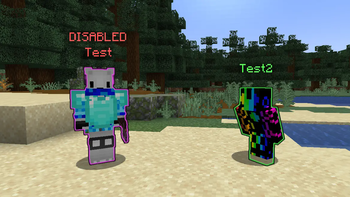
Create, customize, and manage player-like NPCs with an in-game editor GUI, click actions, AI goals, and a built-in path system.
If you have any suggestions, need a feature implemented, encounter any issues, or just have a question, feel free to use the issue page or reach out to me on Discord @eisi05
> ⚠️ Important: If you're upgrading from a version earlier than 2. 1. 0, you must first update to a version between 2. 1. 0 and 2. 4. 2 before installing 3. 2.x.
### 🌍 Translations & Localization: > If you want to add a new language to the project, please reach out to me so I can set it up on Crowdin for you! Or you can send me a translated .zip file directly
If you want to make a tutorial video about it, feel free to do so
## Supported Versions
> Spigot: 1. 20. 6 - 26. 2 > > Paper: 1. 21 - 26. 2
## Overview
- In-game editor: create and configure NPCs directly on your server.
- Click Actions: build action chains for left/right/both clicks.
- Path system: create and reuse paths (including visualization + testing).
## Getting Started
- `/npc create`
- `/npc edit`
- Right-click an NPC to open its editor.
- Plugin docs: https://github.com/Eisi05/NpcApi-Spigot/wiki/PLUGIN-Home
- API / Developer docs:
- - Spigot: https://github.com/Eisi05/NpcApi-Spigot/wiki/API-Home
- - Paper: https://github.com/Eisi05/NpcApi-Paper/wiki/API-Home
## Highlights
- In-game NPC editor
- - Toggle edit-mode and configure NPCs directly by interacting with them.
- - Edit common properties like name, skin, equipment, glow, visibility, tab-list, pose, and more.
- Click Actions (Left / Right / Both)
- - Build action chains that run when players click an NPC.
- - Built-in action types include:
- - `Command` (run commands with placeholders + variables)
- - `Server` (send players to a BungeeCord server)
- - `Wait` (wait by time or by command trigger)
- - `Animation` (play an animation)
- - `Path` (make the NPC walk along a saved path)
- - `SetVariable` (set local/instance/global numeric variables)
- - `Condition` (run a sub-chain if an expression is true)
- - `Loop` (repeat a sub-chain; while-loop or for-loop)
- - `Npc` (apply NPC options per-player or globally as an action)
- - `Stop` (stop the chain)
- Path system
- - Create paths using points, visualize them, test them with a temporary NPC, and reuse them in NPC actions.
- AI Goals
- - Configure NPC behavior with built-in goals: Walk to Location, Walk Path, Follow Entity, Attack Entity, Look Around, Wait, and Wander.
- - Set target predicates using expressions for dynamic entity selection.
- Expression Parser
- - Use mathematical expressions with variables, functions, and boolean logic.
- - Support for local, instance, and global variables.
- - Execute commands within expressions and use their results.
- Localization + PlaceholderAPI
- - Ships with language files (default `en_US`).
- - PlaceholderAPI is supported (soft-depend): placeholders can be used in plugin messages where applicable.
## Guides
Getting Started (Installation + Quick Start)
### Installation
1. Download the jar and place it into your server’s `plugins/` folder.
2. Start the server once.
3. Configure (optional):
- `plugins/NpcPlugin/config.yml`
- `plugins/NpcPlugin/lang/
### Quick Start
#### 1) Create an NPC
- `/npc create`
#### 2) Enable edit-mode
- `/npc edit`
While edit-mode is enabled:
- Interact with an NPC to open its editor GUI.
If the NPC is not editable, you’ll get a message like `This NPC is not editable!`.
#### 3) Configure NPC options in the GUI
The GUI lets you change things like:
- Name
- Skin (player name / UUID / local `.png` / URL / `.yml` file / PlaceholderAPI)
- “Use Player Skin” (per-player skin)
- Equipment slots
- Visibility / enabled state
- Tab list visibility
- Hide nametag
- Pose
- Skin parts
- Glowing + color
- Look-at-player radius / interval
- Scale
- Teleport to NPC / teleport NPC to you
- Delete NPC
- Goals
For detailed information on setting skins, see the (https://github.com/Eisi05/NpcApi-Spigot/wiki/PLUGIN-Skins).
Click Actions
## Click Actions (Left / Right / Both)
In the NPC GUI go to Click Action.
You can configure actions separately for:
- Left click
- Right click
- Both (combined)
You can create an action chain by adding multiple actions.
### Action editing tips
- Remove an action: middle-click an existing action.
- Add actions quickly: shift-click an action type to append it.
- Reorder / insert: pick up an action type onto your cursor and click a slot.
### Common action types
#### `Command`
Executes a command.
- Input can be with or without leading `/` (the plug
📊 Mod Details
- Game
- Minecraft Plugins
- Author
- Eisi05
- Version
- 3.2.2
- Downloads
- 42,712
- Endorsements
- 48
- Category
- management
- Created
- 9/9/2025
- Updated
- 8/17/2026
- Game Versions
- 1.20.6, 1.21, 1.21.1, 1.21.2, 1.21.3
- Tags
- management, technology, utility
🔧 How to Install Minecraft Plugins Mods
Download from Modrinth. Use Prism Launcher or drop into your mods folder.
📖 Full step-by-step install guide for Minecraft Plugins →
Visit the official mod page for specific installation instructions for this mod.
🎮 Need cheat codes or console commands? Check ur gaming wiki for Minecraft Plugins commands, item IDs, and more.
❓ Frequently Asked Questions
Which Minecraft Plugins versions does NPC Plugin support?
The author lists 1.20.6, 1.21, 1.21.1, 1.21.2, 1.21.3, 1.21.4. Other versions may work but are untested by the author.
What is the latest version of NPC Plugin?
Version 3.2.2, published 2026-08-17 with 42,712 downloads recorded at the source.
Keep browsing — more Minecraft Plugins mods await