NiceLife
🟡 Updated this year🖼️ Gallery (1 images)
🔍 Analysis
- 🏆 #226 of 378 game-mechanics mods in this game by downloads
📋 About This Mod
# NiceLife A recreation of the (https://www.youtube.com/watch?v=2teag5QC7NA) Series by (https://www.youtube.com/@Grian) --- ## Features Carries on over most of the features as seen in the series on Youtube. This plugin has quite a lot of customization options as well including enabling/disabling snow accumulation, red winter, tweaking amout of time given to voting and triva and more! --- ## 🔧 Setup Guide ### Requirements - **Paper 26.1+** - Java 21+ - *(Optional, client-side)* **EMF** (Entity Model Features) + **ETF** (Entity Texture Features) for custom Santa Bot models (coming soon, i broke them accidently) ### Installation 1. Drop `NiceLife.jar` into your server's `plugins/` folder 2. Start the server once to generate `plugins/NiceLife/config.yml` and `plugins/NiceLife/trivia.yml` ### Configuration Open `plugins/NiceLife/config.yml` and set: *This does not have to be changed unless dimension folders have been renamed* ```yaml worlds: overworld: "world" # exact name of your overworld folder nether: "world_nether" # exact name of your nether folder ``` All other settings have sensible defaults. See the inline comments in `config.yml` for full documentation of every option, or you can reach out to me for help via my discord server ### Trivia Questions Edit `plugins/NiceLife/trivia.yml` to add your own questions: ```yaml questions: my_question: question: "Who runs the Life Series?" options: - "Grian" - "Joel" - "Bdubs" answer: "Grian" ``` The `answer` field must exactly match one of the `options` (case-insensitive). You can also use (https://armyfury.github.io/WLTriviaGen/) to generate your trivia but make sure to delete the "difficulty" lines before putting this in (ideally they will get ignored but sometimes it bugs out) ### Starting a Game ``` /nicelife session 1 # set the session number (1, 2, or 3) /nicelife start # begins the game and registers all online players ``` ### Nether Conversion *(optional)* Converts your existing nether to Nice Life's nether (lava -> ice, netherrack -> snow) Pre-generate your nether world, then run: ``` /nicelife nether-convert ``` This command will convert all chunks that were generated at time time of command execution. Progress is shown to all operators. This is irreversible — back up your world first. --- ## Commands All admin commands require the `nicelife.admin` permission (default: **op**). Non-admin players who run `/nicelife` will see a description of the plugin instead. | Command | Description | |---|---| | `/nicelife start` | Start the game and register all online players | | `/nicelife stop` | Stop the game and save state to disk | | `/nicelife session <1\|2\|3>` | Set the current session number | | `/nicelife info` | Display full game state — lives, session, night count, snow speed | | `/nicelife addlife <player>` | Give a player one extra life | | `/nicelife removelife <player>` | Remove one life from a player | | `/nicelife setlives <player> <n>` | Set a player's life count directly | | `/nicelife setnaughty <player>` | Manually place a player on the Naughty List | | `/nicelife setnice <player>` | Manually place a player on the Nice List | | `/nicelife clearlist ` | Clear Naughty/Nice status — one player or everyone | | `/nicelife nether-convert` | Begin the async Nether conversion | | `/nicelife reload` | Reload `config.yml` and `trivia.yml` without restarting | | `/nicelife trivia` | Show how many trivia questions are currently loaded | --- ## Permissions | Permission | Description | Default | |---|---|---| | `nicelife.admin` | Access to all admin commands | op | | `nicelife.player` | Basic player permission (auto-granted) | true | --- ## Session Guide | Session | Naughty List | Nice List | Red Winter | |---|---|---|---| | 1 | ✅ Every night | ❌ | ❌ | | 2 | ✅ Alternating nights | ✅ Alternating nights | ❌ | | 3 | ✅ Alternating nights | ✅ Alternating nights | ✅ Triggers on last Yellow death | Switch sessions mid-series with `/nicelife session <n>`. --- ## Trivia Format Reference ```yaml questions: unique_key: # any unique string, used only as an identifier question: "..." # the question shown to players options: # 2–5 answer choices - "Option A" - "Option B" - "Option C" answer: "Option A" # must exactly match one of the options (case-insensitive) ``` ## Extra help/Bug reports/Feature requests You can contact me on my discord server (username-ArmyFury) ---
A recreation of the (https://www.youtube.com/watch?v=2teag5QC7NA) Series by (https://www.youtube.com/@Grian)
## Features
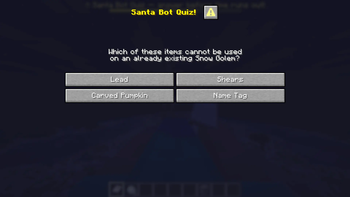
Carries on over most of the features as seen in the series on Youtube. This plugin has quite a lot of customization options as well including enabling/disabling snow accumulation, red winter, tweaking amout of time given to voting and triva and more!
## 🔧 Setup Guide
### Requirements - Paper 26. 1+ - Java 21+ - (Optional, client-side) EMF (Entity Model Features) + ETF (Entity Texture Features) for custom Santa Bot models (coming soon, i broke them accidently)
### Installation 1. Drop `NiceLife.jar` into your server's `plugins/` folder 2. Start the server once to generate `plugins/NiceLife/config.yml` and `plugins/NiceLife/trivia.yml`
### Configuration Open `plugins/NiceLife/config.yml` and set:
This does not have to be changed unless dimension folders have been renamed
```yaml worlds: overworld: "world" # exact name of your overworld folder nether: "world_nether" # exact name of your nether folder ```
All other settings have sensible defaults. See the inline comments in `config.yml` for full documentation of every option, or you can reach out to me for help via my discord server
### Trivia Questions Edit `plugins/NiceLife/trivia.yml` to add your own questions:
```yaml questions: my_question: question: "Who runs the Life Series?" options: - "Grian" - "Joel" - "Bdubs" answer: "Grian" ```
The `answer` field must exactly match one of the `options` (case-insensitive).
You can also use (https://armyfury.github.io/WLTriviaGen/) to generate your trivia but make sure to delete the "difficulty" lines before putting this in (ideally they will get ignored but sometimes it bugs out)
### Starting a Game ``` /nicelife session 1 # set the session number (1, 2, or 3) /nicelife start # begins the game and registers all online players ```
### Nether Conversion (optional) Converts your existing nether to Nice Life's nether (lava -> ice, netherrack -> snow) Pre-generate your nether world, then run: ``` /nicelife nether-convert ``` This command will convert all chunks that were generated at time time of command execution. Progress is shown to all operators. This is irreversible — back up your world first.
## Commands
All admin commands require the `nicelife.admin` permission (default: op). Non-admin players who run `/nicelife` will see a description of the plugin instead.
| Command | Description |
|---|---|
| `/nicelife start` | Start the game and register all online players |
| `/nicelife stop` | Stop the game and save state to disk |
| `/nicelife session <1\|2\|3>` | Set the current session number |
| `/nicelife info` | Display full game state — lives, session, night count, snow speed |
| `/nicelife addlife
## Permissions
| Permission | Description | Default | |---|---|---| | `nicelife.admin` | Access to all admin commands | op | | `nicelife.player` | Basic player permission (auto-granted) | true |
## Session Guide
| Session | Naughty List | Nice List | Red Winter | |---|---|---|---| | 1 | ✅ Every night | ❌ | ❌ | | 2 | ✅ Alternating nights | ✅ Alternating nights | ❌ | | 3 | ✅ Alternating nights | ✅ Alternating nights | ✅ Triggers on last Yellow death |
Switch sessions mid-series with `/nicelife session
## Trivia Format Reference
```yaml questions: unique_key: # any unique string, used only as an identifier question: "..." # the question shown to players options: # 2–5 answer choices - "Option A" - "Option B" - "Option C" answer: "Option A" # must exactly match one of the options (case-insensitive) ```
## Extra help/Bug reports/Feature requests
You can contact me on my discord server (username-ArmyFury) ---
📊 Mod Details
- Game
- Minecraft Plugins
- Author
- ArmyFury
- Version
- 1.1
- Downloads
- 49
- Endorsements
- 1
- Category
- game-mechanics
- Created
- 5/11/2026
- Updated
- 5/13/2026
- Game Versions
- 1.21.10, 1.21.11, 26.1, 26.1.1, 26.1.2
- Tags
- game-mechanics, magic, social
🔧 How to Install Minecraft Plugins Mods
Download from Modrinth. Use Prism Launcher or drop into your mods folder.
📖 Full step-by-step install guide for Minecraft Plugins →
Visit the official mod page for specific installation instructions for this mod.
🎮 Need cheat codes or console commands? Check ur gaming wiki for Minecraft Plugins commands, item IDs, and more.
❓ Frequently Asked Questions
Which Minecraft Plugins versions does NiceLife support?
The author lists 1.21.10, 1.21.11, 26.1, 26.1.1, 26.1.2. Other versions may work but are untested by the author.
What is the latest version of NiceLife?
Version 1.1, published 2026-05-13 with 49 downloads recorded at the source.
Keep browsing — more Minecraft Plugins mods await