Nexora Teams
🟡 Updated this year🖼️ Gallery (3 images)
🔍 Analysis
- 🏆 #88 of 129 economy mods in this game by downloads
📋 About This Mod
# NexoraTeams A modern and highly configurable team-management plugin designed for Minecraft servers running Paper or compatible server software. Create teams, invite players, customise team colours, complete challenges, manage members through interactive GUIs, and display team identities throughout the server. !(https://cdn.modrinth.com/data/cached_images/03646994a8579285b514bd954666ba0e2e7dd14f.png) ## FEATURES * Create and manage player teams * Invite, accept, kick, promote, demote, leave, and disband * Interactive team-management GUI * Custom team colours * Team-coloured names in `/team info` * Optional team-name prefix in the TAB list * Configurable spacing between the team name and player name * Player heads for occupied team slots * Attractive icons for available slots and actions * Team challenges and progression * Team-specific completion titles and subtitles * Modern hexadecimal colour support * Configurable messages, menus, titles, and sounds * Persistent team data across server restarts * Administrative commands and permissions * Clean, compact, player-friendly descriptions !(https://cdn.modrinth.com/data/cached_images/4d551df805791b410240ec8535daba7800a0d410.png) ## INSTALLATION 1. Download the plugin JAR. 2. Stop your Minecraft server. 3. Place the JAR inside the server's `plugins` folder. 4. Start the server. 5. Edit the generated configuration files as needed. 6. Restart the server or use the plugin's supported reload command. Paper or compatible server software is recommended. No client-side installation is required. ## BASIC COMMANDS * `/team create <name>` — Create a team * `/team invite <player>` — Invite a player * `/team accept` — Accept an invitation * `/team info` — View team information * `/team color` — Select a team colour * `/team leave` — Leave your current team * `/team disband` — Disband your team * `/team gui` — Open the team interface * `/team help` — View available commands Commands and permissions may vary depending on configuration and plugin version. ## TEAM COLOURS Players can select a configurable colour for their team. The chosen colour is displayed in supported team menus, messages, team information, and optional TAB-list prefixes. The TAB integration is disabled by default and can be enabled in the configuration. ## SUPPORT When reporting a problem, include: * Plugin version * Minecraft version * Server software and build * Complete console error * Installed plugin list * Steps required to reproduce the issue Discord(https://discord.gg/4rg6Jws35y)
# NexoraTeams
A modern and highly configurable team-management plugin designed for Minecraft servers running Paper or compatible server software.
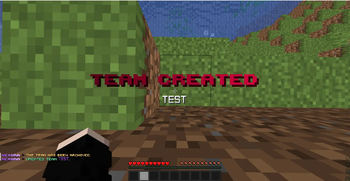
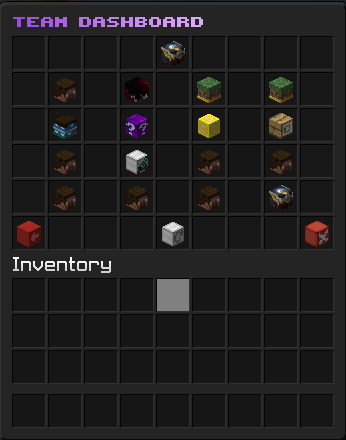
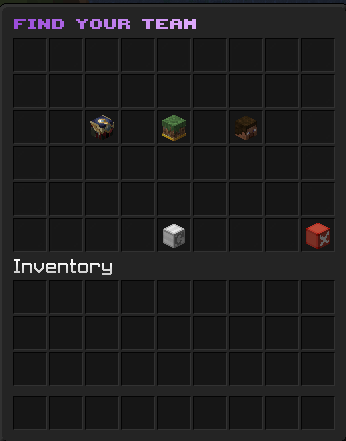
Create teams, invite players, customise team colours, complete challenges, manage members through interactive GUIs, and display team identities throughout the server.
!(https://cdn.modrinth.com/data/cached_images/03646994a8579285b514bd954666ba0e2e7dd14f.png)
## FEATURES
Create and manage player teams Invite, accept, kick, promote, demote, leave, and disband Interactive team-management GUI Custom team colours Team-coloured names in `/team info` Optional team-name prefix in the TAB list Configurable spacing between the team name and player name Player heads for occupied team slots Attractive icons for available slots and actions Team challenges and progression Team-specific completion titles and subtitles Modern hexadecimal colour support Configurable messages, menus, titles, and sounds Persistent team data across server restarts Administrative commands and permissions Clean, compact, player-friendly descriptions
!(https://cdn.modrinth.com/data/cached_images/4d551df805791b410240ec8535daba7800a0d410.png)
## INSTALLATION
1. Download the plugin JAR. 2. Stop your Minecraft server. 3. Place the JAR inside the server's `plugins` folder. 4. Start the server. 5. Edit the generated configuration files as needed. 6. Restart the server or use the plugin's supported reload command.
Paper or compatible server software is recommended.
No client-side installation is required.
## BASIC COMMANDS
`/team create
Commands and permissions may vary depending on configuration and plugin version.
## TEAM COLOURS
Players can select a configurable colour for their team. The chosen colour is displayed in supported team menus, messages, team information, and optional TAB-list prefixes.
The TAB integration is disabled by default and can be enabled in the configuration.
When reporting a problem, include:
Plugin version Minecraft version Server software and build Complete console error Installed plugin list * Steps required to reproduce the issue Discord(https://discord.gg/4rg6Jws35y)
📊 Mod Details
- Game
- Minecraft Plugins
- Author
- veltronthegoat
- Version
- 1.0.0
- Downloads
- 44
- Endorsements
- 1
- Category
- economy
- Created
- 8/7/2026
- Updated
- 7/15/2026
- Game Versions
- 1.20, 1.20.1, 1.20.2, 1.20.3, 1.20.4
- Tags
- economy, social, utility
🔧 How to Install Minecraft Plugins Mods
Download from Modrinth. Use Prism Launcher or drop into your mods folder.
📖 Full step-by-step install guide for Minecraft Plugins →
Visit the official mod page for specific installation instructions for this mod.
🎮 Need cheat codes or console commands? Check ur gaming wiki for Minecraft Plugins commands, item IDs, and more.
❓ Frequently Asked Questions
Which Minecraft Plugins versions does Nexora Teams support?
The author lists 1.20, 1.20.1, 1.20.2, 1.20.3, 1.20.4, 1.20.5. Other versions may work but are untested by the author.
What is the latest version of Nexora Teams?
Version 1.0.0, published 2026-07-15 with 44 downloads recorded at the source.
Keep browsing — more Minecraft Plugins mods await