NexoAIChat
🟡 Updated this year🖼️ Gallery (2 images)

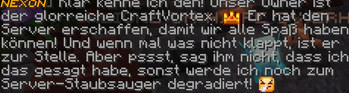
🔍 Analysis
- 🏆 #192 of 1224 bukkit mods in this game by downloads
📋 About This Mod
# 🤖 NexoAIChat Bring powerful AI directly into your Minecraft server. **NexoAIChat** is a fully configurable AI chat plugin developed by **NexoPlugins**. It allows your players to communicate with the latest AI models directly from Minecraft using either chat mentions or a command. Simply choose your AI provider, select a model, enter your API key, and you're ready to go. --- ## ✨ Supported AI Providers NexoAIChat supports the latest models from providers such as: - OpenAI - Grok (xAI) - Google Gemini - DeepSeek - OpenRouter Simply select your provider and model in the configuration. --- ## 💬 Chat Interaction Players can interact with the AI in two different ways. ### Mention Mode Mention the bot directly in chat. Example: ```text @NexoAI How do I build an automatic farm? ``` You can configure: - The bot's name - Whether an `@` symbol is required to trigger the AI - Whether chat mentions are enabled --- ### Command Mode Players can also use: ```text /ai <message> ``` If desired, you can disable chat mentions completely and only allow the command. --- ## 🎭 Custom AI Behavior Configure the AI's behavior with your own system prompt. For example, you can make it act as: - A Minecraft helper - A server assistant - A friendly chatbot - Or anything else you want --- ## 🌍 Public or Private Replies When a player mentions the AI in global chat, you can choose whether it should: - Reply in global chat, or - Send its response only to the player privately. --- ## 🎟 Daily Message Limit Limit how many AI requests each player can make per day. When a player reaches the configured limit: - Chat mentions no longer work. - The `/ai` command no longer works. - The player receives a customizable message informing them that they have used all available messages for the day. --- ## ⚙ Fully Configurable Everything can be configured inside the config.yml, including: - AI provider - AI model - API key - Bot name - AI behavior - Mention settings - Whether an `@` symbol is required - Daily message limit - Public or private replies - All plugin messages --- ## ❤️ Why NexoAIChat? NexoAIChat lets you use your favorite AI provider without being locked into a single platform. Whether you prefer OpenAI, Grok, Gemini, DeepSeek, OpenRouter, or another supported provider, switching is as easy as changing the configuration. Simple to set up, flexible to configure, and designed for modern Minecraft servers. --- Developed by **NexoPlugins**
# 🤖 NexoAIChat
Bring powerful AI directly into your Minecraft server.
NexoAIChat is a fully configurable AI chat plugin developed by NexoPlugins. It allows your players to communicate with the latest AI models directly from Minecraft using either chat mentions or a command.
Simply choose your AI provider, select a model, enter your API key, and you're ready to go.
## ✨ Supported AI Providers
NexoAIChat supports the latest models from providers such as:
- OpenAI
- Grok (xAI)
- Google Gemini
- DeepSeek
- OpenRouter
Simply select your provider and model in the configuration.
## 💬 Chat Interaction
Players can interact with the AI in two different ways.
### Mention Mode
Mention the bot directly in chat.
```text @NexoAI How do I build an automatic farm? ```
You can configure:
- The bot's name
- Whether an `@` symbol is required to trigger the AI
- Whether chat mentions are enabled
### Command Mode
Players can also use:
```text
/ai
If desired, you can disable chat mentions completely and only allow the command.
## 🎭 Custom AI Behavior
Configure the AI's behavior with your own system prompt.
For example, you can make it act as:
- A Minecraft helper
- A server assistant
- A friendly chatbot
- Or anything else you want
## 🌍 Public or Private Replies
When a player mentions the AI in global chat, you can choose whether it should:
- Reply in global chat, or
- Send its response only to the player privately.
## 🎟 Daily Message Limit
Limit how many AI requests each player can make per day.
When a player reaches the configured limit:
- Chat mentions no longer work.
- The `/ai` command no longer works.
- The player receives a customizable message informing them that they have used all available messages for the day.
## ⚙ Fully Configurable
Everything can be configured inside the config.yml, including:
- AI provider
- AI model
- API key
- Bot name
- AI behavior
- Mention settings
- Whether an `@` symbol is required
- Daily message limit
- Public or private replies
- All plugin messages
## ❤️ Why NexoAIChat?
NexoAIChat lets you use your favorite AI provider without being locked into a single platform. Whether you prefer OpenAI, Grok, Gemini, DeepSeek, OpenRouter, or another supported provider, switching is as easy as changing the configuration.
Simple to set up, flexible to configure, and designed for modern Minecraft servers.
Developed by NexoPlugins
📊 Mod Details
- Game
- Minecraft Plugins
- Author
- CraftVortex
- Version
- 2.0.1
- Downloads
- 146
- Endorsements
- 0
- Category
- bukkit
- Created
- 12/21/2025
- Updated
- 7/11/2026
- Game Versions
- 1.20, 1.20.1, 1.20.2, 1.20.3, 1.20.4
- Tags
- magic, management, technology
🔧 How to Install Minecraft Plugins Mods
Download from Modrinth. Use Prism Launcher or drop into your mods folder.
📖 Full step-by-step install guide for Minecraft Plugins →
Visit the official mod page for specific installation instructions for this mod.
🎮 Need cheat codes or console commands? Check ur gaming wiki for Minecraft Plugins commands, item IDs, and more.
❓ Frequently Asked Questions
Which Minecraft Plugins versions does NexoAIChat support?
The author lists 1.20, 1.20.1, 1.20.2, 1.20.3, 1.20.4, 1.20.5. Other versions may work but are untested by the author.
What is the latest version of NexoAIChat?
Version 2.0.1, published 2026-07-11 with 146 downloads recorded at the source.
Keep browsing — more Minecraft Plugins mods await