Neptune FFA
🟡 Updated this year🖼️ Gallery (2 images)
🔍 Analysis
- 🏆 #48 of 92 equipment mods in this game by downloads
📋 About This Mod
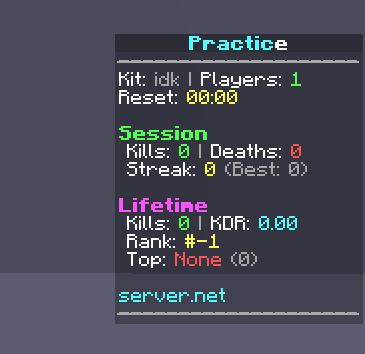
# NeptuneFFA ## Overview NeptuneFFA is a high-performance, kit-based Free-For-All (FFA) engine designed specifically for the Neptune Core practice framework. ## Core Features ### Selector Menu The player interface is built around a dynamic Graphical User Interface (GUI) accessible via `/ffa` or by interacting with the designated lobby item. * **Real-Time Arena Diagnostics**: When hovering over any kit icon, the GUI displays the number of active combatants, the active map name, and the exact seconds remaining before the arena undergoes a scheduled reset. * **Dynamic GUI Resets**: The GUI updates its timers and player counts in real time (every 1 second) while open, eliminating the need for players to close and reopen the interface. * **Custom Slot Mapping and Fillers**: Server administrators can set a custom GUI size (9 to 54 slots) and manually assign specific slots to popular kits. Remaining kits are auto-allocated, and empty slots can be filled with customizable materials (such as colored stained glass panes) with custom display names. * **One-Click Interaction**: Left-clicking a kit joins the corresponding active arena. Right-clicking the active kit leaves the arena and returns the player to the lobby. ### Admin Control The `/ffaadmin` interface provides real-time control over active arenas and configurations directly in-game. * **Session Monitor**: Provides a visual list of all active sessions, showing player counts, current arena settings, and remaining time before automated resets. It supports right-clicking a session to force an immediate map rollback and player kick. * **Kit Settings Panel**: Enables admins to toggle FFA status, toggle worldgen block rollbacks, adjust reset intervals, and manage spawn locations. * **Interactive Spawn Editor**: Opens a sub-menu showing all registered spawn points for a kit. Admins can click to add their current location, teleport to existing spawn points, or clear them. * **Live Slot Arranger**: Allows admins to rearrange kit icons in the player GUI visually. Left-clicking increments the slot index, right-clicking decrements it, and shift-clicking jumps the icon by whole rows. All changes save to configuration files instantly. ### Mechanics #### Block Rollbacks For kits that permit placing or breaking blocks (e.g., CrystalPVP or BuildUHC), NeptuneFFA tracks block interactions. Upon session resets (triggered manually or when the countdown timer expires): 1. All players in the session are safely teleported back to the lobby. 2. Placed blocks are automatically reverted in-memory or via schematic files. 3. The arena session is re-opened and made available for players after a 3-second delay. #### Combat Tagging To prevent combat logging, NeptuneFFA features a built-in combat tag tracker: * **Combat Tag Timer**: Displays a countdown directly in the player's action bar (e.g., "Combat Tag: 8s") supporting full hex codes and MiniMessage formatting. * **Command & Log Protection**: Prevents command preprocess events and teleportation while in combat. Disconnecting while tagged triggers a death penalty, transferring kills and updating statistics. #### Formatting Supports MiniMessage formatting, standard chat colors (e.g., `&a`), and hexadecimal formatting (e.g., `&#FF5555`). These styling systems are fully parsed in menus, scoreboards, action bars, and chat alerts. --- ## Configuration The plugin uses three primary files located in the `plugins/NeptuneFFA/` folder: config.yml Governs global parameters, the lobby item layout, global countdowns, and scoreboard configurations. ```yaml ffa: # Item given to lobby players to access the selector lobby-item: enabled: true slot: 8 material: DIAMOND_SWORD name: "&c&lFree For All &7(Right Click)" lore: - "&7Jump into an FFA arena" respawn-delay-seconds: 5 reset-warning-seconds: track-neptune-kit-stats: true # Scoreboard lines for players in the "IN_FFA" state scoreboard: update-interval-ticks: 20 title: "&c&lFFA" lines: - "&7&m--------------------" - "&fKit: &c<ffa_kit>" - "&fArena: &e<ffa_arena>" - "&fPlayers: &a<ffa_players>" - " " - "&6Reset in: &e<ffa_reset_timer>" - " " - "&7- Session -" - "&fKills: &a<ffa_session_kills>" - "&fDeaths: &c<ffa_session_deaths>" - "&fStreak: &e<ffa_session_streak>" - "&fBest Streak: &6<ffa_session_best_streak>" - "&fKDR: &b<ffa_session_kdr>" - " " - "&7- Lifetime -" - "&fKills: &a<ffa_lifetime_kills>" - "&fDeaths: &c<ffa_lifetime_deaths>" - "&fBest Streak: &6<ffa_lifetime_best_streak>" - "&fKDR: &b<ffa_kdr>" - " " - "&7- Ranking -" - "&fGlobal Rank: &d#<ffa_rank>" - "&fTop Killer: &e<ffa_top_killer> &7(<ffa_top_killer_kills>)" - "&fKills to Pass: &c<ffa_kills_to_next_rank>" - " " - "&bserver.net" - "&7&m--------------------" ``` kits.yml Stores configurations for ea
# NeptuneFFA ## Overview NeptuneFFA is a high-performance, kit-based Free-For-All (FFA) engine designed specifically for the Neptune Core practice framework.
## Core Features
### Selector Menu The player interface is built around a dynamic Graphical User Interface (GUI) accessible via `/ffa` or by interacting with the designated lobby item. Real-Time Arena Diagnostics: When hovering over any kit icon, the GUI displays the number of active combatants, the active map name, and the exact seconds remaining before the arena undergoes a scheduled reset. Dynamic GUI Resets: The GUI updates its timers and player counts in real time (every 1 second) while open, eliminating the need for players to close and reopen the interface. Custom Slot Mapping and Fillers: Server administrators can set a custom GUI size (9 to 54 slots) and manually assign specific slots to popular kits. Remaining kits are auto-allocated, and empty slots can be filled with customizable materials (such as colored stained glass panes) with custom display names. One-Click Interaction: Left-clicking a kit joins the corresponding active arena. Right-clicking the active kit leaves the arena and returns the player to the lobby.
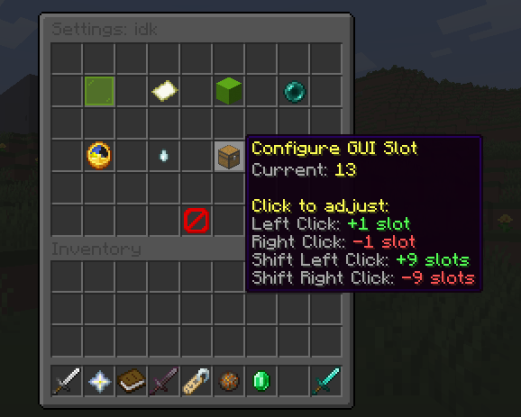
### Admin Control The `/ffaadmin` interface provides real-time control over active arenas and configurations directly in-game. Session Monitor: Provides a visual list of all active sessions, showing player counts, current arena settings, and remaining time before automated resets. It supports right-clicking a session to force an immediate map rollback and player kick. Kit Settings Panel: Enables admins to toggle FFA status, toggle worldgen block rollbacks, adjust reset intervals, and manage spawn locations. Interactive Spawn Editor: Opens a sub-menu showing all registered spawn points for a kit. Admins can click to add their current location, teleport to existing spawn points, or clear them. Live Slot Arranger: Allows admins to rearrange kit icons in the player GUI visually. Left-clicking increments the slot index, right-clicking decrements it, and shift-clicking jumps the icon by whole rows. All changes save to configuration files instantly.
### Mechanics
#### Block Rollbacks For kits that permit placing or breaking blocks (e.g., CrystalPVP or BuildUHC), NeptuneFFA tracks block interactions. Upon session resets (triggered manually or when the countdown timer expires): 1. All players in the session are safely teleported back to the lobby. 2. Placed blocks are automatically reverted in-memory or via schematic files. 3. The arena session is re-opened and made available for players after a 3-second delay.
#### Combat Tagging To prevent combat logging, NeptuneFFA features a built-in combat tag tracker: Combat Tag Timer: Displays a countdown directly in the player's action bar (e.g., "Combat Tag: 8s") supporting full hex codes and MiniMessage formatting. Command & Log Protection: Prevents command preprocess events and teleportation while in combat. Disconnecting while tagged triggers a death penalty, transferring kills and updating statistics.
#### Formatting Supports MiniMessage formatting, standard chat colors (e.g., `&a`), and hexadecimal formatting (e.g., `&#FF5555`). These styling systems are fully parsed in menus, scoreboards, action bars, and chat alerts.
## Configuration
The plugin uses three primary files located in the `plugins/NeptuneFFA/` folder:
config.yml
Governs global parameters, the lobby item layout, global countdowns, and scoreboard configurations.
```yaml
ffa:
# Item given to lobby players to access the selector
lobby-item:
enabled: true
slot: 8
material: DIAMOND_SWORD
name: "&c&lFree For All &7(Right Click)"
lore:
- "&7Jump into an FFA arena"
respawn-delay-seconds: 5
reset-warning-seconds:
track-neptune-kit-stats: true
# Scoreboard lines for players in the "IN_FFA" state
scoreboard:
update-interval-ticks: 20
title: "&c&lFFA"
lines:
- "&7&m--------------------"
- "&fKit: &c
kits.yml Stores configurations for ea
📊 Mod Details
- Game
- Minecraft Plugins
- Author
- Yowsef
- Version
- 1.3
- Downloads
- 227
- Endorsements
- 1
- Category
- equipment
- Created
- 6/6/2026
- Updated
- 7/7/2026
- Game Versions
- 1.21.11
- Tags
- equipment, game-mechanics, minigame
🔧 How to Install Minecraft Plugins Mods
Download from Modrinth. Use Prism Launcher or drop into your mods folder.
📖 Full step-by-step install guide for Minecraft Plugins →
Visit the official mod page for specific installation instructions for this mod.
🎮 Need cheat codes or console commands? Check ur gaming wiki for Minecraft Plugins commands, item IDs, and more.
❓ Frequently Asked Questions
Which Minecraft Plugins versions does Neptune FFA support?
The author lists 1.21.11. Other versions may work but are untested by the author.
What is the latest version of Neptune FFA?
Version 1.3, published 2026-07-07 with 227 downloads recorded at the source.
Keep browsing — more Minecraft Plugins mods await