NametagHider
🟡 Updated this year🖼️ Gallery (2 images)

🔍 Analysis
- 👍 0.1% endorsement rate
- 🏆 #40 of 82 paper mods in this game by downloads
📋 About This Mod
**NametagHider** is a Paper plugin that hides player nametags and lets you briefly reveal a player’s name by right‑clicking them. _The displayed text is configurable._ ### Features 1. Hides player nametags using a scoreboard team. 2. Temporary name reveal on right‑click. 3. Toggleable core logic and right‑click reveal. 4. Customizable display format. ### Commands and permissions 1. `/nametagHider reload` — reload config. 2. `/nametagHider set-rc ` — enable/disable right‑click reveal. 3. `/nametagHider enabled` — toggle nametag hiding logic. 4. `/nametagHider info` — show plugin state. Permission: `nametagHider.commands` ### Config file ```yaml # Master switch for the hiding logic. # true — the plugin hides nametags via a scoreboard team. # false — the plugin does nothing. enabled: true # Temporary reveal on player right-click. # true — shows target's nickname briefly when right-clicked. # false — disables right-click reveal. rightClickView: false # A string shown to the clicking player when revealing a nickname. # Placeholders: # %nickname% — target player's nickname. # also supported placeholders from PlacehodlerAPI # Formatting: # Minecraft color/format codes using the § character are supported (e.g., §6, §f, §l). nicknameFormat: '§f-§6§f-§r' # The plugin uses a scoreboard team to hide nametags. # Note: old teams are NOT removed automatically if you change the name; clean them up manually if needed. scoreboardTeam: # Technical team name. Change it if there is a conflict on your server. name: 'NametagHider' # Display name shown in UI. Any arbitrary string. displayName: 'NametagHider team used to hide nametags' # Optional: if MythicLib plugin exist and option if true, the plugin will use MythicLib's API to display nickname instead of using default way to display in actionbar. mythicLibIntegration: true ```
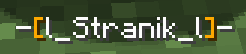
NametagHider is a Paper plugin that hides player nametags and lets you briefly reveal a player’s name by right‑clicking them. _The displayed text is configurable._
### Features 1. Hides player nametags using a scoreboard team. 2. Temporary name reveal on right‑click. 3. Toggleable core logic and right‑click reveal. 4. Customizable display format.
### Commands and permissions 1. `/nametagHider reload` — reload config. 2. `/nametagHider set-rc ` — enable/disable right‑click reveal. 3. `/nametagHider enabled` — toggle nametag hiding logic. 4. `/nametagHider info` — show plugin state.
Permission: `nametagHider.commands`
### Config file ```yaml # Master switch for the hiding logic. # true — the plugin hides nametags via a scoreboard team. # false — the plugin does nothing. enabled: true
# Temporary reveal on player right-click. # true — shows target's nickname briefly when right-clicked. # false — disables right-click reveal. rightClickView: false
# A string shown to the clicking player when revealing a nickname. # Placeholders: # %nickname% — target player's nickname. # also supported placeholders from PlacehodlerAPI # Formatting: # Minecraft color/format codes using the § character are supported (e.g., §6, §f, §l). nicknameFormat: '§f-§6[§r%nickname%§6]§f-§r'
# The plugin uses a scoreboard team to hide nametags. # Note: old teams are NOT removed automatically if you change the name; clean them up manually if needed. scoreboardTeam: # Technical team name. Change it if there is a conflict on your server. name: 'NametagHider' # Display name shown in UI. Any arbitrary string. displayName: 'NametagHider team used to hide nametags'
# Optional: if MythicLib plugin exist and option if true, the plugin will use MythicLib's API to display nickname instead of using default way to display in actionbar. mythicLibIntegration: true ```
📊 Mod Details
- Game
- Minecraft Plugins
- Author
- Stranik2504
- Version
- 1.2
- Downloads
- 2,772
- Endorsements
- 2
- Category
- paper
- Created
- 9/22/2025
- Updated
- 8/19/2026
- Game Versions
- 26.2
- Tags
- social
🔧 How to Install Minecraft Plugins Mods
Download from Modrinth. Use Prism Launcher or drop into your mods folder.
📖 Full step-by-step install guide for Minecraft Plugins →
Visit the official mod page for specific installation instructions for this mod.
🎮 Need cheat codes or console commands? Check ur gaming wiki for Minecraft Plugins commands, item IDs, and more.
❓ Frequently Asked Questions
Which Minecraft Plugins versions does NametagHider support?
The author lists 26.2. Other versions may work but are untested by the author.
What is the latest version of NametagHider?
Version 1.2, published 2026-08-19 with 2,772 downloads recorded at the source.
Keep browsing — more Minecraft Plugins mods await