MusicStudio
🟡 Updated this year🖼️ Gallery (3 images)
🔍 Analysis
- 🏆 #86 of 383 adventure mods in this game by downloads
📋 About This Mod
# MusicStudio In-game music composition studio — compose songs in a tracker-style GUI, press them to music discs, and play them anywhere. ## Features - **Tracker-style editor** inside a 54-slot inventory GUI — a layers × ticks grid where you place, move, and delete notes - **16 vanilla note block instruments**, **25 pitches** (F#3–F#5, two octaves) - Per-layer **instrument**, **volume**, and **mute** control - Adjustable **tempo** (ticks per cell) - **Copy / paste** and in-editor **preview playback** (only you hear it) - **Press songs to music discs** — right-click to play; the music follows the holder like a portable radio - Optional **extraction cost**, **ItemsAdder** custom item support, and vanilla `glint` / `unbreakable` / `custom-model-data` - **Import Note Block Studio `.nbs` files** - **Per-player song ownership** — you only see and edit your own songs (admins see all) - **Full i18n** (`ko_kr` / `en_us`); every string is configurable with MiniMessage - **Update notifications** — console and admins are notified when a newer GitHub release exists - **Wide version support** — Paper / Purpur **1.20.x – 1.21.x and 26.x** ## Supported Versions One jar is provided per version series under `build/libs/Upload/<series>/`. Each jar runs on **both Paper and Purpur**. | Folder | Supported server versions | |--------|---------------------------| | `1.20` | 1.20 – 1.20.6 (all 1.20.x) | | `1.21` | 1.21 – 1.21.11 (all 1.21.x) | | `26.1.2` | 26.1.2 only | > The Java requirement follows the server: 1.20–1.20.4 need Java 17, 1.20.5+ need Java 21, 26.x needs Java 25. ## Permissions | Permission | Default | Grants | |------------|---------|--------| | `musicstudio.use` | `true` (everyone) | Create, edit, and play your own songs | | `musicstudio.admin` | `op` | Import `.nbs`, reload config, access **all** players' songs, bypass the per-player song limit | ## Commands Base command: `/음악스튜디오` (aliases: `/음스`, `/ms`, `/musicstudio`). Both Korean and English subcommands work. ### Song Management | Command | Description | |---------|-------------| | `/ms create <name>` (`생성`) | Create a new empty song | | `/ms list` (`목록`) | List your songs (all songs, if admin) | | `/ms open <name>` (`열기`) | Open the song in the editor | | `/ms rename <old> <new>` (`이름변경`) | Rename a song | | `/ms disc <name>` (`음반`) | Press the song onto a music disc | | `/ms delete <name>` (`삭제`) | Delete a song | | `/ms help` (`도움말`) | Show help | ### Admin | Command | Description | |---------|-------------| | `/ms admin import <file.nbs>` (`관리자 임포트`) | Import an `.nbs` from the import folder (no argument = list available files) | | `/ms admin reload` (`관리자 리로드`) | Reload config, text, and song data | > Names may contain spaces (joined with `_`) and are limited to 32 characters. ## Editor Controls The editor is an inventory GUI. Rows are **layers**, columns are **ticks**; the bottom rows hold the ruler and control bar. On a **layer header**, press F to select that complete logical layer for movement, then press F on another header to move it to that exact position. Press F on the selected source again to cancel. Q continues to delete a layer. | Target | Action | |--------|--------| | **Empty cell** | Left-click — create a note at the current pitch | | **Note** | Left: select (copies its pitch) · Right: +1 semitone · Shift+Right: −1 semitone · Shift+Left: range select · Q: delete | | **Layer header** | Left: change instrument · Right: toggle mute · Shift+Left/Right: volume ±10% · Q (drop): delete layer | | **Info (jukebox)** | Left: pitch up · Right: pitch down · Shift: by octave — sets the pitch used for new notes | | **Tick banners** | Click: set the paste spot (turns blue) · White: unselected · Yellow: selected · Orange: range start pending · Lime: playhead | | **◀ / ▶ tick** | Scroll one tick · Shift: jump 8 ticks | | **▲ / ▼ layer** | Scroll layers up / down | | **▶ preview** | Preview to yourself. Press again to stop (the button toggles) | | **Settings** | Tempo | | **Output** | Press this song onto a music disc | | **Copy / paste** | **Copy takes the yellow cells; Paste lands on the blue banner.** Shift+left click twice on editor cells so the range turns yellow, then press Copy. Click a tick banner to turn it blue, then press Paste. Right click Copy to clear the selection. Empty ticks, scrolling, and non-contiguous ranges are supported. | | **Music disc item** | Right-click: play · right-click again: stop | **Instruments (16):** Harp, Bass, Bass Drum, Snare, Hat, Guitar, Flute, Bell, Chime, Xylophone, Iron Xylophone, Cow Bell, Didgeridoo, Bit, Banjo, Pling. ## Configuration `plugins/MusicStudio/config.yml`: ```yaml language: ko_kr # ko_kr (Korean) or en_us (English); untranslated strings fall back to ko_kr update-check: enabled: true # notify console + admins when a newer GitHub release exists limits: max-ticks: 4096 # maximum song length
# MusicStudio
In-game music composition studio — compose songs in a tracker-style GUI, press them to music discs, and play them anywhere.
## Features
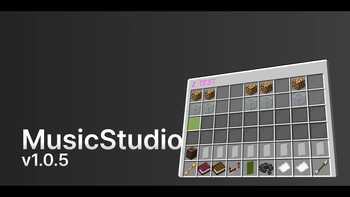
- Tracker-style editor inside a 54-slot inventory GUI — a layers × ticks grid where you place, move, and delete notes
- 16 vanilla note block instruments, 25 pitches (F#3–F#5, two octaves)
- Per-layer instrument, volume, and mute control
- Adjustable tempo (ticks per cell)
- Copy / paste and in-editor preview playback (only you hear it)
- Press songs to music discs — right-click to play; the music follows the holder like a portable radio
- Optional extraction cost, ItemsAdder custom item support, and vanilla `glint` / `unbreakable` / `custom-model-data`
- Import Note Block Studio `.nbs` files
- Per-player song ownership — you only see and edit your own songs (admins see all)
- Full i18n (`ko_kr` / `en_us`); every string is configurable with MiniMessage
- Update notifications — console and admins are notified when a newer GitHub release exists
- Wide version support — Paper / Purpur 1. 20.x – 1. 21.x and 26.x
## Supported Versions
One jar is provided per version series under `build/libs/Upload/
| Folder | Supported server versions | |--------|---------------------------| | `1. 20` | 1. 20 – 1. 20. 6 (all 1. 20.x) | | `1. 21` | 1. 21 – 1. 21. 11 (all 1. 21.x) | | `26. 1. 2` | 26. 1. 2 only |
> The Java requirement follows the server: 1. 20–1. 20. 4 need Java 17, 1. 20. 5+ need Java 21, 26.x needs Java 25.
## Permissions
| Permission | Default | Grants | |------------|---------|--------| | `musicstudio.use` | `true` (everyone) | Create, edit, and play your own songs | | `musicstudio.admin` | `op` | Import `.nbs`, reload config, access all players' songs, bypass the per-player song limit |
## Commands
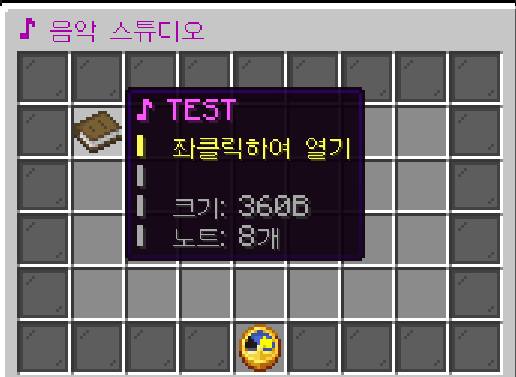
Base command: `/음악스튜디오` (aliases: `/음스`, `/ms`, `/musicstudio`). Both Korean and English subcommands work.
### Song Management
| Command | Description |
|---------|-------------|
| `/ms create
### Admin
| Command | Description |
|---------|-------------|
| `/ms admin import
> Names may contain spaces (joined with `_`) and are limited to 32 characters.
## Editor Controls
The editor is an inventory GUI. Rows are layers, columns are ticks; the bottom rows hold the ruler and control bar.
On a layer header, press F to select that complete logical layer for movement, then press F on another header to move it to that exact position. Press F on the selected source again to cancel. Q continues to delete a layer.
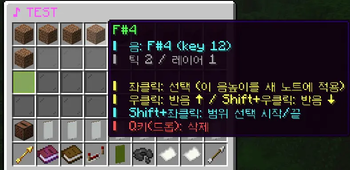
| Target | Action | |--------|--------| | Empty cell | Left-click — create a note at the current pitch | | Note | Left: select (copies its pitch) · Right: +1 semitone · Shift+Right: −1 semitone · Shift+Left: range select · Q: delete | | Layer header | Left: change instrument · Right: toggle mute · Shift+Left/Right: volume ±10% · Q (drop): delete layer | | Info (jukebox) | Left: pitch up · Right: pitch down · Shift: by octave — sets the pitch used for new notes | | Tick banners | Click: set the paste spot (turns blue) · White: unselected · Yellow: selected · Orange: range start pending · Lime: playhead | | ◀ / ▶ tick | Scroll one tick · Shift: jump 8 ticks | | ▲ / ▼ layer | Scroll layers up / down | | ▶ preview | Preview to yourself. Press again to stop (the button toggles) | | Settings | Tempo | | Output | Press this song onto a music disc | | Copy / paste | Copy takes the yellow cells; Paste lands on the blue banner. Shift+left click twice on editor cells so the range turns yellow, then press Copy. Click a tick banner to turn it blue, then press Paste. Right click Copy to clear the selection. Empty ticks, scrolling, and non-contiguous ranges are supported. | | Music disc item | Right-click: play · right-click again: stop |
Instruments (16): Harp, Bass, Bass Drum, Snare, Hat, Guitar, Flute, Bell, Chime, Xylophone, Iron Xylophone, Cow Bell, Didgeridoo, Bit, Banjo, Pling.
## Configuration
`plugins/MusicStudio/config.yml`:
```yaml language: ko_kr # ko_kr (Korean) or en_us (English); untranslated strings fall back to ko_kr
update-check: enabled: true # notify console + admins when a newer GitHub release exists
limits: max-ticks: 4096 # maximum song length
📊 Mod Details
- Game
- Minecraft Plugins
- Author
- Riha
- Version
- 1.0.6
- Downloads
- 143
- Endorsements
- 2
- Category
- adventure
- Created
- 6/7/2026
- Updated
- 8/2/2026
- Game Versions
- 26.1
- Tags
- adventure, minigame, utility
🔧 How to Install Minecraft Plugins Mods
Download from Modrinth. Use Prism Launcher or drop into your mods folder.
📖 Full step-by-step install guide for Minecraft Plugins →
Visit the official mod page for specific installation instructions for this mod.
🎮 Need cheat codes or console commands? Check ur gaming wiki for Minecraft Plugins commands, item IDs, and more.
❓ Frequently Asked Questions
Which Minecraft Plugins versions does MusicStudio support?
The author lists 26.1. Other versions may work but are untested by the author.
What is the latest version of MusicStudio?
Version 1.0.6, published 2026-08-02 with 143 downloads recorded at the source.
Keep browsing — more Minecraft Plugins mods await