MusicPlay
🟡 Updated this year🖼️ Gallery (1 images)
🔍 Analysis
- 🏆 #58 of 59 decoration mods in this game by downloads
📋 About This Mod
# 🎵 MusicPlay — Custom Music Player for Your Server **MusicPlay** is a fully-featured, server-side music player plugin for Paper/Spigot servers. Upload your own `.ogg` tracks, serve them through a built-in HTTP server, and let players enjoy custom music through a beautiful inventory GUI — no client mods required. > 🎧 Turn any Minecraft server into a real music platform. --- ## ✨ Features - 🎼 **Custom Track Library** — Upload any `.ogg` audio file via a chat link. Titles are read automatically from the file’s metadata (Vorbis TITLE tag). - 🖥️ **Inventory GUI Player** — Open a clean music player interface by Shift + Right-clicking your jukebox, or using `/music play`. - 📋 **Personal Playlists** — Every player has their own playlist (up to 45 tracks). Add tracks with Right-click in the library, remove them with Shift + Left-click in your playlist. - ⏭️ **Auto Track Switching** — When a song ends, the next one plays automatically. Works in both Library mode and Playlist mode. - 🔁 **Looping Playlists** — Playing your playlist? It loops seamlessly. - 📦 **Built-in Resource Pack Server** — No external hosting needed. MusicPlay runs its own HTTP server and sends the pack to players on join. - 🔤 **Readable Track Names** — Forget `custom.track_1`. Track titles are extracted from the `.ogg` file and shown everywhere in the UI. - 🎵 **Audio Conversion** — Supports uploading MP3, WAV, FLAC, M4A and other formats. If `ffmpeg` is installed on the server, the plugin automatically converts the track to **OGG Mono** (as required by Minecraft) at 192kbps quality. - 🔊 **Mono Audio** — All converted tracks are forced to mono, ensuring correct 3D spatial positioning in-game. - 🔗 **Smart Download** — Automatically follows HTTP redirects (301/302/307/308), sanitizes URLs from stray characters, and works with any CDN. - 🌍 **Full Localization** — Every string in the UI and chat is stored in `lang.yml`. Translate the plugin to any language in minutes. - 🎛️ **Per-Player Resource Pack Control** — Players can opt out of auto-loading and install the pack manually. --- ## 🕹️ How to Use ### For Players 1. Ask an admin to place a **Jukebox** and insert a custom disc (given via `/music disk`). 2. **Shift + Right-click** the jukebox to open the music player. 3. Use the GUI buttons to control playback: - ⏸ **Pause / ▶ Resume** — Stop or continue the current track. - ⏮ **Previous** / **Next** ⏭ — Switch tracks. - 📋 **Playlist** — Open your personal playlist. - 📄 **Track Library** — Browse all available tracks. **Right-click** a track to add it to your playlist. - ➕ **Add Track** — (Admins only) Upload a new `.ogg` track by pasting a download link in chat. ### For Admins 1. Place a Jukebox, insert a custom disc from `/music disk`. 2. Use `/music upload` and paste a **direct `.ogg` download link** in chat. > ⚠️ **Important:** The link must be a **direct download URL** — it must end with `.ogg` and open the file immediately (not a page like Google Drive or YouTube). Services like (https://dropbox.com) (with `?dl=1`), (https://github.com), or a direct web server link work great. 3. The plugin downloads the file (following any redirects automatically), reads its title, rebuilds the resource pack, and notifies players automatically. > 🎵 **Format Conversion:** If the link points to an MP3, WAV, FLAC, M4A, etc. — the plugin automatically converts it to **OGG Mono** if `ffmpeg` is installed on the server. Without ffmpeg — upload tracks in `.ogg` format directly. > Mono is required for correct 3D spatial audio positioning in Minecraft. > 🎨 **Custom Disc Texture:** After the first server launch, a file will appear at `plugins/MusicPlay/textures/custom_disc.png`. Replace it with your own 16×16 PNG texture to give your music disc a unique look! Rebuild the pack with `/music pack` after replacing. --- ## 🔧 Commands | Command | Description | Permission | |---|---|---| | `/music play` | Open the music player GUI | — | | `/music disk ` | Give yourself a custom music disc | `musicplay.disk` | | `/music upload` | Upload a new `.ogg` track via chat link | `musicplay.upload` | | `/music pack` | Rebuild the resource pack manually | `musicplay.upload` | | `/music tracks` | List all available sound keys | — | | `/music linkrp` | Get the resource pack download link | — | | `/music skiprp` | Disable auto resource pack loading | — | | `/music loadrp` | Re-enable auto resource pack loading | — | | `/music help` | Show help message | — | --- ## ⚙️ Technical Details ### How It Works 1. You upload a `.ogg` file via a URL. 2. MusicPlay downloads it, parses the **Vorbis Comment headers** to extract the track title and duration. 3. It rebuilds a `.zip` resource pack containing the audio files and `sounds.json`, then serves it via a built-in **Java HTTP server**. 4. Players receive the pack on join. The plugin uses `world.playSound()` targeting the jukebox location for spatial audio. 5. A ligh
# 🎵 MusicPlay — Custom Music Player for Your Server
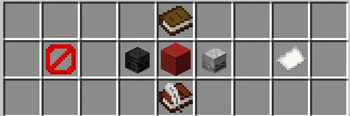
MusicPlay is a fully-featured, server-side music player plugin for Paper/Spigot servers. Upload your own `.ogg` tracks, serve them through a built-in HTTP server, and let players enjoy custom music through a beautiful inventory GUI — no client mods required.
> 🎧 Turn any Minecraft server into a real music platform.
## ✨ Features
- 🎼 Custom Track Library — Upload any `.ogg` audio file via a chat link. Titles are read automatically from the file’s metadata (Vorbis TITLE tag).
- 🖥️ Inventory GUI Player — Open a clean music player interface by Shift + Right-clicking your jukebox, or using `/music play`.
- 📋 Personal Playlists — Every player has their own playlist (up to 45 tracks). Add tracks with Right-click in the library, remove them with Shift + Left-click in your playlist.
- ⏭️ Auto Track Switching — When a song ends, the next one plays automatically. Works in both Library mode and Playlist mode.
- 🔁 Looping Playlists — Playing your playlist? It loops seamlessly.
- 📦 Built-in Resource Pack Server — No external hosting needed. MusicPlay runs its own HTTP server and sends the pack to players on join.
- 🔤 Readable Track Names — Forget `custom.track_1`. Track titles are extracted from the `.ogg` file and shown everywhere in the UI.
- 🎵 Audio Conversion — Supports uploading MP3, WAV, FLAC, M4A and other formats. If `ffmpeg` is installed on the server, the plugin automatically converts the track to OGG Mono (as required by Minecraft) at 192kbps quality.
- 🔊 Mono Audio — All converted tracks are forced to mono, ensuring correct 3D spatial positioning in-game.
- 🔗 Smart Download — Automatically follows HTTP redirects (301/302/307/308), sanitizes URLs from stray characters, and works with any CDN.
- 🌍 Full Localization — Every string in the UI and chat is stored in `lang.yml`. Translate the plugin to any language in minutes.
- 🎛️ Per-Player Resource Pack Control — Players can opt out of auto-loading and install the pack manually.
## 🕹️ How to Use
### For Players
1. Ask an admin to place a Jukebox and insert a custom disc (given via `/music disk`). 2. Shift + Right-click the jukebox to open the music player. 3. Use the GUI buttons to control playback: - ⏸ Pause / ▶ Resume — Stop or continue the current track. - ⏮ Previous / Next ⏭ — Switch tracks. - 📋 Playlist — Open your personal playlist. - 📄 Track Library — Browse all available tracks. Right-click a track to add it to your playlist. - ➕ Add Track — (Admins only) Upload a new `.ogg` track by pasting a download link in chat.
### For Admins
1. Place a Jukebox, insert a custom disc from `/music disk`. 2. Use `/music upload` and paste a direct `.ogg` download link in chat.
> ⚠️ Important: The link must be a direct download URL — it must end with `.ogg` and open the file immediately (not a page like Google Drive or YouTube). Services like (https://dropbox.com) (with `?dl=1`), (https://github.com), or a direct web server link work great.
3. The plugin downloads the file (following any redirects automatically), reads its title, rebuilds the resource pack, and notifies players automatically.
> 🎵 Format Conversion: If the link points to an MP3, WAV, FLAC, M4A, etc. — the plugin automatically converts it to OGG Mono if `ffmpeg` is installed on the server. Without ffmpeg — upload tracks in `.ogg` format directly. > Mono is required for correct 3D spatial audio positioning in Minecraft.
> 🎨 Custom Disc Texture: After the first server launch, a file will appear at `plugins/MusicPlay/textures/custom_disc.png`. Replace it with your own 16×16 PNG texture to give your music disc a unique look! Rebuild the pack with `/music pack` after replacing.
## 🔧 Commands
| Command | Description | Permission | |---|---|---| | `/music play` | Open the music player GUI | — | | `/music disk ` | Give yourself a custom music disc | `musicplay.disk` | | `/music upload` | Upload a new `.ogg` track via chat link | `musicplay.upload` | | `/music pack` | Rebuild the resource pack manually | `musicplay.upload` | | `/music tracks` | List all available sound keys | — | | `/music linkrp` | Get the resource pack download link | — | | `/music skiprp` | Disable auto resource pack loading | — | | `/music loadrp` | Re-enable auto resource pack loading | — | | `/music help` | Show help message | — |
## ⚙️ Technical Details
### How It Works
1. You upload a `.ogg` file via a URL. 2. MusicPlay downloads it, parses the Vorbis Comment headers to extract the track title and duration. 3. It rebuilds a `.zip` resource pack containing the audio files and `sounds.json`, then serves it via a built-in Java HTTP server. 4. Players receive the pack on join. The plugin uses `world.playSound()` targeting the jukebox location for spatial audio. 5. A ligh
📊 Mod Details
- Game
- Minecraft Plugins
- Author
- Lolovilka86
- Version
- 1.0
- Downloads
- 81
- Endorsements
- 1
- Category
- decoration
- Created
- 7/7/2026
- Updated
- 6/20/2026
- Game Versions
- 1.21.8, 1.21.9, 1.21.10, 1.21.11
- Tags
- decoration, technology, utility
🔧 How to Install Minecraft Plugins Mods
Download from Modrinth. Use Prism Launcher or drop into your mods folder.
📖 Full step-by-step install guide for Minecraft Plugins →
Visit the official mod page for specific installation instructions for this mod.
🎮 Need cheat codes or console commands? Check ur gaming wiki for Minecraft Plugins commands, item IDs, and more.
❓ Frequently Asked Questions
Which Minecraft Plugins versions does MusicPlay support?
The author lists 1.21.8, 1.21.9, 1.21.10, 1.21.11. Other versions may work but are untested by the author.
What is the latest version of MusicPlay?
Version 1.0, published 2026-06-20 with 81 downloads recorded at the source.
Keep browsing — more Minecraft Plugins mods await