MultiMessageBridge
🟢 Updated this month🖼️ Gallery (1 images)
🔍 Analysis
- 🏆 #10 of 25 library mods in this game by downloads
📋 About This Mod
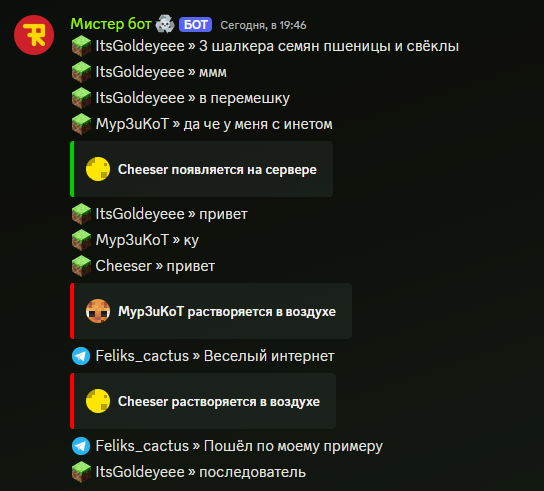
Plugin that connects minecraft, discord, telegram and other messangers in one place
# MultiMessageBridge - Link Messengers Together
!(https://img.shields.io/modrinth/dt/multimessagebridge) !(https://img.shields.io/modrinth/v/multimessagebridge) !(https://img.shields.io/bstats/players/24055) !(https://img.shields.io/bstats/servers/24055)
(https://bstats.org/plugin/bukkit/MultiMessageBridge/24055)
Documentation also available in these languages: (https://github.com/Azimkin/MultiMessageBridge/wiki/%D0%9F%D1%80%D0%BE-%D0%BF%D0%BB%D0%B0%D0%B3%D0%B8%D0%BD)
The MultiMessageBridge plugin allows you to connect Minecraft, Discord, Telegram, and other messengers (via add-ons) together! Exchange messages, images, stickers between different platforms - it’s really wonderful!
## Special Thanks - (https://discord.gg/fairkor) and (https://modrinth.com/user/MediocreSteam67) for sponsoring development and testing the plugin! - Anea - Icon for the plugin on Modrinth - hellbowe - help with developing version 0. 5
## Plugin Features - Send messages simultaneously between Telegram, Discord, Minecraft, and other platforms using add-ons - Send images between different platforms (displayed in-game as clickable text) - Display stickers across platforms - Reply to messages across platforms using native methods - Display player join and leave messages on the server - Display death messages - Display received achievements - Translate achievements and death messages into any language - Flexible configuration - Send server console output to Discord - Support for threads in Telegram
## Compatible Plugins Plugins supported by MMB:
- EssentialsX Chat
- ChatEX
- SkinsRestorer
- PlaceholderAPI
## Installation and Setup
### Installing the Plugin 1. Download the (https://modrinth.com/plugin/multimessagebridge/versions) of the plugin from Modrinth 2. Place the downloaded file into your server's `plugins` folder 3. Start the server. You will likely see 2 errors in the console; these indicate that Discord and Telegram bot tokens are not set 4. Stop the server to make configuration changes
### Plugin Configuration Configuring `config.yml` ```yaml # Whether to store messages in a database for cross-platform message replies enableMessageStorage: true # recommended true, default false # Interval to update channel info in chat, in seconds serverInfoUpdateTime: 603 # Default text displayed in the channel description defaultServerInfoFormat: 'Online: {online} Total players: {total} Uptime: {uptime}' # Format used to display server uptime in Discord channel description timeFormat: '{d} days {h} hours {m} minutes' # placeholder {uptime} in defaultServerInfoFormat # Whether to translate achievements and death messages from English translateMessages: true # Whether to repeat all player messages in the console sendMessagesToConsole: true # Platforms to be used. If [] is specified, all will be enabled enabledReceivers: - Minecraft - Discord - Telegram imageHosting: # Which image hosting to use; currently only freeimage is available type: freeimage heads: # Configure display of player heads (e.g., in join/leave messages) # For SkinsRestorer https://mc-heads.net/avatar/%skinsrestorer_texture_id_or_steve%.png#%username% url: https://crafthead.net/helm/%nickname% provider: default # Whether to include your server in metrics metrics: true ````
### Discord Bot Setup
For detailed information, see (https://github.com/Azimkin/MultiMessageBridge/wiki/Getting-Started)
1. Create a bot and get its token, make sure to enable message intent 2. Configure `Discord.yml` ```yaml bot: # Enter your bot token here token: 'paste token here' # Enter your server's Guild ID guild: 1234567890123456789 channels: messages: type: main_text id: 1234567890123456789 # ID of the player messages channel # Channel description, leave '' to use default description description: 'Online: {online} | Registered: {total} | Uptime: {uptime}' console: type: console id: 1234567890123456789 # ID of the console channel description: ' ' # Whether to require a prefix for commands in the console channel commandsShouldStartsWithPrefix: true commandPrefix: '!/' # Configuration for displayed messages, see wiki for details messages: # ... # Phrase filter for @everyone, @here mentions phraseFilter: filterMessages: true filters: '@everyone': '' '@here': '' ```
### Telegram Bot Setup
For detailed information, see (https://github.com/Azimkin/MultiMessageBridge/wiki/Getting-Started)
1. Go to BotFather and create a bot 2. Configure bot permissions if using a group 3. Add the bot to your group, or use private messages 4. Copy the token 5. Add your token to `Telegram.yml` ```yaml bot: token: 'Your B
📊 Mod Details
- Game
- Minecraft Plugins
- Author
- Azimkin
- Version
- 26.2
- Downloads
- 278
- Endorsements
- 7
- Category
- library
- Created
- 11/21/2024
- Updated
- 8/28/2026
- Game Versions
- 1.19.3, 1.19.4, 1.20, 1.20.1, 1.20.2
- Tags
- library, social, utility
🔧 How to Install Minecraft Plugins Mods
Download from Modrinth. Use Prism Launcher or drop into your mods folder.
📖 Full step-by-step install guide for Minecraft Plugins →
Visit the official mod page for specific installation instructions for this mod.
🎮 Need cheat codes or console commands? Check ur gaming wiki for Minecraft Plugins commands, item IDs, and more.
❓ Frequently Asked Questions
Which Minecraft Plugins versions does MultiMessageBridge support?
The author lists 1.19.3, 1.19.4, 1.20, 1.20.1, 1.20.2, 1.20.3. Other versions may work but are untested by the author.
What is the latest version of MultiMessageBridge?
Version 26.2, published 2026-08-28 with 278 downloads recorded at the source.
Keep browsing — more Minecraft Plugins mods await