MOTD Studio
🟡 Updated this year🖼️ Gallery (2 images)

🔍 Analysis
- 🏆 #968 of 1224 bukkit mods in this game by downloads
📋 About This Mod
MOTD Studio — Animated MOTD, Icon Randomizer & Web Editor MOTD Studio is a modern Minecraft server-list customization plugin built for server owners who want their server to look clean, professional, and eye-catching before players even join. Your MOTD is one of the first things players see in the multiplayer menu, so MOTD Studio gives you the tools to turn that small server-list area into a polished branding space. Instead of constantly editing config files, restarting, reloading, and refreshing Minecraft again and again, MOTD Studio includes a browser-based web panel where you can design, preview, edit, and apply your server-list appearance more easily. It is made for owners who want powerful customization without making setup painful. MOTD Studio supports beautiful two-line MOTDs with colors, gradients, symbols, placeholders, smart centering, positioning, and frame-based animation. You can create multiple MOTD frames and let them rotate when players refresh or ping the server list. This makes your server feel more alive and active, especially for SMPs, Lifesteal servers, Skyblock, BoxPvP, OneBlock, Survival, Factions, Minigames, and network-style servers. «Note: Minecraft does not support true real-time GIF-style MOTD animation. MOTD Studio uses frame-based animation, which changes when the client refreshes or pings the server list.» Browser-Based Web Panel MOTD Studio includes a built-in web editor, available by default at: "http://YOUR_SERVER_IP:8877" Default login: "admin / 12345678" From the web panel, you can edit your MOTD, manage frames, adjust gradients, upload icons, preview changes, activate presets, customize hover text, change player count display, edit version text, manage maintenance mode, and adjust settings without digging through every file manually. The web panel is designed to be simple enough for beginners, but still flexible enough for advanced server owners. It includes a Minecraft-style live preview so you can see how your server may look in the multiplayer list before applying the changes. Because the default web panel is easy to access, MOTD Studio clearly warns you when the default password is still active. For public servers, you should change the password after setup. Server Icon Randomizer MOTD Studio includes a server icon system that allows you to rotate icons, randomize icons, and assign icons to specific presets or modes. You can use different icons for normal gameplay, events, maintenance, holidays, seasons, whitelist periods, or special updates. Icons are validated and cached to avoid unnecessary server load. MOTD Studio is designed so icons are loaded during startup or reload, not during every server-list ping. Presets and Templates Create different server-list styles for different situations. You can have separate presets for: - Default server mode - Lifesteal - Survival - Skyblock - BoxPvP - Events - Maintenance - Whitelist - Coming soon - Store sale - Night mode - Seasonal themes Each preset can control MOTD frames, icon behavior, hover text, player count styling, version text, and layout settings. This makes it easy to quickly switch your server’s appearance depending on what is happening. Customization Features MOTD Studio gives you control over many parts of the server-list display: - Animated frame-based MOTDs - Gradient and color formatting - Smart centered text - Manual spacing and positioning - Symbol picker - Placeholder support - Server icon randomizer - Icon animation - Hover text customization - Player count styling - Version text styling - Maintenance mode - Event mode - Preset system - Template gallery - Live preview - Config backup system - Editable ".yml" and ".properties" files - SQLite database support - Lightweight analytics Performance-Safe Design MOTD Studio is built with performance in mind. The plugin avoids heavy work during server-list ping events. MOTD frames, icons, placeholders, player count data, and runtime settings are cached so the ping handler stays lightweight. The plugin is designed to avoid: - File loading during ping events - Database queries during ping events - Image decoding during ping events - YAML parsing during ping events - Expensive placeholder parsing during ping events - Console spam during frequent pings This makes MOTD Studio suitable for real public servers where many players, bots, websites, or server lists may ping the server frequently. File and Config Editing MOTD Studio also includes tools for editing supported configuration files from the web panel. You can edit plugin ".yml", ".properties", and supported server configuration files with backup protection. This is useful for owners who want easier control without constantly using FTP, file managers, or external editors. Before saving important files, MOTD Studio can create backups so you can recover from mistakes more easily. Compatibility MOTD Studio is built as a Bukkit-compatible plugin and is designed to work with: - Bukkit-c
MOTD Studio — Animated MOTD, Icon Randomizer & Web Editor
MOTD Studio is a modern Minecraft server-list customization plugin built for server owners who want their server to look clean, professional, and eye-catching before players even join. Your MOTD is one of the first things players see in the multiplayer menu, so MOTD Studio gives you the tools to turn that small server-list area into a polished branding space.
Instead of constantly editing config files, restarting, reloading, and refreshing Minecraft again and again, MOTD Studio includes a browser-based web panel where you can design, preview, edit, and apply your server-list appearance more easily. It is made for owners who want powerful customization without making setup painful.
MOTD Studio supports beautiful two-line MOTDs with colors, gradients, symbols, placeholders, smart centering, positioning, and frame-based animation. You can create multiple MOTD frames and let them rotate when players refresh or ping the server list. This makes your server feel more alive and active, especially for SMPs, Lifesteal servers, Skyblock, BoxPvP, OneBlock, Survival, Factions, Minigames, and network-style servers.
«Note: Minecraft does not support true real-time GIF-style MOTD animation. MOTD Studio uses frame-based animation, which changes when the client refreshes or pings the server list.»
Browser-Based Web Panel
MOTD Studio includes a built-in web editor, available by default at:
"http://YOUR_SERVER_IP:8877"
Default login:
"admin / 12345678"
From the web panel, you can edit your MOTD, manage frames, adjust gradients, upload icons, preview changes, activate presets, customize hover text, change player count display, edit version text, manage maintenance mode, and adjust settings without digging through every file manually.
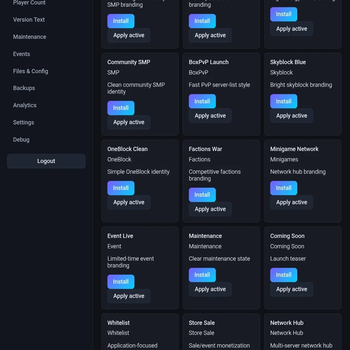
The web panel is designed to be simple enough for beginners, but still flexible enough for advanced server owners. It includes a Minecraft-style live preview so you can see how your server may look in the multiplayer list before applying the changes.
Because the default web panel is easy to access, MOTD Studio clearly warns you when the default password is still active. For public servers, you should change the password after setup.
Server Icon Randomizer
MOTD Studio includes a server icon system that allows you to rotate icons, randomize icons, and assign icons to specific presets or modes. You can use different icons for normal gameplay, events, maintenance, holidays, seasons, whitelist periods, or special updates.
Icons are validated and cached to avoid unnecessary server load. MOTD Studio is designed so icons are loaded during startup or reload, not during every server-list ping.
Presets and Templates
Create different server-list styles for different situations. You can have separate presets for:
- Default server mode
- Lifesteal
- Survival
- Skyblock
- BoxPvP
- Events
- Maintenance
- Whitelist
- Coming soon
- Store sale
- Night mode
- Seasonal themes
Each preset can control MOTD frames, icon behavior, hover text, player count styling, version text, and layout settings. This makes it easy to quickly switch your server’s appearance depending on what is happening.
Customization Features
MOTD Studio gives you control over many parts of the server-list display:
- Animated frame-based MOTDs
- Gradient and color formatting
- Smart centered text
- Manual spacing and positioning
- Symbol picker
- Placeholder support
- Server icon randomizer
- Icon animation
- Hover text customization
- Player count styling
- Version text styling
- Maintenance mode
- Event mode
- Preset system
- Template gallery
- Live preview
- Config backup system
- Editable ".yml" and ".properties" files
- SQLite database support
- Lightweight analytics
Performance-Safe Design
MOTD Studio is built with performance in mind. The plugin avoids heavy work during server-list ping events. MOTD frames, icons, placeholders, player count data, and runtime settings are cached so the ping handler stays lightweight.
The plugin is designed to avoid:
- File loading during ping events
- Database queries during ping events
- Image decoding during ping events
- YAML parsing during ping events
- Expensive placeholder parsing during ping events
- Console spam during frequent pings
This makes MOTD Studio suitable for real public servers where many players, bots, websites, or server lists may ping the server frequently.
File and Config Editing
MOTD Studio also includes tools for editing supported configuration files from the web panel. You can edit plugin ".yml", ".properties", and supported server configuration files with backup protection. This is useful for owners who want easier control without constantly using FTP, file managers, or external editors.
Before saving important files, MOTD Studio can create backups so you can recover from mistakes more easily.
Compatibility
MOTD Studio is built as a Bukkit-compatible plugin and is designed to work with:
📊 Mod Details
- Game
- Minecraft Plugins
- Author
- samuelculbert13
- Version
- RELEASE-1.0.1
- Downloads
- 91
- Endorsements
- 0
- Category
- bukkit
- Created
- 7/7/2026
- Updated
- 6/15/2026
- Game Versions
- 1.20, 1.20.1, 1.20.2, 1.20.3, 1.20.4
- Tags
- game-mechanics, management, technology
🔧 How to Install Minecraft Plugins Mods
Download from Modrinth. Use Prism Launcher or drop into your mods folder.
📖 Full step-by-step install guide for Minecraft Plugins →
Visit the official mod page for specific installation instructions for this mod.
🎮 Need cheat codes or console commands? Check ur gaming wiki for Minecraft Plugins commands, item IDs, and more.
❓ Frequently Asked Questions
Which Minecraft Plugins versions does MOTD Studio support?
The author lists 1.20, 1.20.1, 1.20.2, 1.20.3, 1.20.4, 1.20.5. Other versions may work but are untested by the author.
What is the latest version of MOTD Studio?
Version RELEASE-1.0.1, published 2026-06-15 with 91 downloads recorded at the source.
Keep browsing — more Minecraft Plugins mods await