ModularPacks
🟡 Updated this year🖼️ Gallery (3 images)
🔍 Analysis
- 🏆 #279 of 351 adventure mods in this game by downloads
📋 About This Mod
# ModularPacks !(https://img.shields.io/badge/Paper-1.21.10%2B-blue?style=flat-square) !(https://img.shields.io/badge/Java-21-orange?style=flat-square) !(https://img.shields.io/badge/API-available-brightgreen?style=flat-square) !(https://img.shields.io/badge/storage-SQLite-lightgrey?style=flat-square) !(https://img.shields.io/badge/status-active_development-purple?style=flat-square) !(https://img.shields.io/badge/license-MIT-lightgrey?style=flat-square) **ModularPacks** is a Paper plugin that adds physical, upgradeable backpacks to Minecraft servers. Instead of treating backpacks like another command-based player vault, ModularPacks makes the backpack an actual item. Players carry it, open it, upgrade it, place it, share it, and build around it like a real part of the world. The goal is to bring a modded-style backpack experience to Paper servers while keeping the server playable for vanilla clients. ModularPacks was heavily inspired by the feel of modded backpack systems, especially the idea of installable upgrades, but it is not meant to be a quick clone with a few settings changed. This plugin was built around Paper's server-side systems, PersistentDataContainer item identity, SQLite-backed storage, configurable recipes, admin recovery tools, and an API for custom module support. ## Features * Physical backpack items with persistent identity * Configurable backpack tiers, sizes, recipes, names, lore, colors, skull textures, and custom model data * Installable upgrade modules * Placeable backpacks with configurable world rendering * Shared backpacks with configurable shared-user limits * SQLite-backed storage for backpack contents and installed module state * Admin commands for giving, opening, listing, recovering, and changing backpacks * Void recovery logging for accidentally voided items * Optional update checker with in-game and console notifications * Optional resource pack support through `CustomModelData` * Public API for registering custom modules from other plugins <details> <summary><strong id="resource-pack">Optional Resource Pack</strong></summary> Want custom backpack and module visuals? Use the official ModularPacks Resources pack for full model support and themed item rendering! Resource pack link: https://modrinth.com/resourcepack/modularpacks-resources The plugin works without the pack, but the pack is recommended for the intended visual experience. </details> <details> <summary><strong id="requirements-and-installation">Requirements and installation</strong></summary> ## Requirements * Paper `1.21.10+` * Java `21` * Maven, if building from source ModularPacks is built against the Paper API and is intended for Paper-based servers. Other server platforms may work if they maintain Paper API compatibility, but Paper is the supported target. ## Installation 1. Download the plugin jar. 2. Place it in your server's `plugins/` folder. 3. Start the server once. 4. ModularPacks will generate its data folder and default files: * `plugins/ModularPacks/config.yml` * `plugins/ModularPacks/lang/en_us.yml` * `plugins/ModularPacks/backpacks.db`, created when backpack data is first used 5. Edit `config.yml` and `lang/en_us.yml` as needed. 6. Restart the server, or run: ```text /backpack reload ``` </details> <details> <summary><strong id="design-goals-and-backpack-behavior">Design goals and backpack behavior</strong></summary> ## What makes ModularPacks different? A lot of backpack plugins solve storage by adding a command, a virtual inventory, or a simple item that opens a menu. ModularPacks takes a different approach. Each backpack has its own UUID stored on the item. The item itself is only the key. The contents, installed modules, module state, share data, and recovery information are stored safely in SQLite. This means a backpack can be renamed, upgraded, placed, opened by admins, recovered, or inspected without relying on fragile item lore alone. The plugin is also designed around modules rather than one hardcoded backpack menu. A backpack can have upgrade slots, and modules can provide passive effects, custom screens, filters, pumps, tanks, crafting utilities, or other behavior. That structure is what makes the plugin expandable instead of just being a fixed-size storage menu. In short: the inspiration is familiar, but the implementation is built specifically for Paper servers, server owners, admins, and developers who want something configurable and expandable. ## How backpacks work Every ModularPacks backpack stores persistent metadata on the item: * `backpack_id` - the UUID identity of the backpack * `backpack_type` - the configured type or tier, such as `Leather`, `Iron`, or `Netherite` The actual contents are stored in the plugin database, not directly in the item lore. When a player opens a backpack, ModularPacks loads the contents and installed modules for that `backpack_id`. When the menu closes, the plugin s
# ModularPacks
!(https://img.shields.io/badge/Paper-1. 21. 10%2B-blue?style=flat-square) !(https://img.shields.io/badge/Java-21-orange?style=flat-square) !(https://img.shields.io/badge/API-available-brightgreen?style=flat-square) !(https://img.shields.io/badge/storage-SQLite-lightgrey?style=flat-square) !(https://img.shields.io/badge/status-active_development-purple?style=flat-square) !(https://img.shields.io/badge/license-MIT-lightgrey?style=flat-square)
ModularPacks is a Paper plugin that adds physical, upgradeable backpacks to Minecraft servers.
Instead of treating backpacks like another command-based player vault, ModularPacks makes the backpack an actual item. Players carry it, open it, upgrade it, place it, share it, and build around it like a real part of the world. The goal is to bring a modded-style backpack experience to Paper servers while keeping the server playable for vanilla clients.
ModularPacks was heavily inspired by the feel of modded backpack systems, especially the idea of installable upgrades, but it is not meant to be a quick clone with a few settings changed. This plugin was built around Paper's server-side systems, PersistentDataContainer item identity, SQLite-backed storage, configurable recipes, admin recovery tools, and an API for custom module support.
## Features
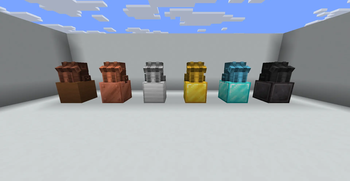
Physical backpack items with persistent identity Configurable backpack tiers, sizes, recipes, names, lore, colors, skull textures, and custom model data Installable upgrade modules Placeable backpacks with configurable world rendering Shared backpacks with configurable shared-user limits SQLite-backed storage for backpack contents and installed module state Admin commands for giving, opening, listing, recovering, and changing backpacks Void recovery logging for accidentally voided items Optional update checker with in-game and console notifications Optional resource pack support through `CustomModelData` Public API for registering custom modules from other plugins
Optional Resource Pack
Want custom backpack and module visuals? Use the official ModularPacks Resources pack for full model support and themed item rendering!
Resource pack link: https://modrinth.com/resourcepack/modularpacks-resources
The plugin works without the pack, but the pack is recommended for the intended visual experience.
Requirements and installation
## Requirements
Paper `1. 21. 10+` Java `21` Maven, if building from source
ModularPacks is built against the Paper API and is intended for Paper-based servers. Other server platforms may work if they maintain Paper API compatibility, but Paper is the supported target.
## Installation
1. Download the plugin jar. 2. Place it in your server's `plugins/` folder. 3. Start the server once. 4. ModularPacks will generate its data folder and default files:
`plugins/ModularPacks/config.yml` `plugins/ModularPacks/lang/en_us.yml` `plugins/ModularPacks/backpacks.db`, created when backpack data is first used 5. Edit `config.yml` and `lang/en_us.yml` as needed. 6. Restart the server, or run:
```text /backpack reload ```
Design goals and backpack behavior
## What makes ModularPacks different?
A lot of backpack plugins solve storage by adding a command, a virtual inventory, or a simple item that opens a menu. ModularPacks takes a different approach.
Each backpack has its own UUID stored on the item. The item itself is only the key. The contents, installed modules, module state, share data, and recovery information are stored safely in SQLite. This means a backpack can be renamed, upgraded, placed, opened by admins, recovered, or inspected without relying on fragile item lore alone.
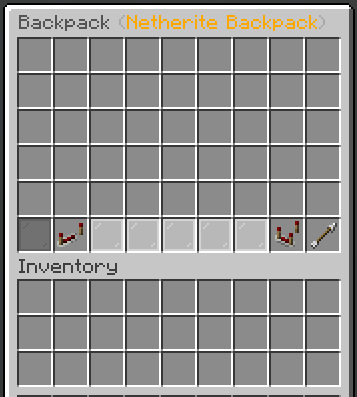
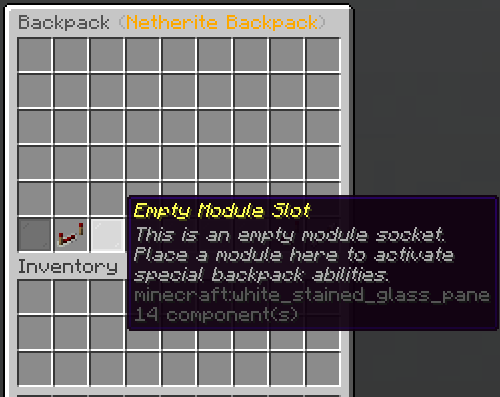
The plugin is also designed around modules rather than one hardcoded backpack menu. A backpack can have upgrade slots, and modules can provide passive effects, custom screens, filters, pumps, tanks, crafting utilities, or other behavior. That structure is what makes the plugin expandable instead of just being a fixed-size storage menu.
In short: the inspiration is familiar, but the implementation is built specifically for Paper servers, server owners, admins, and developers who want something configurable and expandable.
## How backpacks work
Every ModularPacks backpack stores persistent metadata on the item:
`backpack_id` - the UUID identity of the backpack * `backpack_type` - the configured type or tier, such as `Leather`, `Iron`, or `Netherite`
The actual contents are stored in the plugin database, not directly in the item lore. When a player opens a backpack, ModularPacks loads the contents and installed modules for that `backpack_id`. When the menu closes, the plugin s
📊 Mod Details
- Game
- Minecraft Plugins
- Author
- TooterTutor
- Version
- 2.7.0
- Downloads
- 413
- Endorsements
- 5
- Category
- adventure
- Created
- 5/12/2026
- Updated
- 8/17/2026
- Game Versions
- 1.21, 1.21.1, 1.21.2, 1.21.3, 1.21.4
- Tags
- adventure, game-mechanics, storage
🔧 How to Install Minecraft Plugins Mods
Download from Modrinth. Use Prism Launcher or drop into your mods folder.
📖 Full step-by-step install guide for Minecraft Plugins →
Visit the official mod page for specific installation instructions for this mod.
🎮 Need cheat codes or console commands? Check ur gaming wiki for Minecraft Plugins commands, item IDs, and more.
❓ Frequently Asked Questions
Which Minecraft Plugins versions does ModularPacks support?
The author lists 1.21, 1.21.1, 1.21.2, 1.21.3, 1.21.4, 1.21.5. Other versions may work but are untested by the author.
What is the latest version of ModularPacks?
Version 2.7.0, published 2026-08-17 with 413 downloads recorded at the source.
Keep browsing — more Minecraft Plugins mods await