ModGuard
🟡 Updated this year🖼️ Gallery (4 images)
🔍 Analysis
- 🏆 #954 of 1224 bukkit mods in this game by downloads
📋 About This Mod
!(https://cdn.modrinth.com/data/cached_images/047932845f73569a2cea21efdeb8a2e3177bc288_0.webp)
English Description
ModGuard is a powerful, highly efficient all-in-one moderation solution for Minecraft servers.
It combines all critical administration tools into a single, resource-friendly system to keep your server clean and secure.
ModGuard was specifically designed for server administrators who value performance and intuitive usability. With a modern GUI dashboard and advanced features like Vanish and Freeze, it provides everything you need for professional team management.
### Features
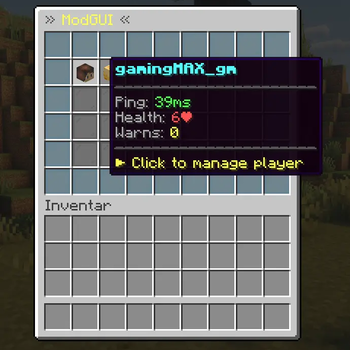
- Central Mod GUI: Manage all online players through a clear menu (/mod).
- Vanish System: Become invisible to players including fake join/quit messages.
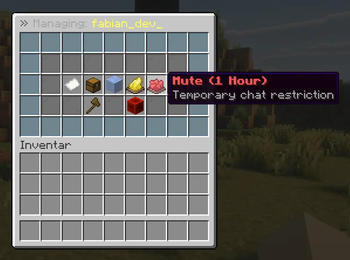
- Advanced Sanctions: Ban, Mute, Kick and Warn system with data storage.
- Live Monitoring: Open inventories (Invsee) or freeze players when suspicious (Freeze).
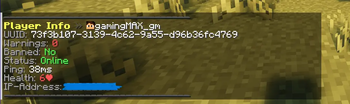
- Real-time Information: Detailed user info including IP address, ping and warn history.
- Chat Management: Global chat clear and automatic word filter (Blacklist).
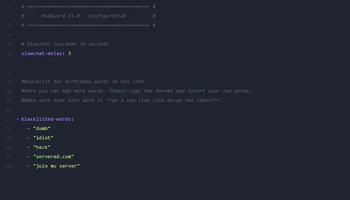
- Custom Blacklist: Fully customizable word filter in the configuration to automatically block insults and advertisements.
- Alt Account Detection: Identifies players who are likely the same person (via IP matching) to effectively prevent ban evasion.
- Resource Efficient: Optimized code for minimal server load (Single-Class design).
- Compatible: Developed for Paper and Spigot (1. 20+).
### Setup & Installation
1. Drag the JAR file into your ```/plugins folder``` and restart the server. 2. In ```/config.yml``` you can adjust the word filter and the slowchat delay. 3. Make sure your team has the permission ```simplemod.mod```.
### Permissions Permission management is handled via common permission plugins such as LuckPerms. We recommend creating groups (e.g. mod, admin) and assigning the corresponding nodes.
```simplemod.mod``` Full Access. Allows the use of all commands (```/ban```, ```/vanish```, ```/freeze```, etc.), access to the ```/mod``` GUI and the ability to see invisible players.
```simplemod.bypass.slowchat``` Chat Advantage. Allows sending messages without delay even when slowchat is active.
### Commands
```/modgui``` Opens the graphical moderation dashboard
```/vanish``` Makes you invisible to other players
```/freeze
```/userinfo
```/invsee
```/mute
```/warn
```/warns
```/kick
```/unban
```/unmute
```/remove-timeout
```/clearchat``` Clears the entire global chat
### License & Contact
License: See the metadata section of this project (MIT License). Support: For questions or feedback contact us at ```support@g-nav.at```
Deutsche Beschreibung
ModGuard ist eine leistungsstarke, hocheffiziente All-in-One Moderationslösung für Minecraft-Server.
Es vereint alle kritischen Administrations-Werkzeuge in einem einzigen, ressourcenschonenden System, um deinen Server sauber und sicher zu halten.
ModGuard wurde speziell für Server-Administratoren entwickelt, die Wert auf Performance und eine intuitive Bedienung legen. Mit einem modernen GUI-Dashboard und fortschrittlichen Features wie Vanish und Freeze bietet es alles, was du für professionelles Team-Management benötigst.
### Features
- Zentrales Mod-GUI: Verwalte alle Online-Spieler über ein übersichtliches Menü (/mod).
- Vanish-System: Werde unsichtbar für Spieler inklusive gefälschter Join/Quit-Nachrichten.
- Advanced Sanctions: Ban-, Mute-, Kick- und Warn-System mit Daten-Speicherung.
- Live-Überwachung: Öffne Inventare (Invsee) oder friere Spieler bei Verdacht ein (Freeze).
- Echtzeit-Informationen: Detaillierte Nutzer-Infos inklusive IP-Adresse, Ping und Warn-Historie.
- Chat-Management: Globaler Chat-Clear und automatischer Wort-Filter (Blacklist).
- Eigene Blacklist: Vollständig anpassbarer Wortfilter in der Konfiguration, um Beleidigungen und Eigenwerbung automatisch zu blockieren.
- Alt-Account Erkennung: Identifiziert Spieler, die wahrscheinlich dieselbe Person sind (über IP-Abgleich), um Bann-Umgehungen effektiv zu verhindern.
- Ressourcenschonend: Optimierter Code für minimale Serverlast (Single-Class-Design).
- Kompatibel: Entwickelt für Paper und Spigot (1. 20+).
### Setup & Installation
1. Ziehe die JAR-Datei in deinen ```/plugins Ordner```
📊 Mod Details
- Game
- Minecraft Plugins
- Author
- gamingMAX
- Version
- 1.0.1
- Downloads
- 92
- Endorsements
- 1
- Category
- bukkit
- Created
- 3/19/2026
- Updated
- 3/12/2026
- Game Versions
- 1.20, 1.20.1, 1.20.2, 1.20.3, 1.20.4
🔧 How to Install Minecraft Plugins Mods
Download from Modrinth. Use Prism Launcher or drop into your mods folder.
📖 Full step-by-step install guide for Minecraft Plugins →
Visit the official mod page for specific installation instructions for this mod.
🎮 Need cheat codes or console commands? Check ur gaming wiki for Minecraft Plugins commands, item IDs, and more.
❓ Frequently Asked Questions
Which Minecraft Plugins versions does ModGuard support?
The author lists 1.20, 1.20.1, 1.20.2, 1.20.3, 1.20.4, 1.20.5. Other versions may work but are untested by the author.
What is the latest version of ModGuard?
Version 1.0.1, published 2026-03-12 with 92 downloads recorded at the source.
Keep browsing — more Minecraft Plugins mods await