Mobi's Homes
🟡 Updated this year🖼️ Gallery (3 images)
🔍 Analysis
- 👍 0.2% endorsement rate
- 🏆 #623 of 1560 bukkit mods in this game by downloads
📋 About This Mod
### Minecraft Version: **1.13.X** - **26.1** * It may be possible to use this Plugin in other versions, then those who are officially supported. --- # Set one or multiple personal Home-points and conveniently teleport to them! ## Commands: ### /sethome <u>Usage:</u> **/sethome** or **/sethome <name>** <u>Description:</u> Sets a Home-point to your current location. When only /sethome is used, a Home-point with the default name 'home' will be created. When a name is given, the Home-point will be named that way. <br> <br> <br> ### /home <u>Usage:</u> **/home** or **/home <name>** <u>Description:</u> Teleports you to your previously set Home-point. When only /home is used, you will be teleported either to the Home-point named 'home' if available or to the first Home-point in your list. When a name is given, you will be teleported to that Home-point. <br> <br> <br> ### /back <u>Usage:</u> **/back** <u>Aliases:</u> **/return** <u> Description:</u> Teleports you to the place where you last used the /home command <br> <br> <br> ### /listhomes <u>Usage:</u> **/listhomes** <u>Aliases:</u> **/homes**, **/homeslist** <u>Description:</u> Gets you a list of all your Home-points and displays the maximum amount of Home-points a Player can have. <br> <br> <br> ### /deletehome <u>Usage:</u> **/deletehome** or **/deletehome ** <u>Aliases:</u> **/homedelete** <u>Description:</u> Deletes a Home-point. When only /deletehome is used, the Home-point named 'home' will be deleted if available. When a name is given, that Home-point will be deleted. <br> <br> <br> ### /setmaxhomes <u>Usage:</u> **/setmaxhomes <number> ** <u>Description:</u> Sets the Maximum amount of Homes one has. When only /setmaxhomes <number> is used, the global default MaxHome-Count will be edited. When a name is given that a Player specific Home-limit is set (you will need permissions to do this). <br> <br> <br> ### /setspawn <u>Usage:</u> **/setspawn or /setspawn <name>** <u>Description:</u> Sets a custom World-Spawn (you will need permissions to do this). <br> <br> <br> ### /spawn <u>Usage:</u> **/spawn** <u>Description:</u> Teleports you to the Spawn-point. <br> <br> <br> <br> <br> **<arg>** represent required arguments, represent optional arguments Everything can be adjusted in the Plugin-Config, including the Home-limits, Home- and Spawn-Points. (By default, the global Home-limit is 2) <br> <br> <br> <br> <br> **<u>Note:</u> I am developing this Plugin in my spare time, consistent updates and new features are not guaranteed. Features and Bug fixes are implemented mostly based on personal need and/or seventy of a Problem.**
### Minecraft Version: 1. 13. X - 26. 1 * It may be possible to use this Plugin in other versions, then those who are officially supported.
# Set one or multiple personal Home-points and conveniently teleport to them!
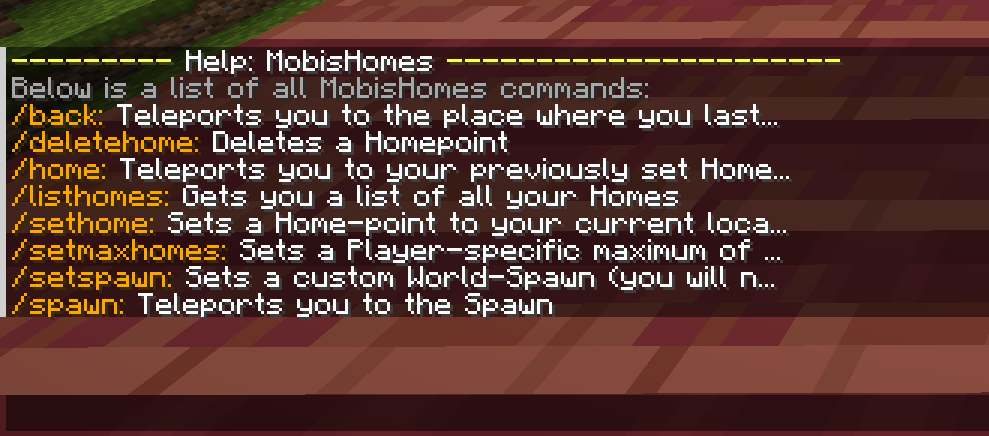
## Commands:
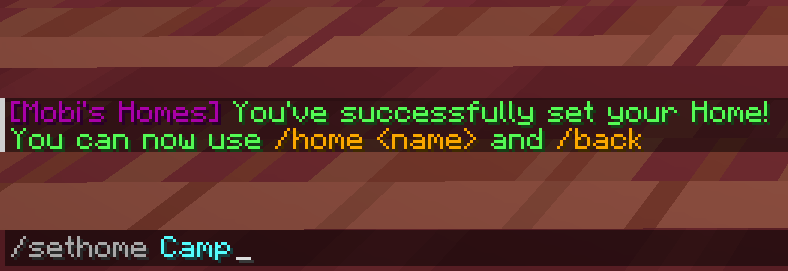
### /sethome
Usage: /sethome or /sethome
Description: Sets a Home-point to your current location. When only /sethome is used, a Home-point with the default name 'home' will be created. When a name is given, the Home-point will be named that way.
Usage: /home or /home
Description: Teleports you to your previously set Home-point. When only /home is used, you will be teleported either to the Home-point named 'home' if available or to the first Home-point in your list. When a name is given, you will be teleported to that Home-point.
Usage: /back
Aliases: /return
Description: Teleports you to the place where you last used the /home command
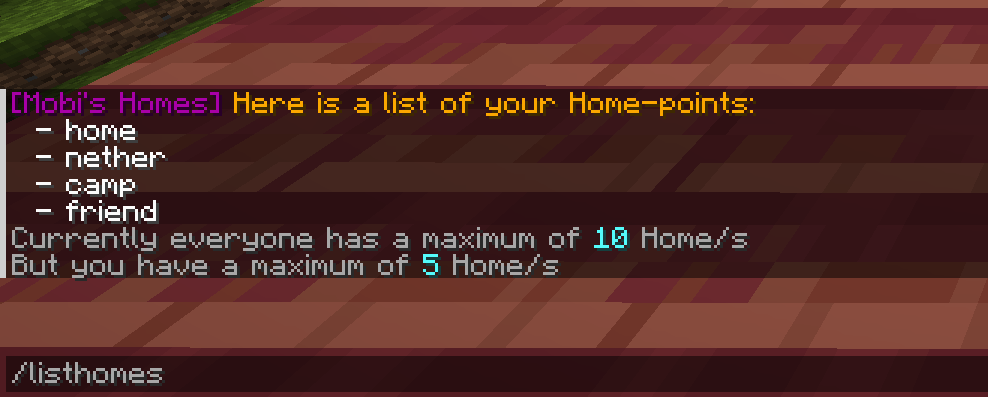
### /listhomes
Usage: /listhomes
Aliases: /homes, /homeslist
Description: Gets you a list of all your Home-points and displays the maximum amount of Home-points a Player can have.
### /deletehome
Usage: /deletehome or /deletehome
Aliases: /homedelete
Description: Deletes a Home-point. When only /deletehome is used, the Home-point named 'home' will be deleted if available. When a name is given, that Home-point will be deleted.
### /setmaxhomes
Usage: /setmaxhomes
Description: Sets the Maximum amount of Homes one has. When only /setmaxhomes
### /setspawn
Usage: /setspawn or /setspawn
Description: Sets a custom World-Spawn (you will need permissions to do this).
Usage: /spawn
Description: Teleports you to the Spawn-point.
represent required arguments, represent optional arguments
Everything can be adjusted in the Plugin-Config, including the Home-limits, Home- and Spawn-Points. (By default, the global Home-limit is 2)
📊 Mod Details
- Game
- Minecraft Plugins
- Author
- MrM0bi
- Version
- 4.0
- Downloads
- 4,006
- Endorsements
- 7
- Category
- bukkit
- Created
- 6/19/2023
- Updated
- 5/17/2026
- Game Versions
- 26.1
- Tags
- game-mechanics, transportation, utility
🔧 How to Install Minecraft Plugins Mods
Download from Modrinth. Use Prism Launcher or drop into your mods folder.
📖 Full step-by-step install guide for Minecraft Plugins →
Visit the official mod page for specific installation instructions for this mod.
🎮 Need cheat codes or console commands? Check ur gaming wiki for Minecraft Plugins commands, item IDs, and more.
❓ Frequently Asked Questions
Which Minecraft Plugins versions does Mobi's Homes support?
The author lists 26.1. Other versions may work but are untested by the author.
What is the latest version of Mobi's Homes?
Version 4.0, published 2026-05-17 with 4,006 downloads recorded at the source.
Keep browsing — more Minecraft Plugins mods await