Minicompat
🟠 Updated over a year ago🖼️ Gallery (3 images)

🔍 Analysis
- 🏆 #634 of 1224 bukkit mods in this game by downloads
📋 About This Mod
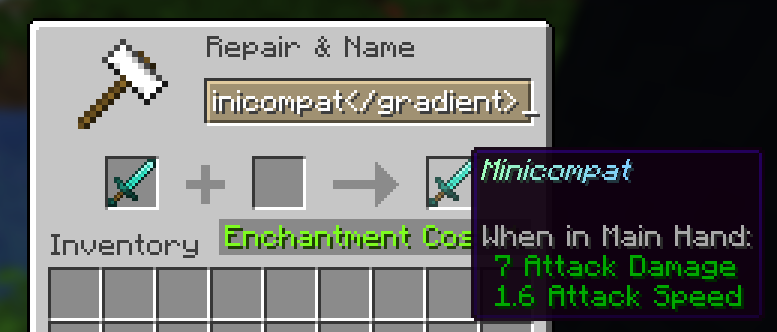
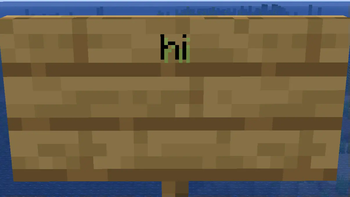
# Minicompat A Simple yet useful Plugin that allows the use of Minimessage in Chat, Anvils, Signs. With this Plugin you will be able to rename your Tools/Weapons in an Anvil using Minimessage Formatting, so you can get cool gradients or text effects on your Tools/Weapons. The Plugin also allows for Minimessage Support on Signs and in Chat, so you can type colorful chat messages or have multiple colors on a sign. <details> <summary>Chat Formatting Plugins Support</summary> The Plugin will work fine with most Chat formatting Plugins since it only modifies the content of your message and not the rest of the Chat. </details> <details> <summary>config.yml</summary> ``` anvil-enabled: true chat-enabled: true signs-enabled: true ``` </details> Anvil: !(https://cdn.modrinth.com/data/cached_images/9574e5ef5229b2addb6ed4c57a36bb0311940930.png) Chat: !(https://cdn.modrinth.com/data/cached_images/3f7b1702debcb548f874cce3b106726c9506b197.png) Sign: !(https://cdn.modrinth.com/data/cached_images/3798d5d2b28f92d7f21841ce7bc3a5cb9343451a_0.webp)
# Minicompat A Simple yet useful Plugin that allows the use of Minimessage in Chat, Anvils, Signs.
With this Plugin you will be able to rename your Tools/Weapons in an Anvil using Minimessage Formatting, so you can get cool gradients or text effects on your Tools/Weapons. The Plugin also allows for Minimessage Support on Signs and in Chat, so you can type colorful chat messages or have multiple colors on a sign.
Chat Formatting Plugins Support
The Plugin will work fine with most Chat formatting Plugins since it only modifies the content of your message and not the rest of the Chat.
config.yml
``` anvil-enabled: true chat-enabled: true signs-enabled: true ```
!(https://cdn.modrinth.com/data/cached_images/9574e5ef5229b2addb6ed4c57a36bb0311940930.png)
!(https://cdn.modrinth.com/data/cached_images/3f7b1702debcb548f874cce3b106726c9506b197.png)
!(https://cdn.modrinth.com/data/cached_images/3798d5d2b28f92d7f21841ce7bc3a5cb9343451a_0.webp)
📊 Mod Details
- Game
- Minecraft Plugins
- Author
- Blizzard
- Version
- 1.0
- Downloads
- 111
- Endorsements
- 4
- Category
- bukkit
- Created
- 8/14/2025
- Updated
- 8/10/2025
- Game Versions
- 1.21, 1.21.1, 1.21.2, 1.21.3, 1.21.4
- Tags
- decoration, social, utility
🔧 How to Install Minecraft Plugins Mods
Download from Modrinth. Use Prism Launcher or drop into your mods folder.
📖 Full step-by-step install guide for Minecraft Plugins →
Visit the official mod page for specific installation instructions for this mod.
🎮 Need cheat codes or console commands? Check ur gaming wiki for Minecraft Plugins commands, item IDs, and more.
❓ Frequently Asked Questions
Which Minecraft Plugins versions does Minicompat support?
The author lists 1.21, 1.21.1, 1.21.2, 1.21.3, 1.21.4, 1.21.5. Other versions may work but are untested by the author.
What is the latest version of Minicompat?
Version 1.0, published 2025-08-10 with 111 downloads recorded at the source.
Keep browsing — more Minecraft Plugins mods await