MineVerify
🟡 Updated this year🖼️ Gallery (1 images)
🔍 Analysis
- 🏆 #325 of 333 management mods in this game by downloads
📋 About This Mod
<div align="center"> # MineVerify Lightweight PaperMC plugin allowing apps to verify Minecraft players through generated in-game codes. </div> ## 📋 Overview MineVerify lets external apps verify that a Minecraft account is controlled by a real player on your server. The app creates an internal verification request and asks the player to run `/mineverify`. The plugin then polls configured apps, generates a temporary code, validates `/mineverify <code>` in game, and reports the verified Minecraft UUID and username back to the app. MineVerify only makes outbound requests to configured apps. It does not expose a public HTTP API on the Minecraft server. !(https://raw.githubusercontent.com/Sukikui/MineVerify/main/assets/verification-flow.png) ## ✨ Features - Verifies that a real connected Minecraft player owns a generated code - Lets several external apps use the same Minecraft server for verification - Keeps the Minecraft server private by using outbound app calls only - Sends the app the verified Minecraft UUID and username after validation - Expires unused codes automatically - Expires pending verifications during graceful server shutdowns - Provides admin status commands to inspect current verification activity - Supports localized in-game messages ## 🚀 Installation 1. Install a (https://papermc.io/downloads/paper) with Java 25+ 2. Download the latest `MineVerify-x.x.x+mcx.x.x.jar` from the (https://github.com/Sukikui/MineVerify/releases) 3. Drop the jar into your server's `plugins/` folder 4. Restart the server or run `/reload confirm` 5. Configure your apps in `plugins/MineVerify/config.yml` ## 🕹 Command Usage | Command | Permission | Description | | --- | --- | --- | | `/mineverify` | `mineverify.use` | Starts checking configured apps for pending verification requests. | | `/mineverify <code>` | `mineverify.use` | Validates a generated code for the connected player. | | `/mineverify status` | `mineverify.admin` | Shows polling state, configured apps, stored requests, and last app responses. | | `/mineverify status requests` | `mineverify.admin` | Shows admin status with stored request details. | `/mineverify` and `/mineverify <code>` must be run by a real player. Admin status commands can be run by admins or from the console. ## ⚙️ Configuration (src/main/resources/config.yml) defines the language, remote apps, and code validity. ```yaml language: "en_us" apps: my-app: name: "Your App" base-url: "https://your-app.com" token: "generated-token-from-your-app" poll-interval-seconds: 3 linking: code-ttl-seconds: 60 ``` | Key | Default | Description | | --- | --- | --- | | `language` | `en_us` | In-game message language. Available values are listed in `config.yml`. | | `apps.<id>.name` | `<id>` | Player-facing app name. | | `apps.<id>.base-url` | Required | Full app backend URL, starting with `http://` or `https://`. | | `apps.<id>.token` | Required | Bearer token used by MineVerify when calling this app. | | `apps.<id>.poll-interval-seconds` | `3` | Poll interval used only during an active player-triggered polling session. | | `linking.code-ttl-seconds` | `60` | Generated code validity duration. | ## 🔁 Verification Flow 1. The app creates an internal request for its own user. 2. The app asks the player to join the Minecraft server and run `/mineverify`. 3. **MineVerify** starts a temporary polling session. 4. **MineVerify** calls each configured app for pending requests. 5. **MineVerify** generates a code for each new pending request and sends it to the owning app. 6. The app shows `/mineverify <code>` to the user. 7. The player runs `/mineverify <code>` in game. 8. **MineVerify** validates the code and reads the connected player's UUID and username. 9. **MineVerify** reports either validation or expiration to the app. ## 🔌 App Endpoints It's always **MineVerify** that contacts the app, never the opposite. In this way, each app configured in `config.yml` must implement these endpoints on its own backend. | Endpoint | Method | Description | | --- | --- | --- | | `/api/mineverify/pending-requests` | `GET` | Returns app requests waiting for a generated code. | | `/api/mineverify/code-created` | `POST` | Receives the generated code and expiration time. | | `/api/mineverify/validated` | `POST` | Receives the verified Minecraft UUID and username. | | `/api/mineverify/expired` | `POST` | Receives an expiration event for an unused code or a graceful server shutdown. | Every request sent by **MineVerify** includes: ```http Authorization: Bearer <app-token> ``` > > To fully integrate **MineVerify** into your app, follow > (docs/APP_INTEGRATION.md). --- <div align="center"> Crafted by <img src="https://starlightskins.lunareclipse.studio/render/head/_Suki_/full?borderHighlight=true&borderHighlightRadius=7&dropShadow=true" width="20" height="20" style="vertical-align:
# MineVerify
Lightweight PaperMC plugin allowing apps to verify Minecraft players through generated in-game codes.
## 📋 Overview
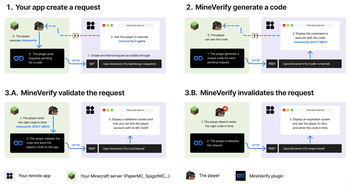
MineVerify lets external apps verify that a Minecraft account is controlled by a real player on your server.
The app creates an internal verification request and asks the player to run `/mineverify`.
The plugin then polls configured apps, generates a temporary code, validates `/mineverify `
in game, and reports the verified Minecraft UUID and username back to the app.
MineVerify only makes outbound requests to configured apps. It does not expose a public HTTP API on the Minecraft server.
!(https://raw.githubusercontent.com/Sukikui/MineVerify/main/assets/verification-flow.png)
## ✨ Features
- Verifies that a real connected Minecraft player owns a generated code
- Lets several external apps use the same Minecraft server for verification
- Keeps the Minecraft server private by using outbound app calls only
- Sends the app the verified Minecraft UUID and username after validation
- Expires unused codes automatically
- Expires pending verifications during graceful server shutdowns
- Provides admin status commands to inspect current verification activity
- Supports localized in-game messages
## 🚀 Installation
1. Install a (https://papermc.io/downloads/paper) with Java 25+ 2. Download the latest `MineVerify-x.x.x+mcx.x.x.jar` from the (https://github.com/Sukikui/MineVerify/releases) 3. Drop the jar into your server's `plugins/` folder 4. Restart the server or run `/reload confirm` 5. Configure your apps in `plugins/MineVerify/config.yml`
## 🕹 Command Usage
| Command | Permission | Description |
| --- | --- | --- |
| `/mineverify` | `mineverify.use` | Starts checking configured apps for pending verification requests. |
| `/mineverify ` | `mineverify.use` | Validates a generated code for the connected player. |
| `/mineverify status` | `mineverify.admin` | Shows polling state, configured apps, stored requests, and last app responses. |
| `/mineverify status requests` | `mineverify.admin` | Shows admin status with stored request details. |
`/mineverify` and `/mineverify ` must be run by a real player. Admin status commands can be
run by admins or from the console.
## ⚙️ Configuration
[`config.yml`](src/main/resources/config.yml) defines the language, remote apps, and code validity.
```yaml language: "en_us"
apps: my-app: name: "Your App" base-url: "https://your-app.com" token: "generated-token-from-your-app" poll-interval-seconds: 3
linking: code-ttl-seconds: 60 ```
| Key | Default | Description |
| --- | --- | --- |
| `language` | `en_us` | In-game message language. Available values are listed in `config.yml`. |
| `apps.
## 🔁 Verification Flow
1. The app creates an internal request for its own user.
2. The app asks the player to join the Minecraft server and run `/mineverify`.
3. MineVerify starts a temporary polling session.
4. MineVerify calls each configured app for pending requests.
5. MineVerify generates a code for each new pending request and sends it to the owning app.
6. The app shows `/mineverify ` to the user.
7. The player runs `/mineverify ` in game.
8. MineVerify validates the code and reads the connected player's UUID and username.
9. MineVerify reports either validation or expiration to the app.
## 🔌 App Endpoints
It's always MineVerify that contacts the app, never the opposite. In this way, each app configured in `config.yml` must implement these endpoints on its own backend.
| Endpoint | Method | Description | | --- | --- | --- | | `/api/mineverify/pending-requests` | `GET` | Returns app requests waiting for a generated code. | | `/api/mineverify/code-created` | `POST` | Receives the generated code and expiration time. | | `/api/mineverify/validated` | `POST` | Receives the verified Minecraft UUID and username. | | `/api/mineverify/expired` | `POST` | Receives an expiration event for an unused code or a graceful server shutdown. |
Every request sent by MineVerify includes:
```http
Authorization: Bearer
> [!IMPORTANT] > To fully integrate MineVerify into your app, follow > [`docs/APP_INTEGRATION.md`](docs/APP_INTEGRATION.md).
📊 Mod Details
- Game
- Minecraft Plugins
- Author
- Sukikui
- Version
- AYqtyWHa
- Downloads
- 31
- Endorsements
- 0
- Category
- management
- Created
- 6/18/2026
- Updated
- 8/3/2026
- Game Versions
- rAXhWC0l, bgSPeHDf, AYqtyWHa
- Tags
- management, technology, utility
🔧 How to Install Minecraft Plugins Mods
Download from Modrinth. Use Prism Launcher or drop into your mods folder.
📖 Full step-by-step install guide for Minecraft Plugins →
Visit the official mod page for specific installation instructions for this mod.
🎮 Need cheat codes or console commands? Check ur gaming wiki for Minecraft Plugins commands, item IDs, and more.
❓ Frequently Asked Questions
Which Minecraft Plugins versions does MineVerify support?
The author lists rAXhWC0l, bgSPeHDf, AYqtyWHa. Other versions may work but are untested by the author.
What is the latest version of MineVerify?
Version AYqtyWHa, published 2026-08-03 with 31 downloads recorded at the source.
Keep browsing — more Minecraft Plugins mods await