minecraft-gpt-god-plugin
⚪ Last updated 2024🖼️ Gallery (2 images)
🔍 Analysis
- 👍 1.5% endorsement rate — high engagement, a strong quality signal
- 🏆 #981 of 1560 bukkit mods in this game by downloads
📋 About This Mod
# Yous's GPT GOD for Minecraft ## Important If you have a newer OpenAI API account expect to get rate limited when using 4o https://platform.openai.com/docs/guides/rate-limits/usage-tiers OpenAI has this annoying system where they limit how much newer accounts use their API so after spending about 5 dollars things should smooth out at Tier 1. you might have issues with speech to text still but version 0.0.2 onwards you can use 4o-mini and slow down the rate in the config file to hopefully work around this. In the video my account was Tier 2 so I didn't experience rate limits. Sorry if this ruins your experience, but it is out of my control. ## Overview This Plugin Interfaces with OpenAI's GPT-4o and Whisper models to provide the experience of having an omniscient god watching the players as featured on the BigYous Youtube Channel. ## God's Capabilities - God can listen to player conversations! - God has a randomized list of liked and disliked behaviors that it will reward and punish players to make them adhere to that list! - Experience the weird approximation of morality exhibited by LLMs!!! ## How To Install <iframe width="560" height="315" src="https://www.youtube-nocookie.com/embed/uyVlkg75UVk" title="YouTube video player" frameborder="0" allow="accelerometer; autoplay; clipboard-write; encrypted-media; gyroscope; picture-in-picture; web-share" allowfullscreen></iframe> 1. download the latest version of the plugin 2. add plugin to plugins folder of your bukkit server - I used (https://papermc.io/downloads/paper) and Minecraft 1.20.4 in the video 3. after adding the plugin run the server to generate the plugin folder and config file 4. extract (https://legacy.curseforge.com/minecraft/worlds/bigyous-minegpt-worlds/files) into `plugins/gptgodmc` - these are the reccommended maps, you can use your own if you would like 5. open the config file - if you want to play sandbox mode, set `startingWorld` to `island` - if you want to play the Deathmatch mode set `gamemode` to `DEATHMATCH` - paste in your OpenAI API key (yes, you need to give them money) 6. for voicechat to work, all players must install the voicechat mod locally ## Added Commands `/nickname <nickname>`: tells GPT what name other players call you, handy if people don't refer to you by your user name
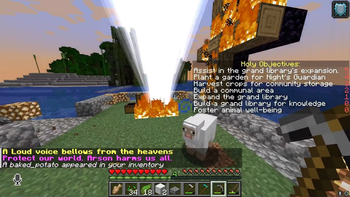
# Yous's GPT GOD for Minecraft ## Important If you have a newer OpenAI API account expect to get rate limited when using 4o https://platform.openai.com/docs/guides/rate-limits/usage-tiers OpenAI has this annoying system where they limit how much newer accounts use their API so after spending about 5 dollars things should smooth out at Tier 1. you might have issues with speech to text still but version 0. 0. 2 onwards you can use 4o-mini and slow down the rate in the config file to hopefully work around this. In the video my account was Tier 2 so I didn't experience rate limits. Sorry if this ruins your experience, but it is out of my control. ## Overview This Plugin Interfaces with OpenAI's GPT-4o and Whisper models to provide the experience of having an omniscient god watching the players as featured on the BigYous Youtube Channel.
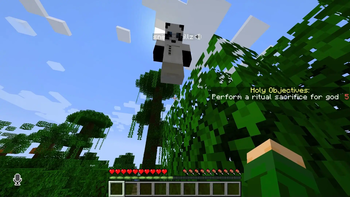
## God's Capabilities - God can listen to player conversations! - God has a randomized list of liked and disliked behaviors that it will reward and punish players to make them adhere to that list! - Experience the weird approximation of morality exhibited by LLMs!!! ## How To Install
1. download the latest version of the plugin 2. add plugin to plugins folder of your bukkit server - I used (https://papermc.io/downloads/paper) and Minecraft 1. 20. 4 in the video 3. after adding the plugin run the server to generate the plugin folder and config file 4. extract (https://legacy.curseforge.com/minecraft/worlds/bigyous-minegpt-worlds/files) into `plugins/gptgodmc` - these are the reccommended maps, you can use your own if you would like 5. open the config file - if you want to play sandbox mode, set `startingWorld` to `island` - if you want to play the Deathmatch mode set `gamemode` to `DEATHMATCH` - paste in your OpenAI API key (yes, you need to give them money) 6. for voicechat to work, all players must install the voicechat mod locally
## Added Commands
`/nickname
📊 Mod Details
- Game
- Minecraft Plugins
- Author
- YOUSY0US3F
- Version
- 0.1.7
- Downloads
- 2,132
- Endorsements
- 31
- Category
- bukkit
- Created
- 8/29/2024
- Updated
- 9/23/2024
- Game Versions
- 1.2.1, 1.2.2, 1.2.3, 1.2.4, 1.2.5
- Tags
- cursed, minigame
🔧 How to Install Minecraft Plugins Mods
Download from Modrinth. Use Prism Launcher or drop into your mods folder.
📖 Full step-by-step install guide for Minecraft Plugins →
Visit the official mod page for specific installation instructions for this mod.
🎮 Need cheat codes or console commands? Check ur gaming wiki for Minecraft Plugins commands, item IDs, and more.
❓ Frequently Asked Questions
Which Minecraft Plugins versions does minecraft-gpt-god-plugin support?
The author lists 1.2.1, 1.2.2, 1.2.3, 1.2.4, 1.2.5, 1.20. Other versions may work but are untested by the author.
What is the latest version of minecraft-gpt-god-plugin?
Version 0.1.7, published 2024-09-23 with 2,132 downloads recorded at the source.
Keep browsing — more Minecraft Plugins mods await