MineBot
🟡 Updated this year🖼️ Gallery (4 images)

🔍 Analysis
- 🏆 #72 of 235 management mods in this game by downloads
📋 About This Mod
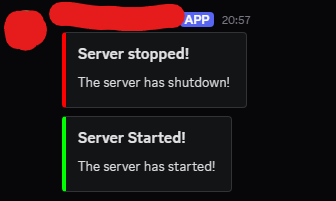
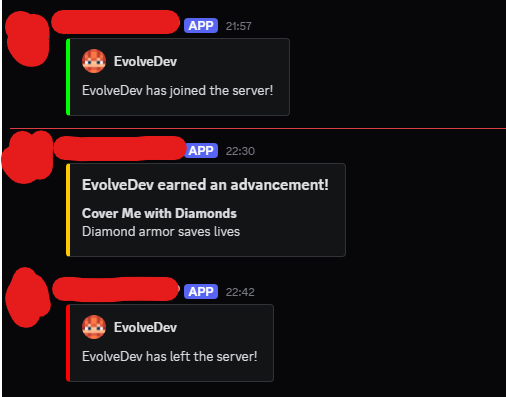
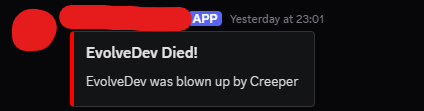
## Minebot A lightweight plugin that links your Minecraft server with a Discord bot. It forwards server activity, lets admins whitelist players through Discord, and keeps the setup process as painless as possible. Built for Paper and Spigot. ### **Features** * Connect your Minecraft server directly to Discord * Send server info and events to a chosen channel * Simple configuration through `config.yml` * Whitelist players using `/whitelist` via Discord admin role ### **Requirements** * Java 8+ * PaperMC or Spigot * A Discord bot token * (Optional) Maven if building from source ### **Installation** 1. Download the latest release `.jar`. 2. Drop it into your server’s `/plugins/` folder. 3. Start the server to generate the config. 4. Fill in your bot token, channel ID, guild ID, and admin role ID in `config.yml`. 5. Restart the server.
## Minebot A lightweight plugin that links your Minecraft server with a Discord bot. It forwards server activity, lets admins whitelist players through Discord, and keeps the setup process as painless as possible. Built for Paper and Spigot.
### Features
Connect your Minecraft server directly to Discord Send server info and events to a chosen channel Simple configuration through `config.yml` Whitelist players using `/whitelist` via Discord admin role
### Requirements
Java 8+ PaperMC or Spigot A Discord bot token (Optional) Maven if building from source
### Installation
1. Download the latest release `.jar`. 2. Drop it into your server’s `/plugins/` folder. 3. Start the server to generate the config. 4. Fill in your bot token, channel ID, guild ID, and admin role ID in `config.yml`. 5. Restart the server.
📊 Mod Details
- Game
- Minecraft Plugins
- Author
- LarsDevelopment
- Version
- 1.2
- Downloads
- 265
- Endorsements
- 0
- Category
- management
- Created
- 11/18/2025
- Updated
- 12/19/2025
- Game Versions
- 1.21, 1.21.1, 1.21.2, 1.21.3, 1.21.4
- Tags
- management, social, utility
🔧 How to Install Minecraft Plugins Mods
Download from Modrinth. Use Prism Launcher or drop into your mods folder.
📖 Full step-by-step install guide for Minecraft Plugins →
Visit the official mod page for specific installation instructions for this mod.
🎮 Need cheat codes or console commands? Check ur gaming wiki for Minecraft Plugins commands, item IDs, and more.
❓ Frequently Asked Questions
Which Minecraft Plugins versions does MineBot support?
The author lists 1.21, 1.21.1, 1.21.2, 1.21.3, 1.21.4, 1.21.5. Other versions may work but are untested by the author.
What is the latest version of MineBot?
Version 1.2, published 2025-12-19 with 265 downloads recorded at the source.
Keep browsing — more Minecraft Plugins mods await