MacTime
🟡 Updated this year🖼️ Gallery (3 images)
🔍 Analysis
- 👍 0.2% endorsement rate
- 🏆 #708 of 1560 bukkit mods in this game by downloads
📋 About This Mod
# MacTime This plugin allows tracking of the online time for players.<br> # Features - Only online time tracking plugin that is updated to the latest minecraft version - Almost every message is configurable via messages.yml - GUI which showcases various ontime data for players (Updates in real time at an interval which can be configured) (*`1.21.0` to `1.21.11`*) - 0% thread usage on a single instance with over 500 players while tracking more than 50 staff members (*via spark*) - MySQL support - Folia Support - Administrator friendly commands, permission nodes, and error messages to pinpoint issues - Discord Webhook support - All commands (besides /mactime gui) can be executed by console - Hex support for configurable messages - PlaceholderAPI Support - AFK time tracking (with EssentialsX) # Commands ### Admin Commands * `/mactime export <all:player> ` * If discord webhooks are enabled, this allows you to export all ontime data for either a specific player or all players being tracked. * `/mactime gui ` *This command is reserved for servers running Minecraft versions `1.21.0` to `1.21.11`* * Opens a GUI with all players showcasing their ontime data. If you have luckperms on your server, you can sort players in the gui by group weights. * You are also able to set the real time update interval for the GUI (If you would not like this, set `gui.updateinterval` to `0` in config.yml) * If you would like to view players' ontimes that are in a specific group, you can specify any included groups under `gui.whitelisted-groups` and run `/mactime gui ` * You are also able to specify viewing online players or offline players data by running `/mactime gui ` * If a player was previously in a group specified under `gui.whitelisted-groups` but now isn't, you can view their data by running `/mactime gui ` <br> (If you would like their data wiped on their next join if they no longer have the `mactime.track` permission node, you can enable `other.remove-if-no-perm` in config.yml) * `/mactime help` * Displays the help menu * `/mactime reload ` * Reloads either the config.yml file or messages.yml file. If no choice is specified, both will be reloaded. * `/mactime reset <player:group> <groupname:username>` * Resets ontime data for either a player or a group (if luckperms is on your server). <br> *If you would like the user data to be permanently removed from your server after running this command, you can set `reset.delete-data-on-reset` to `true` in the config.yml.* * `/ontime <username>` * View ontime data for a specific player ### Player Commands * `/ontime` * Displays ontime data based on the player's permissions. # Permissions | Permission | Description| | ------------- |:-------------:| |`mactime.*`| Grants all permissions.| |`ontime.track`| Allows the plugin to track the player's on-time.| |`mactime.admin`| Provides access to /mactime command.| |`mactime.command.*`| Provides access to all /mactime commands and their subcommands.| |`mactime.command.help`| Grants access to /mactime help.| |`mactime.command.reload`| Grants access to /mactime reload .| |`mactime.command.export`| if discord webhooks are enabled, this allows you to export player’s ontime data to a webhook.| |`mactime.command.reset`| Grants access to /mactime reset command.| |`mactime.command.gui`| Grants access to the /mactime gui command.| |`ontime.own`| Allows use of /ontime command.| |`ontime.own.*`| Provides access to see all on-time statistics.| |`ontime.own.afk`| Provides access to see AFK time via /ontime.| |`ontime.own.daily`| Provides access to see daily time via /ontime.| |`ontime.own.weekly`| Provides access to see weekly time via /ontime.| |`ontime.own.monthly`| Provides access to see monthly time via /ontime.| |`ontime.own.yearly`| Provides access to see yearly time via /ontime.| |`ontime.own.alltime`| Provides access to see all-time via /ontime.| |`ontime.others`| Allows usage of /ontime <username> to view other player's on-times.| |`ontime.others.*`| Provides access to see all on-time statistics for other players.| |`ontime.others.afk`| Provides access to see AFK time via /ontime for other players.| |`ontime.others.daily`| Provides access to see daily time via /ontime for other players.| |`ontime.others.weekly`| Provides access to see weekly time via /ontime for other players.| |`ontime.others.monthly`| Provides access to see monthly time via /ontime for other players.| |`ontime.others.yearly`| Provides access to see yearly time via /ontime for other players.| |`ontime.others.alltime`| Provides access to see all-time via /ontime for other players.| # Placeholders | Permission | Description| | ------------- |:-------------:| | `%mactime_current%`| Displays the current ontime of the user looking at the placeholder| | `%mactime_daily%`| Displays the daily ontime of the user looking at the pl
This plugin allows tracking of the online time for players.
# Features
- Only online time tracking plugin that is updated to the latest minecraft version
- Almost every message is configurable via messages.yml
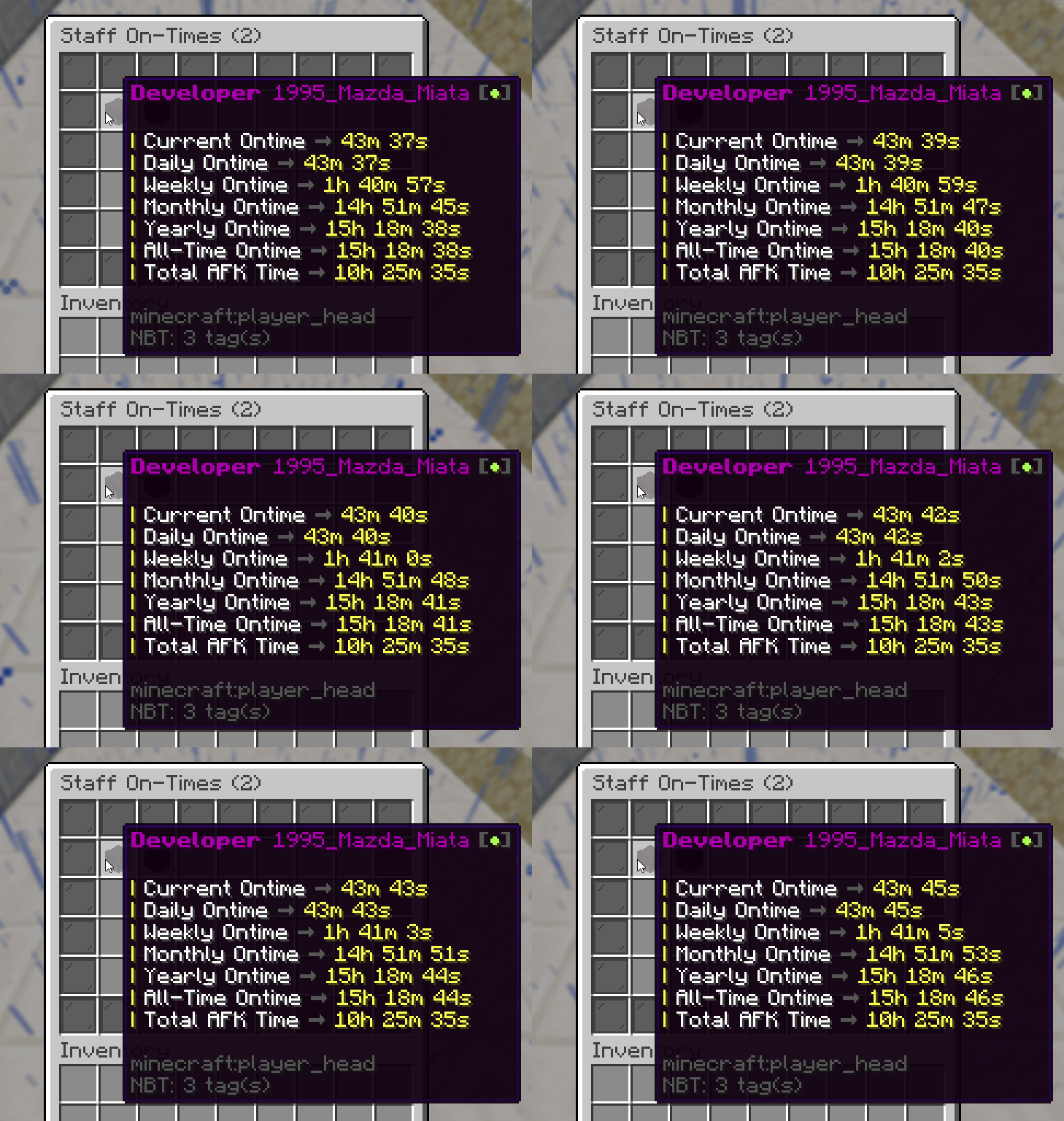
- GUI which showcases various ontime data for players (Updates in real time at an interval which can be configured) (`1. 21. 0` to `1. 21. 11`)
- 0% thread usage on a single instance with over 500 players while tracking more than 50 staff members (via spark)
- MySQL support
- Folia Support
- Administrator friendly commands, permission nodes, and error messages to pinpoint issues
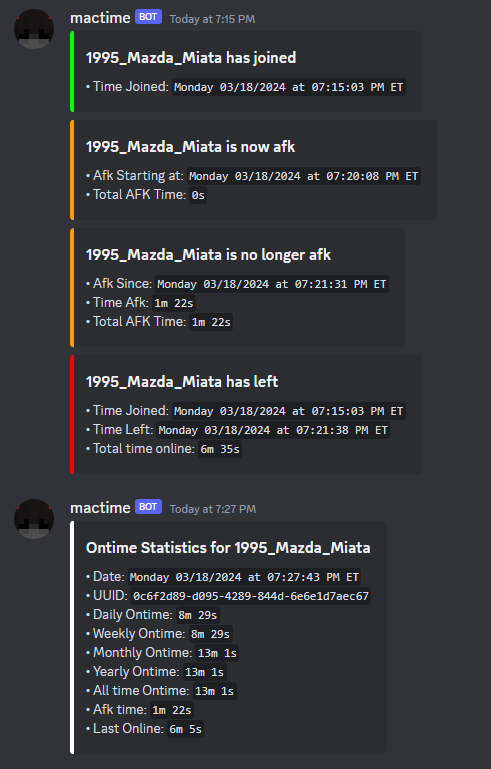
- Discord Webhook support
- All commands (besides /mactime gui) can be executed by console
- Hex support for configurable messages
- PlaceholderAPI Support
- AFK time tracking (with EssentialsX)
# Commands
### Admin Commands
`/mactime export
(If you would like their data wiped on their next join if they no longer have the `mactime.track` permission node, you can enable `other.remove-if-no-perm` in config.yml)
`/mactime help`
Displays the help menu
`/mactime reload `
Reloads either the config.yml file or messages.yml file. If no choice is specified, both will be reloaded.
`/mactime reset
If you would like the user data to be permanently removed from your server after running this command, you can set `reset.delete-data-on-reset` to `true` in the config.yml.
`/ontime
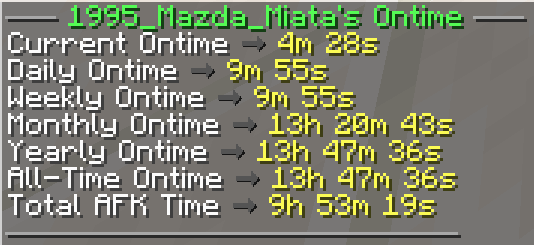
### Player Commands `/ontime` Displays ontime data based on the player's permissions.
# Permissions
| Permission | Description|
| ------------- |:-------------:|
|`mactime.`| Grants all permissions.|
|`ontime.track`| Allows the plugin to track the player's on-time.|
|`mactime.admin`| Provides access to /mactime command.|
|`mactime.command.`| Provides access to all /mactime commands and their subcommands.|
|`mactime.command.help`| Grants access to /mactime help.|
|`mactime.command.reload`| Grants access to /mactime reload .|
|`mactime.command.export`| if discord webhooks are enabled, this allows you to export player’s ontime data to a webhook.|
|`mactime.command.reset`| Grants access to /mactime reset command.|
|`mactime.command.gui`| Grants access to the /mactime gui command.|
|`ontime.own`| Allows use of /ontime command.|
|`ontime.own.`| Provides access to see all on-time statistics.|
|`ontime.own.afk`| Provides access to see AFK time via /ontime.|
|`ontime.own.daily`| Provides access to see daily time via /ontime.|
|`ontime.own.weekly`| Provides access to see weekly time via /ontime.|
|`ontime.own.monthly`| Provides access to see monthly time via /ontime.|
|`ontime.own.yearly`| Provides access to see yearly time via /ontime.|
|`ontime.own.alltime`| Provides access to see all-time via /ontime.|
|`ontime.others`| Allows usage of /ontime
# Placeholders | Permission | Description| | ------------- |:-------------:| | `%mactime_current%`| Displays the current ontime of the user looking at the placeholder| | `%mactime_daily%`| Displays the daily ontime of the user looking at the pl
📊 Mod Details
- Game
- Minecraft Plugins
- Author
- ajmac
- Version
- 1.1.9
- Downloads
- 3,327
- Endorsements
- 6
- Category
- bukkit
- Created
- 3/17/2024
- Updated
- 7/29/2026
- Game Versions
- 1.20, 1.20.1, 1.20.2, 1.20.3, 1.20.4
- Tags
- management, social, utility
🔧 How to Install Minecraft Plugins Mods
Download from Modrinth. Use Prism Launcher or drop into your mods folder.
📖 Full step-by-step install guide for Minecraft Plugins →
Visit the official mod page for specific installation instructions for this mod.
🎮 Need cheat codes or console commands? Check ur gaming wiki for Minecraft Plugins commands, item IDs, and more.
❓ Frequently Asked Questions
Which Minecraft Plugins versions does MacTime support?
The author lists 1.20, 1.20.1, 1.20.2, 1.20.3, 1.20.4, 1.20.5. Other versions may work but are untested by the author.
What is the latest version of MacTime?
Version 1.1.9, published 2026-07-29 with 3,327 downloads recorded at the source.
Keep browsing — more Minecraft Plugins mods await