M0-ExtraEnchants
🟡 Updated this year🖼️ Gallery (1 images)
🔍 Analysis
- 🏆 #201 of 331 adventure mods in this game by downloads
📋 About This Mod
# ExtraEnchants A simple enchantment plugin that adds extra enchants to the game. You can give players an enchanted book with: ```text /ee give <player> <enchant_name> <level> ``` Players can click the enchanted book in their inventory and then click a compatible tool to enchant it, or apply it through an anvil. If you would like a new enchantment added, feel free to contact me on Discord. --- # Available Enchants ### Featured Enchants - **Plow** — Tills a 3×1 area to the left of the tilled block and plants seeds directly from the hotbar. - **Telepathy** — Automatically puts mined blocks into the player's inventory. - **Smelt** — Automatically smelts mined blocks and ores. - **Lava Walker** — Allows walking on lava by creating temporary obsidian blocks. - **Bonded** — Prevents the item from being dropped and provides a chance to keep it after death. ### Additional Enchants - Smelt - Beheading - Haste Miner - Vein Miner - Anti Thorns - Experience Miner - Lifesteal - Assassin - Replanter - Berserk - Disposer - Tunnel - Withering - Barbarian - Armor Breaker - Cold Steel - Bat Vision - Turtle Shell - Reinforced - GILLS - Webbing - Death Siphon *and more...* Descriptions for all enchantments can be found in the configuration file: https://github.com/M0diis/M0-ExtraEnchants/blob/main/src/main/resources/config.yml The plugin also supports **config-driven** enchantments, see more here: https://github.com/M0diis/M0-ExtraEnchants/tree/main/src/main/resources/custom-enchants --- # Permissions - `extraenchants.command.list` — Access to `/ee list` - `extraenchants.command.enchant` — Access to `/ee give <player> <enchant_name> <level>` - `extraenchants.command.unenchant` — Access to `/unenchant` - `extraenchants.signs.use` — Permission to use enchant signs - `extraenchants.signs.create` — Permission to create enchant signs --- # Configuration The full configuration file can be found on GitHub: https://github.com/M0diis/M0-ExtraEnchants/blob/main/src/main/resources/config.yml ```yaml enchants: ... # All enchants are listed here messages: no-permission: "&c&lYou do not have permission to do this!" player-not-found: "&c&lPlayer not found." enchantment-list: "&9&lCurrent Enchants:\n&3&lTelepathy, Plow, Lava Walker, Bonded..." usage: "&c&lCommand usage: &d/&7ee <enchantment> <player>" enchant-removed: "&4%enchant_name% enchant has been removed" enchant-conflicts: "&cEnchant conflicts with one of the enchants shown below:" cannot-enchant-item: "&cYou cannot enchant this item." enchant-applied: "&aSuccessfully applied enchantment to item." hold-item: "&cYou must hold an item in your hand." reloaded: "&aSuccessfully reloaded config." # Enchant signs work similar to EssentialsX signs. # It supports the ExtraEnchants enchantments and vanilla ones. # To create an enchant sign, use the following format (first line should match enchant-signs.first-line-format). # > ENCHANT < # ENCHANTABLE_ITEM_TYPE # ENCHANTMENT # COST : LEVEL # # Sign example: # > ENCHANT < # ANY # TELEPATHY # 1000 : 1 # # Item type can be: TOOLS, ARMOR, WEAPONS, ALL # or specify the type of armor, e.g. HELMET, CHESTPLATE, LEGGINGS, BOOTS, ELYTRA, SHIELD # or specify the type of tool, e.g. PICKAXE, AXE, SHOVEL, HOE, SWORD, BOW, FISHING_ROD # or specify the type of weapon, e.g. SWORD, BOW, CROSSBOW # The default limitation still applies if you don't specify anything. # # Cost can be defined in money, experience or levels. (The currency symbol can be anything) # The following formats are supported: # - 100 : 1 # - 100$ : 1 # - 100 $ : 1 # - 100L : 1 # - 100 L : 1 # - 100XP : 1 # - 100 XP : 1 enchant-signs: enabled: true # You can add own color codes when placing it. This should be plain. # You can also add color format to other lines too. enchant-first-line-format: "> ENCHANT <" disenchant-first-line-format: "> DISENCHANT <" retrieve-first-line-format: "> RETRIEVE <" messages: sign-created: "&aSuccessfully created enchant sign." invalid-enchant: "&cInvalid enchantment." invalid-item-type: "&cInvalid item type." invalid-cost-level: "&cInvalid cost and level format." not-enough-money: "&cYou do not have enough money to purchase this enchant." no-item-in-hand: "&cYou must hold an item in your hand." cannot-enchant-item: "&cYou cannot enchant this item with this sign." enchant-applied: "&aSuccessfully applied enchantment." already-enchanted: "&cThis item is already enchanted." not-enough-xp: "&cYou do not have enough XP to purchase this enchant." not-enough-levels: "&cYou do not have enough levels to purchase this enchant." item-not-enchanted: "&cThis item is not enchanted." enchant-removed: "&4%enchant_name% enchant has been removed" enchant-retrieved: "&aSuccessfully retrieved enchantment." # General debug flag for Messenger.debug() calls debug: false # Enables the custom-enchants/*.yml framework (books, triggers, execution, list entries). # Se
# ExtraEnchants
A simple enchantment plugin that adds extra enchants to the game.
You can give players an enchanted book with:
```text
/ee give
Players can click the enchanted book in their inventory and then click a compatible tool to enchant it, or apply it through an anvil.
If you would like a new enchantment added, feel free to contact me on Discord.
# Available Enchants
### Featured Enchants
- Plow — Tills a 3×1 area to the left of the tilled block and plants seeds directly from the hotbar.
- Telepathy — Automatically puts mined blocks into the player's inventory.
- Smelt — Automatically smelts mined blocks and ores.
- Lava Walker — Allows walking on lava by creating temporary obsidian blocks.
- Bonded — Prevents the item from being dropped and provides a chance to keep it after death.
### Additional Enchants
- Smelt
- Beheading
- Haste Miner
- Vein Miner
- Anti Thorns
- Experience Miner
- Lifesteal
- Assassin
- Replanter
- Berserk
- Disposer
- Tunnel
- Withering
- Barbarian
- Armor Breaker
- Cold Steel
- Bat Vision
- Turtle Shell
- Reinforced
- GILLS
- Webbing
- Death Siphon
and more...
Descriptions for all enchantments can be found in the configuration file: https://github.com/M0diis/M0-ExtraEnchants/blob/main/src/main/resources/config.yml
The plugin also supports config-driven enchantments, see more here: https://github.com/M0diis/M0-ExtraEnchants/tree/main/src/main/resources/custom-enchants
# Permissions
- `extraenchants.command.list` — Access to `/ee list`
- `extraenchants.command.enchant` — Access to `/ee give
` - `extraenchants.command.unenchant` — Access to `/unenchant`
- `extraenchants.signs.use` — Permission to use enchant signs
- `extraenchants.signs.create` — Permission to create enchant signs
# Configuration
The full configuration file can be found on GitHub:
https://github.com/M0diis/M0-ExtraEnchants/blob/main/src/main/resources/config.yml
```yaml enchants: ... # All enchants are listed here
messages:
no-permission: "&c&lYou do not have permission to do this!"
player-not-found: "&c&lPlayer not found."
enchantment-list: "&9&lCurrent Enchants:\n&3&lTelepathy, Plow, Lava Walker, Bonded..."
usage: "&c&lCommand usage: &d/&7ee
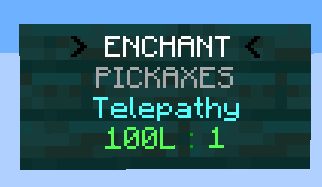
# Enchant signs work similar to EssentialsX signs. # It supports the ExtraEnchants enchantments and vanilla ones. # To create an enchant sign, use the following format (first line should match enchant-signs.first-line-format). # > ENCHANT < # ENCHANTABLE_ITEM_TYPE # ENCHANTMENT # COST : LEVEL # # Sign example: # > ENCHANT < # ANY # TELEPATHY # 1000 : 1 # # Item type can be: TOOLS, ARMOR, WEAPONS, ALL # or specify the type of armor, e.g. HELMET, CHESTPLATE, LEGGINGS, BOOTS, ELYTRA, SHIELD # or specify the type of tool, e.g. PICKAXE, AXE, SHOVEL, HOE, SWORD, BOW, FISHING_ROD # or specify the type of weapon, e.g. SWORD, BOW, CROSSBOW # The default limitation still applies if you don't specify anything. # # Cost can be defined in money, experience or levels. (The currency symbol can be anything) # The following formats are supported: # - 100 : 1 # - 100$ : 1 # - 100 $ : 1 # - 100L : 1 # - 100 L : 1 # - 100XP : 1 # - 100 XP : 1 enchant-signs: enabled: true # You can add own color codes when placing it. This should be plain. # You can also add color format to other lines too. enchant-first-line-format: "> ENCHANT <" disenchant-first-line-format: "> DISENCHANT <" retrieve-first-line-format: "> RETRIEVE <" messages: sign-created: "&aSuccessfully created enchant sign." invalid-enchant: "&cInvalid enchantment." invalid-item-type: "&cInvalid item type." invalid-cost-level: "&cInvalid cost and level format." not-enough-money: "&cYou do not have enough money to purchase this enchant." no-item-in-hand: "&cYou must hold an item in your hand." cannot-enchant-item: "&cYou cannot enchant this item with this sign." enchant-applied: "&aSuccessfully applied enchantment." already-enchanted: "&cThis item is already enchanted." not-enough-xp: "&cYou do not have enough XP to purchase this enchant." not-enough-levels: "&cYou do not have enough levels to purchase this enchant." item-not-enchanted: "&cThis item is not enchanted." enchant-removed: "&4%enchant_name% enchant has been removed" enchant-retrieved: "&aSuccessfully retrieved enchantment." # General debug flag for Messenger.debug() calls debug: false
# Enables the custom-enchants/*.yml framework (books, triggers, execution, list entries). # Se
📊 Mod Details
- Game
- Minecraft Plugins
- Author
- M0diis
- Version
- j21-mc1.21.11-5.0.0
- Downloads
- 50
- Endorsements
- 0
- Category
- adventure
- Created
- 6/6/2026
- Updated
- 6/4/2026
- Game Versions
- 1.21.8
- Tags
- adventure, game-mechanics, magic
🔧 How to Install Minecraft Plugins Mods
Download from Modrinth. Use Prism Launcher or drop into your mods folder.
📖 Full step-by-step install guide for Minecraft Plugins →
Visit the official mod page for specific installation instructions for this mod.
🎮 Need cheat codes or console commands? Check ur gaming wiki for Minecraft Plugins commands, item IDs, and more.
❓ Frequently Asked Questions
Which Minecraft Plugins versions does M0-ExtraEnchants support?
The author lists 1.21.8. Other versions may work but are untested by the author.
What is the latest version of M0-ExtraEnchants?
Version j21-mc1.21.11-5.0.0, published 2026-06-04 with 50 downloads recorded at the source.
Keep browsing — more Minecraft Plugins mods await