LuigiScreen
🟡 Updated this year🖼️ Gallery (4 images)
🔍 Analysis
- 🏆 #28 of 38 cursed mods in this game by downloads
📋 About This Mod
# Turn a Minecraft wall into a media screen LuigiScreen is a server-side Paper/Bukkit plugin that displays live streams, videos, images, GIFs, playlists and event scenes across configurable walls of Minecraft maps. # IN ALPHA STAGE A lot of stuff is not done and finished! Select an RTMP or MJPEG stream, a local video, a local or remote image, or an animated GIF. LuigiScreen loads the latest frame and MapEngine renders it for nearby players. No client mod is required. Players join with a normal Minecraft client. ## Features - In-game Control Studio with role-based access - Secure browser Web Studio with one-time login links and revocable sessions - Beginner-first Web Studio workflow: Media Library -> Playlist Editor -> Screen Automation - Direct browser playlist builder with visible add, delete, duplicate and assign controls - Direct browser playlist item editor for media, duration, weight and enabled state - Direct browser event builder with visible add step, delete, duplicate, start and stop controls - Direct browser event step editor for type, value, text, duration and enabled state - Direct browser automation builder with readable WHEN / IF / THEN rules - Searchable bundled picker controls for long screen, media, event and playlist lists - Preview/Program Live Studio with bounded live source thumbnails - Clean hover help and accessible descriptions without permanent info icons - Dashboard, Live Control Room, queues and playback explanations - Watched Media Library with validation and generated map thumbnails - Draft/Publish editing, audit history, snapshots and undo - Screen groups, schedules, templates and audience voting - Playlist simulation, advanced anti-repeat and eligibility diagnostics - RTMP and MJPEG live streams - Looping local videos and GIFs - Local and URL images - Per-screen playlists with weighted random media rotation - Manual event scenes that temporarily interrupt normal playback - Random media folder items for videos, images and GIFs - Multiple named screens with independent settings - One shared loader for screens using the same source type and value - Configurable screen dimensions, worlds, locations and orientation - Automatic reconnect with exponential backoff - Viewer-distance detection - Decoder pause while nobody is near the screen - Adaptive FPS protection for larger screens - Delta map updates to reduce unnecessary traffic - Optional guided MediaMTX configuration for RTMP - Editable Czech and English localization - English default configuration with optional Czech localization - Granular permissions for every management command - Optional `luigiscreen.see.<screen>` protection per display - Live performance boss bar and debug sidebar - Optional asynchronous Modrinth update notifications - Persistent screen configuration across restarts - Masked remote-source credentials in commands and plugin logs - Bundled FFmpeg natives for Windows x86_64 and Linux x86_64 ## Requirements - Paper 1.21.11 - Java 21 - MapEngine 1.8.12 - MediaMTX and OBS Studio only when using RTMP - Windows x86_64 or Linux x86_64 server LuigiScreen belongs to the Bukkit plugin ecosystem but currently targets Paper APIs. Use Paper 1.21.11, not a plain Spigot or CraftBukkit server. (https://modrinth.com/plugin/mapengine) ## Source types ```text rtmp rtmp:// or rtmps:// live stream mjpeg HTTP(S) MJPEG camera stream video looping local video file image local static image url-image remote HTTP(S) image gif looping local or remote GIF ``` Relative local paths use `plugins/LuigiScreen/media/`. Screens using the same source type and value share one loader while keeping independent FPS, distance, location, dimensions and permissions. ## Playlists and events Screens can also run configured playlists: ```text /screen playlist set main spawn_rotation ``` Playlist items can use RTMP, MJPEG, video, image, URL image, GIF, text frames or a random folder of local media files. Items support weights, durations, cooldowns and simple conditions such as viewer count, online players, viewer permission and TPS. Manual event scenes can interrupt the normal playlist and then return to it: ```text /screen event play main update_reveal ``` Events are useful for announcements, update reveals, countdowns or temporary live streams. For RTMP, MediaMTX and OBS do not have to run on the Minecraft server computer. LuigiScreen includes guided setup profiles for the same computer, LAN, public IP, VPN and external hosting. ## Installation 1. Stop the Paper server completely. 2. Install MapEngine 1.8.12. 3. Put the LuigiScreen JAR in `plugins/`. 4. Start the server. 5. Create the screen while looking at the upper-left block of a vertical wall. 6. Select its source. Example: ```text /screen create main 7 4 /screen source main video intro.mp4 /screen start main ``` Use `/screen mediamtx <situation>` only for an RTMP setup. Read the [complete step-by-step docume
# Turn a Minecraft wall into a media screen
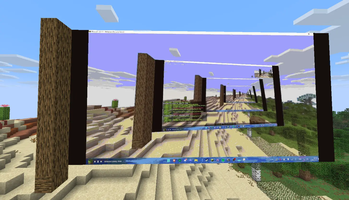
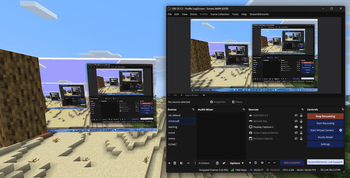
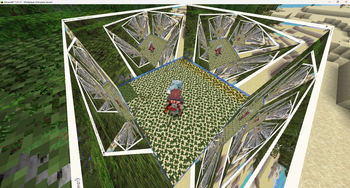
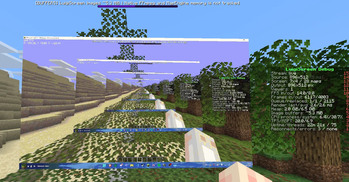
LuigiScreen is a server-side Paper/Bukkit plugin that displays live streams, videos, images, GIFs, playlists and event scenes across configurable walls of Minecraft maps.
# IN ALPHA STAGE A lot of stuff is not done and finished!
Select an RTMP or MJPEG stream, a local video, a local or remote image, or an animated GIF. LuigiScreen loads the latest frame and MapEngine renders it for nearby players.
No client mod is required. Players join with a normal Minecraft client.
## Features
- In-game Control Studio with role-based access
- Secure browser Web Studio with one-time login links and revocable sessions
- Beginner-first Web Studio workflow: Media Library -> Playlist Editor -> Screen Automation
- Direct browser playlist builder with visible add, delete, duplicate and assign controls
- Direct browser playlist item editor for media, duration, weight and enabled state
- Direct browser event builder with visible add step, delete, duplicate, start and stop controls
- Direct browser event step editor for type, value, text, duration and enabled state
- Direct browser automation builder with readable WHEN / IF / THEN rules
- Searchable bundled picker controls for long screen, media, event and playlist lists
- Preview/Program Live Studio with bounded live source thumbnails
- Clean hover help and accessible descriptions without permanent info icons
- Dashboard, Live Control Room, queues and playback explanations
- Watched Media Library with validation and generated map thumbnails
- Draft/Publish editing, audit history, snapshots and undo
- Screen groups, schedules, templates and audience voting
- Playlist simulation, advanced anti-repeat and eligibility diagnostics
- RTMP and MJPEG live streams
- Looping local videos and GIFs
- Local and URL images
- Per-screen playlists with weighted random media rotation
- Manual event scenes that temporarily interrupt normal playback
- Random media folder items for videos, images and GIFs
- Multiple named screens with independent settings
- One shared loader for screens using the same source type and value
- Configurable screen dimensions, worlds, locations and orientation
- Automatic reconnect with exponential backoff
- Viewer-distance detection
- Decoder pause while nobody is near the screen
- Adaptive FPS protection for larger screens
- Delta map updates to reduce unnecessary traffic
- Optional guided MediaMTX configuration for RTMP
- Editable Czech and English localization
- English default configuration with optional Czech localization
- Granular permissions for every management command
- Optional `luigiscreen.see.
` protection per display - Live performance boss bar and debug sidebar
- Optional asynchronous Modrinth update notifications
- Persistent screen configuration across restarts
- Masked remote-source credentials in commands and plugin logs
- Bundled FFmpeg natives for Windows x86_64 and Linux x86_64
## Requirements
- Paper 1. 21. 11
- Java 21
- MapEngine 1. 8. 12
- MediaMTX and OBS Studio only when using RTMP
- Windows x86_64 or Linux x86_64 server
LuigiScreen belongs to the Bukkit plugin ecosystem but currently targets Paper APIs. Use Paper 1. 21. 11, not a plain Spigot or CraftBukkit server.
(https://modrinth.com/plugin/mapengine)
## Source types
```text rtmp rtmp:// or rtmps:// live stream mjpeg HTTP(S) MJPEG camera stream video looping local video file image local static image url-image remote HTTP(S) image gif looping local or remote GIF ```
Relative local paths use `plugins/LuigiScreen/media/`. Screens using the same source type and value share one loader while keeping independent FPS, distance, location, dimensions and permissions.
## Playlists and events
Screens can also run configured playlists:
```text /screen playlist set main spawn_rotation ```
Playlist items can use RTMP, MJPEG, video, image, URL image, GIF, text frames or a random folder of local media files. Items support weights, durations, cooldowns and simple conditions such as viewer count, online players, viewer permission and TPS.
Manual event scenes can interrupt the normal playlist and then return to it:
```text /screen event play main update_reveal ```
Events are useful for announcements, update reveals, countdowns or temporary live streams.
For RTMP, MediaMTX and OBS do not have to run on the Minecraft server computer. LuigiScreen includes guided setup profiles for the same computer, LAN, public IP, VPN and external hosting.
## Installation
1. Stop the Paper server completely. 2. Install MapEngine 1. 8. 12. 3. Put the LuigiScreen JAR in `plugins/`. 4. Start the server. 5. Create the screen while looking at the upper-left block of a vertical wall. 6. Select its source.
```text /screen create main 7 4 /screen source main video intro.mp4 /screen start main ```
Use `/screen mediamtx
📊 Mod Details
- Game
- Minecraft Plugins
- Author
- unknown_56
- Version
- 1.2.0-alpha.5
- Downloads
- 99
- Endorsements
- 2
- Category
- cursed
- Created
- 7/7/2026
- Updated
- 7/15/2026
- Game Versions
- 1.21.11
- Tags
- cursed, technology, utility
🔧 How to Install Minecraft Plugins Mods
Download from Modrinth. Use Prism Launcher or drop into your mods folder.
📖 Full step-by-step install guide for Minecraft Plugins →
Visit the official mod page for specific installation instructions for this mod.
🎮 Need cheat codes or console commands? Check ur gaming wiki for Minecraft Plugins commands, item IDs, and more.
❓ Frequently Asked Questions
Which Minecraft Plugins versions does LuigiScreen support?
The author lists 1.21.11. Other versions may work but are untested by the author.
What is the latest version of LuigiScreen?
Version 1.2.0-alpha.5, published 2026-07-15 with 99 downloads recorded at the source.
Keep browsing — more Minecraft Plugins mods await