LogicLobby
🟠 Updated over a year ago🖼️ Gallery (2 images)
🔍 Analysis
- 👍 0.3% endorsement rate
- 🏆 #63 of 131 management mods in this game by downloads
📋 About This Mod
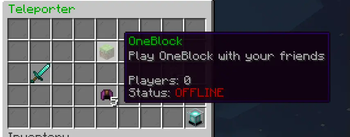
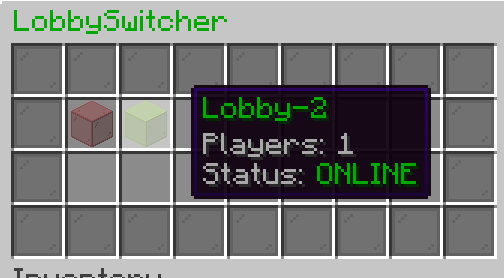
!(https://i.imgur.com/CCnlD4N.png) ### Overview LogicLobby is a versatile and customizable plugin designed to enhance the lobby experience on your Minecraft server. With a rich feature set and flexible configuration options, LogicLobby empowers server owners to create immersive and engaging lobby environments for their players. **Wiki**: https://logic.codearray.dev/docs/logiclobby.html **Key Features** 1. **Teleporter Menu** - Offer players the ability to teleport to different locations or game modes within your server. - Customize teleporter menu options, including inventory layout, filler items, and server descriptions. 2. **Lobby Switcher** - Provide players with a convenient interface to navigate between different lobby areas or game modes. - Configure lobby switcher menu settings such as inventory layout, lobby item types, and associated servers. 3. **Spawn Management** - Control player spawn points and behaviors upon joining the server. - Choose whether players should teleport to a designated spawn location upon joining. 4. **Custom Items and Descriptions** - Define custom items with unique textures, names, and descriptions to enhance visual appeal and usability. - Tailor item attributes such as glow effects, quantities, and colors to suit your server's theme. 5. **CloudNet v4 Support (Optional)** - Offer seamless transitions between CloudNet instances for improved player experience. ### Flexible Configuration LogicLobby comes with a comprehensive configuration system that allows server owners to tailor the plugin's behavior to their specific needs. From defining lobby layouts to specifying server descriptions and item attributes, the configuration file provides extensive customization options. ### Ease of Use Designed with user-friendliness in mind, LogicLobby offers an intuitive interface for both administrators and players. Server owners can easily modify settings and manage lobby features through simple configuration file adjustments. ### Screenshots !(https://i.imgur.com/3EmtMc2.png) !(https://i.imgur.com/8ML0hix.png) ### bStats !(https://bstats.org/signatures/bukkit/LogicLobby.svg)
!(https://i.imgur.com/CCnlD4N.png) ### Overview LogicLobby is a versatile and customizable plugin designed to enhance the lobby experience on your Minecraft server. With a rich feature set and flexible configuration options, LogicLobby empowers server owners to create immersive and engaging lobby environments for their players.
Wiki: https://logic.codearray.dev/docs/logiclobby.html
Key Features 1. Teleporter Menu - Offer players the ability to teleport to different locations or game modes within your server. - Customize teleporter menu options, including inventory layout, filler items, and server descriptions. 2. Lobby Switcher - Provide players with a convenient interface to navigate between different lobby areas or game modes. - Configure lobby switcher menu settings such as inventory layout, lobby item types, and associated servers. 3. Spawn Management - Control player spawn points and behaviors upon joining the server. - Choose whether players should teleport to a designated spawn location upon joining. 4. Custom Items and Descriptions - Define custom items with unique textures, names, and descriptions to enhance visual appeal and usability. - Tailor item attributes such as glow effects, quantities, and colors to suit your server's theme. 5. CloudNet v4 Support (Optional) - Offer seamless transitions between CloudNet instances for improved player experience.
### Flexible Configuration LogicLobby comes with a comprehensive configuration system that allows server owners to tailor the plugin's behavior to their specific needs. From defining lobby layouts to specifying server descriptions and item attributes, the configuration file provides extensive customization options.
### Ease of Use Designed with user-friendliness in mind, LogicLobby offers an intuitive interface for both administrators and players. Server owners can easily modify settings and manage lobby features through simple configuration file adjustments.
### Screenshots !(https://i.imgur.com/3EmtMc2.png) !(https://i.imgur.com/8ML0hix.png)
### bStats !(https://bstats.org/signatures/bukkit/LogicLobby.svg)
📊 Mod Details
- Game
- Minecraft Plugins
- Author
- Frinshy
- Version
- 1.2.0
- Downloads
- 2,439
- Endorsements
- 7
- Category
- management
- Created
- 5/10/2024
- Updated
- 12/29/2024
- Game Versions
- 1.19, 1.19.1, 1.19.2, 1.19.3, 1.19.4
- Tags
- management, utility
🔧 How to Install Minecraft Plugins Mods
Download from Modrinth. Use Prism Launcher or drop into your mods folder.
📖 Full step-by-step install guide for Minecraft Plugins →
Visit the official mod page for specific installation instructions for this mod.
🎮 Need cheat codes or console commands? Check ur gaming wiki for Minecraft Plugins commands, item IDs, and more.
❓ Frequently Asked Questions
Which Minecraft Plugins versions does LogicLobby support?
The author lists 1.19, 1.19.1, 1.19.2, 1.19.3, 1.19.4, 1.20. Other versions may work but are untested by the author.
What is the latest version of LogicLobby?
Version 1.2.0, published 2024-12-29 with 2,439 downloads recorded at the source.
Keep browsing — more Minecraft Plugins mods await