Locator Bar
🟡 Updated this year🖼️ Gallery (3 images)
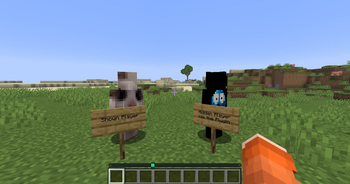


🔍 Analysis
- 👍 0.8% endorsement rate
- 🏆 #91 of 214 game-mechanics mods in this game by downloads
📋 About This Mod
<div align="center"> !(https://cdn.modrinth.com/data/cached_images/cbd7199f9467e3b586b7b5ddc3197792ad7b9eeb.png) !(https://img.shields.io/modrinth/dt/KF5O4Zzd?logo=modrinth&label=Downloads&color=38B541&style=for-the-badge) !(https://img.shields.io/badge/Minecraft-1.21.6+-blue?style=for-the-badge) Per player locator bar visibility control. </div> <div align="center"> !(https://cdn.modrinth.com/data/cached_images/96232b3a19bd4c2828862dccfd721159f7ecd77a_0.webp) The player on the left is shown by default, while the player on the right has hidden himself using the /locatorbar toggle command. The Locator Bar only shows the visible player. </div> <details> <summary>Commands & Permissions</summary> **Commands** | Command | Description | Permission | |---------|-------------|------------| | `/locatorbar toggle` | Toggle your visibility settings | `locatorbar.use` | | `/locatorbar receive` | Toggle receiving others (separate mode) | `locatorbar.use` | | `/locatorbar status` | Check your current settings | `locatorbar.use` | | `/locatorbar help` | Show help message | `locatorbar.use` | | `/locatorbar player <name> ` | Manage other players | `locatorbar.admin` | | `/locatorbar reload` | Reload configuration | `locatorbar.admin` | **Aliases**: `/lb`, `/locator` **Permissions** | Permission | Description | Default | |------------|-------------|---------| | `locatorbar.use` | Access basic commands | `true` | | `locatorbar.admin` | Admin commands and player management | `op` | | `locatorbar.cooldown.bypass` | Bypass all cooldowns | `false` | | `locatorbar.cooldown.X` | X second cooldown (0-300) | `false` | **Examples**: `locatorbar.cooldown.5`, `locatorbar.cooldown.60`, `locatorbar.cooldown.120` </details> <details> <summary>config.yml</summary> ```yaml # LocatorBar by Blaxk_ # https://modrinth.com/plugin/locator-bar # Language settings (en, de) language: "en" # Show welcome message to new players on first join show-first-join-message: false # Control mode for locator bar settings # 'combined' - /lb toggle controls both visibility and receiving together # 'separate' - /lb toggle for visibility, /lb receive for receiving separately control-mode: "combined" # Cooldown settings default-cooldown: 5 # Default cooldown in seconds # Permission-based cooldowns: # locatorbar.cooldown.bypass - No cooldown # locatorbar.cooldown.X - X second cooldown (where X is any number 0-300) # Examples: locatorbar.cooldown.0, locatorbar.cooldown.34, locatorbar.cooldown.120, etc. # Sound settings sounds: enabled: false # Enable/disable all sound effects volume: 1.0 # Sound volume (0.0 to 1.0) pitch: 1.0 # Sound pitch (0.5 to 2.0) enable: "entity.player.levelup" # Sound when enabling visibility disable: "block.note_block.bass" # Sound when disabling visibility # World-specific settings world-settings: # Example world configurations: # world_nether: # force-visible: true # minigame_world: # force-visible: true # lobby: # force-visible: true # Attribute ranges - always applied # Standard Minecraft default is 60000000 default-transmit-range: 60000000.0 default-receive-range: 60000000.0 # When a player toggles visibility off, should their receive range also be set to 0? # Only applies when control-mode is 'combined' # true = player cannot see others when hidden (more immersive) # false = player can still see others even when hidden (more flexible) disable-receive-when-hidden: false # Plugin settings save-interval: 300 # Auto-save player data every 5 minutes (in seconds) update-checker: true # Check for updates on startup # Debug mode debug: false # Do not change this config-version: 2 ``` </details> <details> <summary>lang/en.yml</summary> ```yaml # English Messages prefix: "<gradient:#667eea:#764ba2>ʟᴏᴄᴀᴛᴏʀʙᴀʀ</gradient> <dark_gray>»</dark_gray> " # Update messages update-available: "<prefix><#fbbf24>⚔ Update available! <#94a3b8>Current: <#ff8787>{current} <#94a3b8>Latest: <#51cf66>{latest}" update-hide-button: " <#a78bfa> <#94a3b8>Download: <click:open_url:{download_url}><#a5f3fc>{download_url}</click>" update-hidden: "<prefix><#51cf66>Update notifications hidden for 24 hours! ⌛" # First join messages first-join-welcome: "<prefix><#51cf66>Welcome! <#a5f3fc>✔ <white>You can control your locator bar visibility!" first-join-info: "<prefix><#fbbf24>Use <#a78bfa>/locatorbar help <#fbbf24>to see all available commands. <#94a3b8>Have fun!" # Command messages only-players: "<prefix><#ff6b6b>Only players can use this command!" no-permission: "<prefix><#ff6b6b>You don't have permission to use this command!" config-reloaded: "<prefix><#51cf66>Configuration reloaded successfully!" command-not-available: "<prefix><#ff6b6b>This command is not available in the current control mode!" player-not-found: "<prefix><#ff6b6b>Player not found or n
!(https://cdn.modrinth.com/data/cached_images/cbd7199f9467e3b586b7b5ddc3197792ad7b9eeb.png)
!(https://img.shields.io/modrinth/dt/KF5O4Zzd?logo=modrinth&label=Downloads&color=38B541&style=for-the-badge) !(https://img.shields.io/badge/Minecraft-1. 21. 6+-blue?style=for-the-badge)
Per player locator bar visibility control.
!(https://cdn.modrinth.com/data/cached_images/96232b3a19bd4c2828862dccfd721159f7ecd77a_0.webp)
The player on the left is shown by default, while the player on the right has hidden himself using the /locatorbar toggle command. The Locator Bar only shows the visible player.
Commands & Permissions
Commands
| Command | Description | Permission |
|---------|-------------|------------|
| `/locatorbar toggle` | Toggle your visibility settings | `locatorbar.use` |
| `/locatorbar receive` | Toggle receiving others (separate mode) | `locatorbar.use` |
| `/locatorbar status` | Check your current settings | `locatorbar.use` |
| `/locatorbar help` | Show help message | `locatorbar.use` |
| `/locatorbar player
Aliases: `/lb`, `/locator`
Permissions
| Permission | Description | Default | |------------|-------------|---------| | `locatorbar.use` | Access basic commands | `true` | | `locatorbar.admin` | Admin commands and player management | `op` | | `locatorbar.cooldown.bypass` | Bypass all cooldowns | `false` | | `locatorbar.cooldown. X` | X second cooldown (0-300) | `false` |
Examples: `locatorbar.cooldown. 5`, `locatorbar.cooldown. 60`, `locatorbar.cooldown. 120`
config.yml
```yaml # LocatorBar by Blaxk_ # https://modrinth.com/plugin/locator-bar
# Language settings (en, de) language: "en"
# Show welcome message to new players on first join show-first-join-message: false
# Control mode for locator bar settings # 'combined' - /lb toggle controls both visibility and receiving together # 'separate' - /lb toggle for visibility, /lb receive for receiving separately control-mode: "combined"
# Cooldown settings default-cooldown: 5 # Default cooldown in seconds # Permission-based cooldowns: # locatorbar.cooldown.bypass - No cooldown # locatorbar.cooldown. X - X second cooldown (where X is any number 0-300) # Examples: locatorbar.cooldown. 0, locatorbar.cooldown. 34, locatorbar.cooldown. 120, etc.
# Sound settings sounds: enabled: false # Enable/disable all sound effects volume: 1. 0 # Sound volume (0. 0 to 1. 0) pitch: 1. 0 # Sound pitch (0. 5 to 2. 0) enable: "entity.player.levelup" # Sound when enabling visibility disable: "block.note_block.bass" # Sound when disabling visibility
# World-specific settings world-settings: # Example world configurations: # world_nether: # force-visible: true # minigame_world: # force-visible: true # lobby: # force-visible: true
# Attribute ranges - always applied # Standard Minecraft default is 60000000 default-transmit-range: 60000000. 0 default-receive-range: 60000000. 0
# When a player toggles visibility off, should their receive range also be set to 0? # Only applies when control-mode is 'combined' # true = player cannot see others when hidden (more immersive) # false = player can still see others even when hidden (more flexible) disable-receive-when-hidden: false
# Plugin settings save-interval: 300 # Auto-save player data every 5 minutes (in seconds) update-checker: true # Check for updates on startup
# Debug mode debug: false
# Do not change this config-version: 2 ```
lang/en.yml
```yaml
# English Messages
prefix: "
# Update messages
update-available: "
# First join messages
first-join-welcome: "
# Command messages
only-players: "
📊 Mod Details
- Game
- Minecraft Plugins
- Author
- blaxk
- Version
- 1.1
- Downloads
- 2,905
- Endorsements
- 22
- Category
- game-mechanics
- Created
- 7/8/2025
- Updated
- 2/7/2026
- Game Versions
- 1.21.6, 1.21.7, 1.21.8, 1.21.9, 1.21.10
- Tags
- game-mechanics, management, social
🔧 How to Install Minecraft Plugins Mods
Download from Modrinth. Use Prism Launcher or drop into your mods folder.
📖 Full step-by-step install guide for Minecraft Plugins →
Visit the official mod page for specific installation instructions for this mod.
🎮 Need cheat codes or console commands? Check ur gaming wiki for Minecraft Plugins commands, item IDs, and more.
❓ Frequently Asked Questions
Which Minecraft Plugins versions does Locator Bar support?
The author lists 1.21.6, 1.21.7, 1.21.8, 1.21.9, 1.21.10, 1.21.11. Other versions may work but are untested by the author.
What is the latest version of Locator Bar?
Version 1.1, published 2026-02-07 with 2,905 downloads recorded at the source.
Keep browsing — more Minecraft Plugins mods await