LobbyManager
🟡 Updated this year🖼️ Gallery (2 images)
🔍 Analysis
- 🏆 #67 of 383 adventure mods in this game by downloads
📋 About This Mod
# LobbyManager LobbyManager is a modern, lightweight, and powerful lobby management plugin for Minecraft servers running Paper or Spigot. Designed for both small communities and large server networks, it gives server owners an easy way to manage spawn points, multiple lobbies, teleport menus, and player navigation — all from a clean in-game interface. Unlike basic spawn plugins that only provide a simple `/spawn` command, LobbyManager delivers a complete lobby system with customizable lobby selectors, intuitive admin tools, configurable messages, and flexible storage support. Whether you need a single central hub or a fully organized multi-lobby setup, LobbyManager+ keeps everything simple, fast, and easy to manage. Players can quickly return to the main spawn using `/spawn`, or browse available lobbies through `/lobby` with a clean GUI-based selector. Server staff can fully manage lobbies directly in-game without touching configuration files. --- # Features - Lightweight and optimized for Paper & Spigot - Create and manage multiple lobbies - Main spawn system with `/spawn` - Lobby selector GUI with teleport support - Teleport directly using `/lobby <lobby-id>` - Easy in-game admin management tools - Custom lobby display names and icons - Toggle lobby visibility from the admin GUI - Rename lobbies without editing configs - Delete lobbies directly in-game - Configurable messages and settings - Supports both SQLite and MySQL - Suitable for survival servers, hubs, and large networks --- # Commands ## Player Commands - `/spawn` — Teleport to the main spawn - `/lobby` — Open the lobby selector GUI - `/lobby <lobby-id>` — Teleport directly to a specific lobby ## Admin Commands - `/lm admin` — Open the admin management GUI - `/lm setspawn` — Set the main spawn location - `/lm reload` — Reload plugin configuration and storage - `/lm info` — View plugin information and status --- # Admin GUI Features The built-in admin GUI allows staff to manage lobbies entirely in-game: - Create new lobbies - Rename lobby IDs - Change lobby display names - Edit lobby icons - Toggle lobby visibility - Delete lobbies instantly - Manage lobby settings without restarting the server --- LobbyManager focuses on simplicity, performance, and ease of use while still giving server owners the flexibility needed for professional-quality lobby systems.
# LobbyManager
LobbyManager is a modern, lightweight, and powerful lobby management plugin for Minecraft servers running Paper or Spigot. Designed for both small communities and large server networks, it gives server owners an easy way to manage spawn points, multiple lobbies, teleport menus, and player navigation — all from a clean in-game interface.
Unlike basic spawn plugins that only provide a simple `/spawn` command, LobbyManager delivers a complete lobby system with customizable lobby selectors, intuitive admin tools, configurable messages, and flexible storage support. Whether you need a single central hub or a fully organized multi-lobby setup, LobbyManager+ keeps everything simple, fast, and easy to manage.
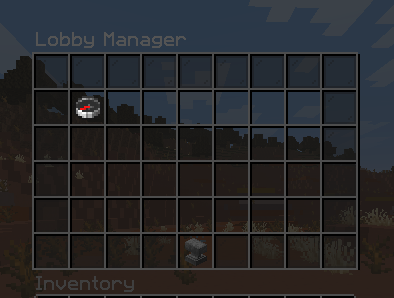
Players can quickly return to the main spawn using `/spawn`, or browse available lobbies through `/lobby` with a clean GUI-based selector. Server staff can fully manage lobbies directly in-game without touching configuration files.
- Lightweight and optimized for Paper & Spigot
- Create and manage multiple lobbies
- Main spawn system with `/spawn`
- Lobby selector GUI with teleport support
- Teleport directly using `/lobby
` - Easy in-game admin management tools
- Custom lobby display names and icons
- Toggle lobby visibility from the admin GUI
- Rename lobbies without editing configs
- Delete lobbies directly in-game
- Configurable messages and settings
- Supports both SQLite and MySQL
- Suitable for survival servers, hubs, and large networks
## Player Commands
- `/spawn` — Teleport to the main spawn
- `/lobby` — Open the lobby selector GUI
- `/lobby
` — Teleport directly to a specific lobby
## Admin Commands
- `/lm admin` — Open the admin management GUI
- `/lm setspawn` — Set the main spawn location
- `/lm reload` — Reload plugin configuration and storage
- `/lm info` — View plugin information and status
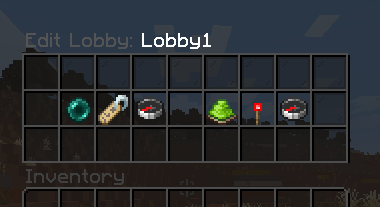
# Admin GUI Features
The built-in admin GUI allows staff to manage lobbies entirely in-game:
- Create new lobbies
- Rename lobby IDs
- Change lobby display names
- Edit lobby icons
- Toggle lobby visibility
- Delete lobbies instantly
- Manage lobby settings without restarting the server
LobbyManager focuses on simplicity, performance, and ease of use while still giving server owners the flexibility needed for professional-quality lobby systems.
📊 Mod Details
- Game
- Minecraft Plugins
- Author
- StarfallIDE
- Version
- 2.0.0
- Downloads
- 148
- Endorsements
- 1
- Category
- adventure
- Created
- 5/12/2026
- Updated
- 5/13/2026
- Game Versions
- 1.21, 1.21.1, 1.21.2, 1.21.3, 1.21.4
- Tags
- adventure, economy, utility
🔧 How to Install Minecraft Plugins Mods
Download from Modrinth. Use Prism Launcher or drop into your mods folder.
📖 Full step-by-step install guide for Minecraft Plugins →
Visit the official mod page for specific installation instructions for this mod.
🎮 Need cheat codes or console commands? Check ur gaming wiki for Minecraft Plugins commands, item IDs, and more.
❓ Frequently Asked Questions
Which Minecraft Plugins versions does LobbyManager support?
The author lists 1.21, 1.21.1, 1.21.2, 1.21.3, 1.21.4, 1.21.5. Other versions may work but are untested by the author.
What is the latest version of LobbyManager?
Version 2.0.0, published 2026-05-13 with 148 downloads recorded at the source.
Keep browsing — more Minecraft Plugins mods await