LightStaff
🟡 Updated this year🖼️ Gallery (7 images)
🔍 Analysis
- 🏆 #847 of 1080 bukkit mods in this game by downloads
📋 About This Mod
# LightStaff A modern staff utility plugin for Paper and Folia servers. LightStaff gives moderators a clean staff mode toolset for investigations: hotbar tools, vanish, freeze, inspection, teleporting, recovery, audit logging, and flexible storage. Built against Paper `1.19.4` with Java 17, while keeping the runtime path ready for newer Paper builds. ## Showcase ### Staff Mode Hotbar The default setup gives staff a compact investigation hotbar with clear names, lore, and actionbar state. ### Staff Mode Tools Staff entering Staff Mode receives a configurable hotbar: | Slot | Tool | Purpose | | ---: | --- | --- | | `0` | Vanish | Hide from regular players while staying visible to staff with permission. | | `1` | Push | Move players away for quick spacing or control. | | `2` | Inspector | Open a read-only inventory view with armor and offhand. | | `4` | Freeze | Stop movement, chat, commands, damage bypasses, and inventory actions. | | `6` | Flight | Toggle flight while investigating. | | `8` | Exit | Leave Staff Mode and restore the saved player state. | Every tool is configured in `tools.yml`: enabled state, slot, permission, material fallback list, cooldown, display name, lore, sound, volume, and pitch. ### Storage Choices Pick the backend that fits the server: - `sqlite` for simple local production use - `json` for readable local files - `mysql` for networked setups - `mariadb` for MariaDB deployments ### Combat-Aware Staff Mode LightStaff can block players from entering Staff Mode while combat tagged. The check is configurable and supports: - metadata keys used by combat plugins - PlaceholderAPI placeholders - a bypass permission for trusted staff ## Features - Staff Mode enter/exit with inventory, armor, offhand, exp, gamemode, and flight restoration - Persistent vanish and freeze state - Read-only inventory inspection - Freeze command and freeze tool with disconnect handling - Staff teleport command - Staff whitelist bypass mode - Session recovery command - Audit logging for moderation actions - Configurable actionbar - Configurable command, plugin, and tool messages - Configurable storage: SQLite, JSON, MySQL, MariaDB - Paper and Folia scheduler support - Material fallback lists for cross-version compatibility ## Requirements - Java 17 or newer - Paper `1.19.4+` - Optional: PlaceholderAPI - Optional: CombatLogX, PvPManager, DeluxeCombat, CombatPlus, or another combat plugin exposed through metadata or PlaceholderAPI ## Installation 1. Download the latest jar from GitHub Releases. 2. Put it in your server `plugins` folder. 3. Start the server once. 4. Edit the generated files in `plugins/LightStaff/`. 5. Run `/lightstaff reload` or restart the server. ## Configuration LightStaff separates configuration into three files: | File | Purpose | | --- | --- | | `config.yml` | Plugin behavior, storage, combat checks, freeze behavior, whitelist mode, audit logging | | `tools.yml` | Staff tool setup, slots, permissions, materials, names, lore, sounds | | `messages.yml` | Prefix, command messages, plugin messages, actionbar labels | ## Storage Default: ```yaml storage: type: "sqlite" ``` Available values: ```yaml storage: type: "sqlite" # sqlite, json, mysql, mariadb ``` JSON storage writes to: - `plugins/LightStaff/data/sessions.json` - `plugins/LightStaff/data/moderation_states.json` ## Combat Blocking ```yaml combat: block_lightstaff_entry: true bypass_permission: "lightstaff.combat.bypass" metadata_keys: - "combatlogx_in_combat" - "in_combat" - "combatTagged" placeholderapi: enabled: true placeholders: - "%combatlogx_in_combat%" - "%pvpmanager_in_combat%" combat_values: - "yes" - "true" - "1" - "tagged" ``` Players with the configured bypass permission can enter Staff Mode even while tagged. ## Freeze Disconnect Message Single line: ```yaml freeze_ban_message: "You disconnected while frozen." ``` Multiple lines: ```yaml freeze_ban_message: - "You disconnected while frozen." - "Open a ticket if this was a mistake." ``` ## Commands | Command | Description | | --- | --- | | `/lightstaff`, `/ls`, `/staffmode`, `/sm` | Toggle Staff Mode | | `/lightstaff reload` | Reload config, tools, and messages | | `/lightstaff status ` | Show staff/vanish/freeze/session status | | `/lightstaff recover <player>` | Recover a saved Staff Mode session | | `/vanish ` | Toggle vanish for yourself or another player | | `/freeze <player> ` | Toggle freeze | | `/freeze on <player> ` | Freeze a player | | `/freeze off <player>` | Unfreeze a player | | `/unfreeze <player>` | Unfreeze a player | | `/stafftp <player>` | Teleport to an online player | | `/staffwhitelist` | Toggle staff whitelist bypass mode | ## Permissions | Permission | Description | | --- | --- | | `lightstaff.use` | Use Staff Mode | | `lightstaff.reload` | Reload configuration | | `lightstaff.recover` | Recover stuck sessi
# LightStaff
A modern staff utility plugin for Paper and Folia servers. LightStaff gives moderators a clean staff mode toolset for investigations: hotbar tools, vanish, freeze, inspection, teleporting, recovery, audit logging, and flexible storage.
Built against Paper `1. 19. 4` with Java 17, while keeping the runtime path ready for newer Paper builds.
## Showcase
### Staff Mode Hotbar
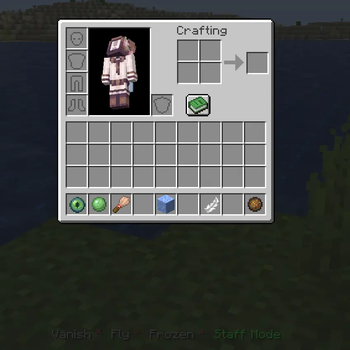
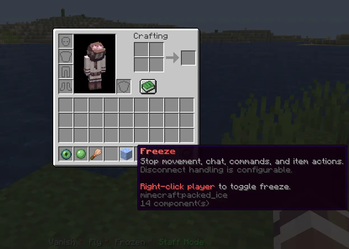
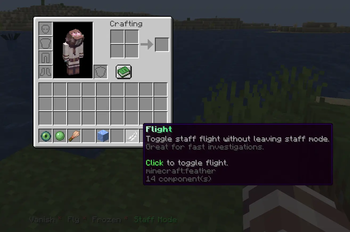
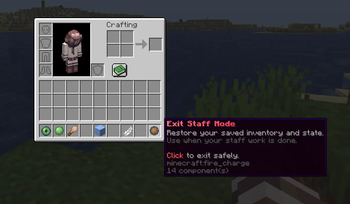
The default setup gives staff a compact investigation hotbar with clear names, lore, and actionbar state.
### Staff Mode Tools
Staff entering Staff Mode receives a configurable hotbar:
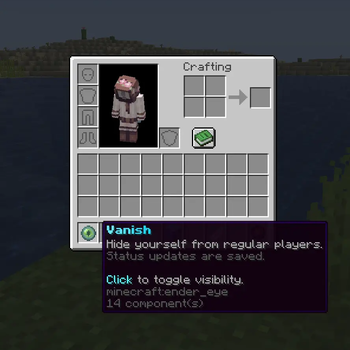
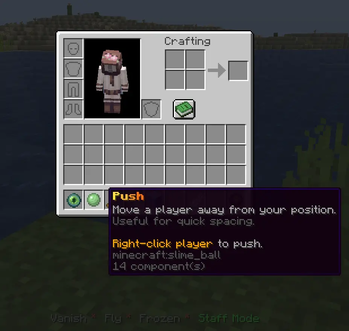
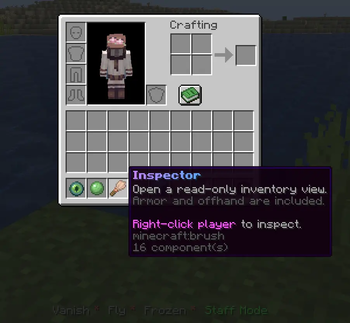
| Slot | Tool | Purpose | | ---: | --- | --- | | `0` | Vanish | Hide from regular players while staying visible to staff with permission. | | `1` | Push | Move players away for quick spacing or control. | | `2` | Inspector | Open a read-only inventory view with armor and offhand. | | `4` | Freeze | Stop movement, chat, commands, damage bypasses, and inventory actions. | | `6` | Flight | Toggle flight while investigating. | | `8` | Exit | Leave Staff Mode and restore the saved player state. |
Every tool is configured in `tools.yml`: enabled state, slot, permission, material fallback list, cooldown, display name, lore, sound, volume, and pitch.
### Storage Choices
Pick the backend that fits the server:
- `sqlite` for simple local production use
- `json` for readable local files
- `mysql` for networked setups
- `mariadb` for MariaDB deployments
### Combat-Aware Staff Mode
LightStaff can block players from entering Staff Mode while combat tagged. The check is configurable and supports:
- metadata keys used by combat plugins
- PlaceholderAPI placeholders
- a bypass permission for trusted staff
## Features
- Staff Mode enter/exit with inventory, armor, offhand, exp, gamemode, and flight restoration
- Persistent vanish and freeze state
- Read-only inventory inspection
- Freeze command and freeze tool with disconnect handling
- Staff teleport command
- Staff whitelist bypass mode
- Session recovery command
- Audit logging for moderation actions
- Configurable actionbar
- Configurable command, plugin, and tool messages
- Configurable storage: SQLite, JSON, MySQL, MariaDB
- Paper and Folia scheduler support
- Material fallback lists for cross-version compatibility
## Requirements
- Java 17 or newer
- Paper `1. 19. 4+`
- Optional: PlaceholderAPI
- Optional: CombatLogX, PvPManager, DeluxeCombat, CombatPlus, or another combat plugin exposed through metadata or PlaceholderAPI
## Installation
1. Download the latest jar from GitHub Releases. 2. Put it in your server `plugins` folder. 3. Start the server once. 4. Edit the generated files in `plugins/LightStaff/`. 5. Run `/lightstaff reload` or restart the server.
## Configuration
LightStaff separates configuration into three files:
| File | Purpose | | --- | --- | | `config.yml` | Plugin behavior, storage, combat checks, freeze behavior, whitelist mode, audit logging | | `tools.yml` | Staff tool setup, slots, permissions, materials, names, lore, sounds | | `messages.yml` | Prefix, command messages, plugin messages, actionbar labels |
```yaml storage: type: "sqlite" ```
Available values:
```yaml storage: type: "sqlite" # sqlite, json, mysql, mariadb ```
JSON storage writes to:
- `plugins/LightStaff/data/sessions.json`
- `plugins/LightStaff/data/moderation_states.json`
## Combat Blocking
```yaml combat: block_lightstaff_entry: true bypass_permission: "lightstaff.combat.bypass" metadata_keys: - "combatlogx_in_combat" - "in_combat" - "combatTagged" placeholderapi: enabled: true placeholders: - "%combatlogx_in_combat%" - "%pvpmanager_in_combat%" combat_values: - "yes" - "true" - "1" - "tagged" ```
Players with the configured bypass permission can enter Staff Mode even while tagged.
## Freeze Disconnect Message
Single line:
```yaml freeze_ban_message: "You disconnected while frozen." ```
Multiple lines:
```yaml freeze_ban_message: - "You disconnected while frozen." - "Open a ticket if this was a mistake." ```
## Commands
| Command | Description |
| --- | --- |
| `/lightstaff`, `/ls`, `/staffmode`, `/sm` | Toggle Staff Mode |
| `/lightstaff reload` | Reload config, tools, and messages |
| `/lightstaff status ` | Show staff/vanish/freeze/session status |
| `/lightstaff recover
## Permissions
| Permission | Description | | --- | --- | | `lightstaff.use` | Use Staff Mode | | `lightstaff.reload` | Reload configuration | | `lightstaff.recover` | Recover stuck sessi
📊 Mod Details
- Game
- Minecraft Plugins
- Author
- flennium
- Version
- wXhPSxcR
- Downloads
- 42
- Endorsements
- 1
- Category
- bukkit
- Created
- 6/18/2026
- Updated
- 6/11/2026
- Game Versions
- wXhPSxcR
- Tags
- management, utility
🔧 How to Install Minecraft Plugins Mods
Download from Modrinth. Use Prism Launcher or drop into your mods folder.
📖 Full step-by-step install guide for Minecraft Plugins →
Visit the official mod page for specific installation instructions for this mod.
🎮 Need cheat codes or console commands? Check ur gaming wiki for Minecraft Plugins commands, item IDs, and more.
❓ Frequently Asked Questions
Which Minecraft Plugins versions does LightStaff support?
The author lists wXhPSxcR. Other versions may work but are untested by the author.
What is the latest version of LightStaff?
Version wXhPSxcR, published 2026-06-11 with 42 downloads recorded at the source.
Keep browsing — more Minecraft Plugins mods await